Announcements

Introducing “HTTP Method Selection” (HEAD/GET/POST/PUT/PATCH/DELETE).

Written by Tomas Koprusak 134 words | 1 min read Updated Nov 13, 2025
0%

Uptime Robot sends HEAD requests for HTTP monitors and GET request for keyword monitors by default (and, this is a good default setting for most monitors).

On the other hand, there are cases when a customization may be needed, like:

  • Checking if a form in the website works as expected
  • Monitoring your APIs which expect specific methods (a perfect match together with the custom HTTP headers feature).

So, here comes the HTTP method selection which enables us to choose the method, send the parameters to be sent (if needed) and also decide if the data will be sent as JSON or not.
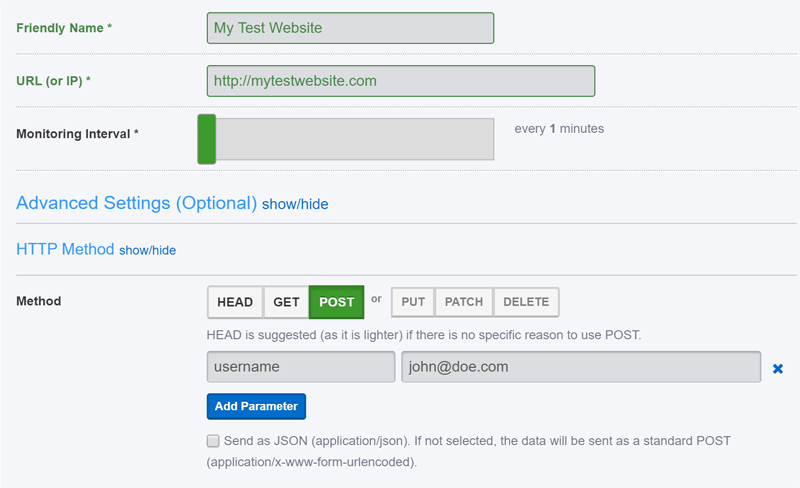
Custom HTTP Methods

The feature can be reached from Add/Edit Monitor dialogs>Advanced Settings>HTTP Method and also through the API.

P.S.> HTTP method selection is a Pro-Plan only feature.

Start using UptimeRobot today.

Join more than 2M+ users and companies!

  • Get 50 monitors for free - forever!
  • Monitor your website, server, SSL certificates, domains, and more.
  • Create customizable status pages.

Written by

Tomas Koprusak

Product Owner |

He has worked for Sygic as a marketer and co-led the implementation and development of a product acquired from a competitor. He has also worked as a freelance developer, helping clients from various areas. Tomas brings a wealth of industry experience to our team. He spent a few years in the blockchain industry, leading projects and marketing teams at multiple blockchain-based companies. He has presented products and managed deals in more than 10 countries around the world, managed the ICO, and built a successful marketing team at Fuergy that continues to thrive. Tomas managed a product team for the biggest job site in Slovakia, covering development and transformation to a new B2B app. Not only is Tomas skilled at web development, but he also has a deep understanding of SaaS businesses, which makes him an invaluable asset in shaping and leading various projects at UptimeRobot. His focus is always on the continual improvement of our service and user experience. In addition to his professional achievements, Tomas is a devoted father. His personal interests include cycling (he traveled around the whole country of Slovakia), playing guitar (he even played in a band), servicing bikes, music, and enjoying good beer.

Feature suggestions? Share

30 Comments

Gunter Nov 7, 2018 at 11:02 pm

thanks for the feature! But would have been great if this would also work with the "Keyword" type :)

Umut Muhaddisoglu Nov 8, 2018 at 11:02 pm

It also exists in the keyword monitors too.

Gunter Nov 9, 2018 at 11:02 pm

@Umut - please double check, it does not for me and I am a pro user!

Martijn Nov 21, 2018 at 11:02 pm

When I pick type keyword monitor there is no option to select HTTP Method.
How can you change it to use e.g. POST

I have a pro license

Umut Muhaddisoglu Nov 29, 2018 at 11:02 pm

Sorry for the trouble regarding this and it must be visible now.

Gerald Nov 8, 2018 at 10:41 am

Thank you for improving the uptimerobot service. When comparing with other services, especially those services which also have nice cakes, I have to say that uptimerobot really does not offer a lot of options. Especially an option to avoid notifications about small downtimes would be really useful. Something like "do not alert for X (configurable) minutes", so I can select whether I want to be notified about a short 3 minute downtime...

Also: Is there an update for your iOS App in the works? It really is a little dated and cannot even rember login information. And it does not support iPad screen sizes.

Umut Muhaddisoglu Nov 8, 2018 at 10:41 am

Hi Gerald,

There is actually the option to ignore minor downtimes just as you defined and here are more details: https://uptimerobot.com/blog/new-feature-advanced-notification-options-for-the-pro-plan/ .

And, yes, a fix for the iOS and Android app bug is on the way too.

Andy Boundy Nov 8, 2018 at 10:58 pm

Great options. Long-time user on Pro - love the service and it keeps getting better. Enhances my service to clients. Thanks!

Bruno Nov 9, 2018 at 8:48 am

Hello, A nice option would be to choose you monitori region. It seems that monitoring is only from US. It works for our european site but with long network latencies, so the response time metric isn't very usefull.

Kristian - Community Manager Jun 9, 2020 at 8:48 am

Hi Bruno,

thank you for your feedback, we are thinking about it, but this is not planned yet.

Giovanni Flammia Nov 9, 2018 at 1:47 pm

Thank you that is a welcome feature, as well as ignoring minor downtimes.

I don't see the HTTP method selection choice under the "Keyword" alert. Is it possible to check for a keyword in the response for an HTTP POST method? how can we check a valid response from the server after the HTTP POST request?

Umut Muhaddisoglu Feb 15, 2019 at 1:47 pm

Sorry for that and it was fixed just afterwards.

The keyword monitor can help checking for a keyword that will appear (or not) after a POST request.

Costa Gauci Nov 23, 2018 at 10:22 am

Great feature but why is there a limitation to the number of form fields?

Matt Nov 28, 2018 at 3:18 am

This is great - will you be adding support for raw body content / other MIME types to use with other HTTP methods?

It would be really useful if I could POST an XML body with MIME type application/xml so I can send test requested into my SOAP APIs!

Martijn Dec 18, 2018 at 3:18 am

+1 What Matt said. That would be awesome.

Umut Muhaddisoglu Feb 15, 2019 at 3:18 am

Just added raw body support.

Kosiarka Nov 29, 2018 at 10:49 am

This is great feature ! I was looking for that kind of monitor , so now I could better monitor my website, thank you Uptimerobot team !

talonx Dec 11, 2018 at 9:56 am

There are a few issues with this feature
- When trying to put a POST body as JSON, it sends invalid JSON data. Can you clarify what the expected format is? i.e., if I want to send a multi-key, multilevel JSON object as POST data, what should I put in the key-value boxes?
- The POST data button says "Add custom header", whereas I think it should be "Add field"

Florian Mar 26, 2019 at 10:43 am

Hallo zusammen,

genau dieses Feature (POST mit Parametern) bräuchte ich aktuell, kann es aber nicht sehen.

Ist das ein Pro-Feature oder ist mein Account falsch konfiguriert? Was kann ich tun?

Danke und Grüße,
euer Fan, Florian

Kristian - Community Manager Jun 9, 2020 at 10:43 am

Hi Florian,

yes it is a Pro Plan feature, you can find it when editing the monitor under advanced options :) Let us know on support@uptimerobot.com and we will be happy to help if needed!

Kostyak Nov 22, 2020 at 10:43 am

Hi Team,
Found a couple of issues using PRO licensed version:

1. POST different payload to the same endpoint is not working - giving an error that such monitor already exists
2. Missing the option to parse JSON response for object, keyword is not good enough
3. Unable to use get parameters converted from JSON like:
URL?provider[0][name][passTime][startH]=16&provider[0][name][passTime][endH]=21&provider[0][name][currency][minute]=15&provider[0][name][currency][item][]=USD

Kristian - Community Manager Nov 23, 2020 at 10:43 am

Hi there,

thank you for reaching out to us!

1. We don't support duplicate monitors of the same type. Maybe it's possible to avoid it with some query parameter, I'm not sure though at the moment.
2. It's not supported yet, unfortunately.
3. Could you please specify this? Preferably, if you could send it to support@uptimerobot.com directly, thank you.

Mikhail Dec 28, 2020 at 1:07 pm

hey,
i set up a keyword monitor which is visible in the website but the uptime robot cannot find the keyword
it cant search for javascript only the html?

Kristian - Community Manager Jan 7, 2021 at 1:07 pm

Hi Mikhail,

yes, please make sure the keyword is case-sensitive and present in the HTML source. Let us know to support@uptimerobot.com if you have any issues and we'll be happy to help.

Nicolò Jan 19, 2021 at 6:49 pm

Hi, I have a lot of problems with the keyword configuration. Can you tell me if there is a simple way to find if the selected keyword exists more then 1 time? Or maybe I can resolve my problem if there is a way to find only the AAA word and not all of the XXAAAX words. I am not good with API and other stuff so can you please help me? I have the Pro plan if it’s requested for these functions.

Kristian - Community Manager Jan 20, 2021 at 6:49 pm

Hi, please make sure the keyword is present in the HTML source and case-sensitive. If you need any further help please contact our support with details to support@uptimerobot.com, thank you.

Mark Apr 19, 2021 at 2:47 pm

Is there any documentation for this feature or a how to of how to test that a form is available and submission succeeds?

Ie which URL do I enter? I'm assuming the url in the form action attribute?

Kristian - Community Manager Apr 20, 2021 at 2:47 pm

Hi Mark, if you need detailed steps on how to create a monitor you can find them with some screenshots in our FAQ https://uptimerobot.com/faq/, if there's any issue please let us know on support@uptimerobot.com, thank you.

Paul Mar 21, 2024 at 3:45 am

I want to monitor some web pages using JS spi calls to render some content on page.

I am using keyword monitor to check the output of that page for content rendered client side - but unsure what http method would be best for this type of monitoring?

Or do I need something else? eg. headless browser type setup

Kristian Kusenda Mar 26, 2024 at 3:45 am

Hi Paul, the keyword monitoring is the best option for this, regarding the HTTP method, if you don't need to send any request headers, GET (the default one) should work just fine. If there's something else please start a chat with our support and we'll be happy to discuss it further.

Recent Articles

Recent Articles

Table of Contents