Announcements

New Feature – Maintenance Windows (for the Pro Plan).

Written by Tomas Koprusak 162 words | 1 min read Updated Nov 13, 2025
0%

We all want our websites/servers to be “up” all the time and take multiple actions to increase uptime.

Yet, not all sites/servers are built for 100% uptime. Some have various tasks that cause downtime like:

  • backups
  • batch jobs
  • restarts
  • upgrades
  • etc.

Uptime Robot now has a new feature (for the Pro Plan) to handle such one-time or regular downtimes nicely:

Maintenance Windows

The feature is for easily defining once or recurring “do-not-monitor periods”.

As an example, we can now set a Maintenance Window that will start “Every Tuesday at 22:35 and run for 20 minutes”. Uptime Robot will stop the monitoring as 22:35 and resume it 20 minutes later so that you don’t get any “expected notifications”.
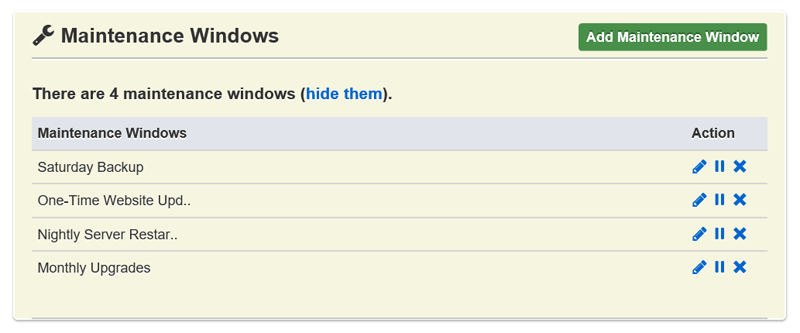
Maintennace Windows

It has support for:

  • once
  • daily
  • weekly
  • monthly

schedules. And, the way it works is very familiar (just like Alert Contacts).

They can simply be defined from the “My Settings” page and attached to the monitors of choice from the Add/Edit Monitor dialogs.

Simple and functional :).

 

Start using UptimeRobot today.

Join more than 2M+ users and companies!

  • Get 50 monitors for free - forever!
  • Monitor your website, server, SSL certificates, domains, and more.
  • Create customizable status pages.

Written by

Tomas Koprusak

Product Owner |

He has worked for Sygic as a marketer and co-led the implementation and development of a product acquired from a competitor. He has also worked as a freelance developer, helping clients from various areas. Tomas brings a wealth of industry experience to our team. He spent a few years in the blockchain industry, leading projects and marketing teams at multiple blockchain-based companies. He has presented products and managed deals in more than 10 countries around the world, managed the ICO, and built a successful marketing team at Fuergy that continues to thrive. Tomas managed a product team for the biggest job site in Slovakia, covering development and transformation to a new B2B app. Not only is Tomas skilled at web development, but he also has a deep understanding of SaaS businesses, which makes him an invaluable asset in shaping and leading various projects at UptimeRobot. His focus is always on the continual improvement of our service and user experience. In addition to his professional achievements, Tomas is a devoted father. His personal interests include cycling (he traveled around the whole country of Slovakia), playing guitar (he even played in a band), servicing bikes, music, and enjoying good beer.

Feature suggestions? Share

39 Comments

Anna McMullen Dec 29, 2015 at 8:46 pm

Awesome feature! If a server drops during the maintenance window and stays down, will we be notified of the drop when monitoring resumes?

Umut Muhaddisoglu Jan 30, 2016 at 8:46 pm

Yes, it will :).

Abdel Jan 12, 2016 at 1:22 pm

There should be a way to add it to all monitors. One by one is a pain.

Umut Muhaddisoglu Jan 30, 2016 at 1:22 pm

We'll be adding this to the Bulk Actions menu soon.

Allan Oct 13, 2016 at 1:22 pm

Has the bulk action been added yet, so maintenance windows can easily be applied to all (or many) sites at once? It's very time consuming to add individually for 60+ sites!

Erik Jan 9, 2018 at 1:22 pm

Any progression on this issue?

Or just a global maintenance window, or bulk action to edit maintenance windows for all hosts.

Slawek Apr 20, 2018 at 1:22 pm

Can you give us update on the bulk maintenance window? I have 30 monitors and I need to go through them one by one - which is really painful. I can see it was raised 2 years ago - you said soon - and yet we are in 2018 and it's not possible to do it from bulk actions?

Jonathan Mayhew Jan 21, 2016 at 3:42 am

This feature is great, thanks. It would also be helpful to have a maintenance window option which continues to monitor through the maintenance window but does not include the downtime during the maintenance window in the uptime percentage.

Umut Muhaddisoglu Jan 30, 2016 at 3:42 am

Totally hear you.

We are still collecting feedback regarding maintenance windows and will definitely be improving it.

Tony Mar 21, 2016 at 3:42 am

Been using UTR and maintenance periods for some time now. Works well.

Agree with Jonathon here... excluding maintenance periods from total %uptime would be useful. If we want that now we need to work out what % of hours were scheduled maintenance and adjust the %uptime number accordingly.

Markus Feb 29, 2016 at 8:11 am

Good work guys, have been waiting for this.

Wesley Apr 26, 2016 at 8:56 am

Great feature! Any chance CRUD'ing maintenance windows through the API is going to be an option? I'd love to automate everything so I don't get flashing lights and blaring alarms in the middle of the night!

Gonzalo Jun 7, 2016 at 11:30 pm

In my case, backups slowdown the server and at times I get unavailable alerts, so for me a nice to have would be to be able to be more specific on how I want monitoring to be different during maintenance window.

For instance, I would setup that during backup window, monitoring interval was larger so the chances to get an alert are fewer.

Cheers.

Umut Muhaddisoglu Sep 9, 2016 at 11:30 pm

I hear you and can see that it can be helpful.

On the other hand, going deeper in means of features/customizations also make things difficult for many others. A hard balance to keep and we may probably not add it for this reason.

Robert Jul 19, 2016 at 2:29 pm

May I have a suggestion? How about a budget plan without any support? Somewhere I read the reasoning for the pro pricing revolves around the cost of support. Some of us are happy with the automated service and don't really need any support. Something like $10/yr for pro features without the support, perhaps with a lower cap on total monthly pings, would be perfect for personal use. There are quite a few services trying to pull $5/mo from me, so I am stuck with the free plan for now here and with the other services. I would be happy to pay a low price for fully automated service though.

Nigel White Aug 15, 2016 at 8:25 am

Hi

We too suffer from too many alerts at night due to backups and this is one way to help. These are usually short outages e.g. 3 minutes
My preferred solution is a different one.

For some unimportant websites we don't want an Alert for a short outage (say 5 or 10 minutes).

For other websites we would like to be Alerted immediately as happens currently.

What we thought would work well therefore is the ability to specify the Outage Before Alerting on a per site basis.

Do you think that would work well?

Thanks for the great tools.

Umut Muhaddisoglu Sep 9, 2016 at 8:25 am

Totally understand the need and the exact feature exists in the Pro Plan.

Here are the details: https://uptimerobot.com/blog/new-feature-advanced-notification-options-for-the-pro-plan/

Jeff Oct 6, 2016 at 2:46 pm

Do the maintenance windows show on the dashboard when you are in them? If they do, can I see an example? We want to send our public page to the partners and have them see when all the maintenance is scheduled.

Umut Muhaddisoglu Jan 27, 2017 at 2:46 pm

They don't (yet) but taking this as a great suggestion.

Allan Oct 14, 2016 at 10:16 am

Having used the maintenance windows for the first time yesterday, I found that it would be helpful if the dashboard / TV mode could still monitor the up / down status of the sites. I was restarting my server for some updates, but because it was in the window, I had no idea which sites had come back up and which were still down. This is important because occasionally I get a site which does not re-start correctly.

Unless I am missing something, I think my choices were:
1. to wait until the end of the maintenance window and then see which sites are down (which is not good because it means leaving sites down longer than necessary and still shows some downtime outside the maintenance window)
2. to end the maintenance window earlier, which I did, and this minimised the downtime, but still ended up with downtime recorded outside the maintenance window which is not ideal
3. to leave the full maintenance window, but manually check every site (way too time consuming and defeats the object of having the monitor system)
So for me, it would be best if the maintenance window suppressed the alerts, but still showed in the Dashboard which sites are up / down. Ideally also the public pages would show the maintenance window (perhaps as a grey "pause" rather than red "downtime") and exclude any downtime from the performance stats.
Alternatively, we could leave everything as it is, but add a new screen which shows uptime / downtime during the maintenance window to the main administrator only (i.e. not on public pages).
With a few changes, this could be a brilliant feature!

Umut Muhaddisoglu Jan 27, 2017 at 10:16 am

These are great suggestions and noted for a possible future addition.

Eric Nov 10, 2016 at 3:47 pm

Since daylight savings time we are being alerted during a scheduled maintenance window. This only started after the DST change. It seems like something is out of sync between our aligned window and actual times you see the events. Please assist. Thank you.

Umut Muhaddisoglu Jan 27, 2017 at 3:47 pm

Sorry for that and must be all fixed.

Matthew Kitchin Feb 28, 2017 at 2:41 pm

I am using the pro plan, but I'm seeing a particular server still being monitored during the maintenance window. I have a ticket open (0F5-2047008E-0302), but I found this write up when researching the issue. The uptime graph on my dashboard still shows it being monitored during the maintenance window. It is key for me that it isn't just an alert blackout, but the server cannot be monitored during this time period. That is not the behavior I'm seeing.

Umut Muhaddisoglu May 23, 2017 at 2:41 pm

This ticket must be already resolved.

Yet, for other users to get an opinion: during a maintenance window, the monitoring stops and it restarts once the period is over.

Steve Melrose Apr 3, 2017 at 2:16 pm

Do you plan on adding support to list maintenance windows on the status page if flagged to do so?

Umut Muhaddisoglu May 23, 2017 at 2:16 pm

Hi Steve,

That is a feature we are willing to add. However, it is not scheduled yet.

Will Sep 5, 2017 at 11:11 am

Hi,

Is there any update of when the bulk action to add a maintenance window will be applied?

Kind Regards,

Will

Umut Muhaddisoglu Jul 24, 2018 at 11:11 am

It is available now.

Matt Hughes Sep 27, 2017 at 12:58 pm

It would be nice to have a spinner and a button that says "start a maintenance window right now to last for N minutes." Also, it might be a helpful reminder to put on the page if the time we are setting is our local time or UTC, or maybe even be given the option. Thank you!

Ross West Jan 10, 2018 at 5:34 am

The feature is awesome. I have already using UTR and maintenance periods for some time now. Works well. Great works guys. Keep updating.

Jon Gabrielson Feb 17, 2019 at 4:37 pm

Maintenance windows are nice but what I really need is "on call windows" per email. Maybe this functionality could piggyback on the maintenance windows so that certain emails get notified 24/7 but other emails get notified only during business hours. The only way to do this currently is to set up identical alerts with separate maintenance windows.

Office setup Feb 3, 2020 at 11:44 am

Great job. Keep doing like this.

Jasper Willem Sep 6, 2021 at 3:07 pm

If I add service windows that already happened, is the uptime recalculated?

We just changed to the pro plan and are adding the service windows as we speak. I don't see any change in the total uptime yet.

We host applications for a lot of different customers and our plan is to make status pages for each of them. It would be great if the service windows show up on those pages. As mentioned in this thread before, that would be an amazing feature.

Kristian - Community Manager Sep 7, 2021 at 3:07 pm

Hi Jasper, it is not. You can't adjust your uptime retrospectively. The Maintenance window will cause the monitor to not send requests during a certain period, therefore any change in status won't be noticed.

Tuomas Karmakallio Sep 20, 2021 at 8:46 am

I assume the time window is set in UTC time?

Kristian - Community Manager Sep 22, 2021 at 8:46 am

Hi, it's set in the time zone that's set under your account (My Settings). Let us know at support@uptimerobot.com if you need any assistance.

JP Oct 9, 2024 at 6:32 am

Hello,

the API allows to CRUDMaintenance Windows but I don't find any way to include a list of monitored tests to it.

How is it supposed to work ?

Kristian Kusenda Dec 6, 2024 at 6:32 am

Hi there, if I understand it correctly you should be able to find which monitor has that maintenance window in the GetMonitors endpoint, please contact our support if you need any help with the API.

Recent Articles

Recent Articles

What is an SLA?

What is an SLA?

SLAs often look like paperwork until something goes wrong. A service goes down, customers ask for credits, and teams scramble…

Table of Contents