Announcements

Custom HTTP Statuses (A New Feature for the Pro Plan).

Written by Tomas Koprusak 145 words | 1 min read Updated Nov 13, 2025
0%

For HTTP monitors, Uptime Robot considers them as up or down according to the HTTP statuses returned (or if “no response returns at all”).

If the HTTP status returned is:

  • between 200 and 399, it is considered as “up”
  • bigger than 399, is considered as “down”
  • with an exception:
    • equals 401 and no authentication info is defined, it is considered as up
    • equals 401 and authentication info is defined, it is considered as down
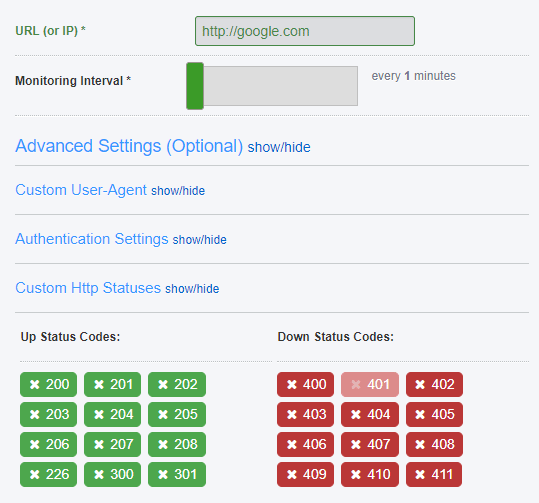
Custom HTTP Statuses

It is now possible to customize which HTTP statuses are considered as up or down.

This is pretty handy if you plan to monitor a web page which returns HTTP 404 and want it to be detected as “up”, prefer to ignore several erroneous HTTP statuses and more.

The feature is available in the Pro Plan and can be reached from the “Add/Edit Monitor dialogs of HTTP monitors>Advanced Settings>Custom HTTP Statuses tab”.


Start using UptimeRobot today.

Join more than 2M+ users and companies!

  • Get 50 monitors for free - forever!
  • Monitor your website, server, SSL certificates, domains, and more.
  • Create customizable status pages.

Written by

Tomas Koprusak

Product Owner |

He has worked for Sygic as a marketer and co-led the implementation and development of a product acquired from a competitor. He has also worked as a freelance developer, helping clients from various areas. Tomas brings a wealth of industry experience to our team. He spent a few years in the blockchain industry, leading projects and marketing teams at multiple blockchain-based companies. He has presented products and managed deals in more than 10 countries around the world, managed the ICO, and built a successful marketing team at Fuergy that continues to thrive. Tomas managed a product team for the biggest job site in Slovakia, covering development and transformation to a new B2B app. Not only is Tomas skilled at web development, but he also has a deep understanding of SaaS businesses, which makes him an invaluable asset in shaping and leading various projects at UptimeRobot. His focus is always on the continual improvement of our service and user experience. In addition to his professional achievements, Tomas is a devoted father. His personal interests include cycling (he traveled around the whole country of Slovakia), playing guitar (he even played in a band), servicing bikes, music, and enjoying good beer.

11 responses to “Custom HTTP Statuses (A New Feature for the Pro Plan)”

  1. How do I get this on keyword monitors? Is there an API to control this? A mass update for existing monitors, or a global setting?

  2. think we should add custom HTML Code to our website so we can get the status on our website so its all in one not differnt links

  3. This only exists in HTTP monitors as keyword monitors don’t take HTTP statuses into account.

  4. We built a webpage that proxies various requests into our internal services.

    Using this I validate that SMTP works (as in, sends an actual email), that SNMP monitors are returning values within an accepted range, and various other tests are up and running.

    404 implies the monitor relay is down, 500 implies the specific test has failed.

    The above change is good; it means if I wanted to, I could “ignore” 404 errors for all monitors (except the one that monitors the relay) and I could “error” on the monitors that should error only when they get 500 (which is a status that says it actually failed).

  5. Following up on moshe alfih’s question…
    Is there an option in the newMonitor and editMonitor APIs to manage this? We’d like to have a different set of status codes for UP on our monitors.

  6. The pages keep going “down” from forbidden error 403. I can access the sites fine, so why cant uptime robot access the glitch project without getting the error?

  7. Hi Nathaniel,

    unfortunately, due to the way glitch projects work, our monitors are not able to reach them, the cause is on their end and there’s nothing we can do on our end.

  8. I configured it to have only 301-308 as Up, but since it seems to follow the redirects instead of reporting on the HTTP Status it shows as down and status 200.

    Is there a way to have it check the direct status code and not follow the redirect, otherwise checking for the 301 is pointless.

Leave a Reply

Your email address will not be published. Required fields are marked *

Recent Articles

Recent Articles

Table of Contents