After adding new features in June we worked on fixing some minor bugs and improving the stability of our service.
We’re happy to announce that besides those fixes, we were also able to introduce a major update to our heartbeat (background job) monitoring. It was requested by many, so let’s take a look at the details!
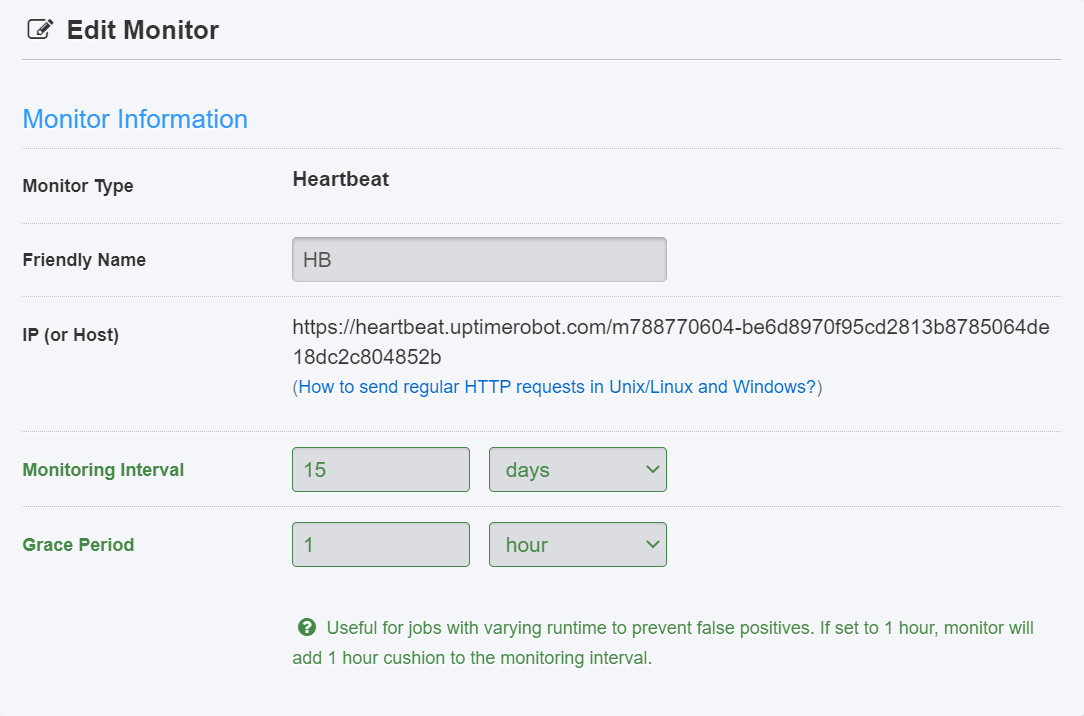
Support for longer intervals
All of you who asked for longer than 24-hour intervals for your weekly or monthly recurring jobs, behold!
You can now increase your heartbeat monitoring intervals up to 31 days! This should cover all the usual use-cases so there is now no excuse to not monitor all of your recurring jobs like backup scripts, SSL renewals and others.
PRO Tip: Heartbeat (cron) monitoring is a PRO feature: read What’s a Heartbeat monitor?
Grace period
The second update for heartbeat monitoring lets you customize the grace period for your monitor.
This is useful for jobs with varying runtime to prevent false positives. It’s pretty common especially with the once-a-week / once-a-month jobs which are now supported as mentioned in the previous section.
PRO Tip: Grace period of 1 hour will add a 1-hour buffer to the monitoring interval before considering it as an outage.
API Rate Limits
In July we also updated the rate limits for our API which apply to all users and are based on the specific Plan of the account. Here are the numbers:
Free Plans rate limits: 10 requests/minute
PRO Plans rate limits: <user_plan> x 2 requests/minute. Maximum: 5,000 requests/minute.
Example: If you’re on a 50-monitor PRO Plan, your limits are 100 requests per minute.
Let us know how you like these updates in the comments below or hit us via support@uptimerobot.com if you have any questions. We’ll be happy to help.
Enjoy the rest of your month and see you soon!




2 Comments
Hi there,
I see that you've increased rate limits on your side, have you also provided clients the opportunity to set rate limits? Or possibly batch jobs as a workaround. I am with a client organization and we're observing some possible causation with some funky metrics on our side.
Thank you for your time!
Hi Donella,
thank you for reaching out to us, please contact us at support@uptimerobot.com with all details and we'll be happy to take a look at it.