When a store has no “notify me when back in stock” button, you don’t have to keep refreshing the page. You can monitor the product page itself and get an alert the moment it changes back to available.
This guide walks through how to set that up with UptimeRobot: what to watch on a product page, how to avoid false alerts, and how to get notified by email, SMS, or push the second an item is back.
Key takeaways
- You can get restock alerts even when a store doesn’t offer a “notify me” button
- Product pages usually change in predictable ways when stock returns
- Website change detection lets you watch for those changes automatically
- Uptime Robot can send alerts the moment availability updates
- Monitoring the right page elements is the difference between useful alerts and noise

What does “notify me when back in stock” mean?
“Notify me when back in stock” simply means getting an alert when an unavailable product becomes available again.
On most product pages, that change shows up in a few predictable ways. An “out of stock” message disappears, an “add to cart” button appears, or an availability label switches from unavailable to in stock.
When one of those changes, it’s a sign that the product can be purchased again.
Why products go out of stock (and why alerts matter)
Products go out of stock for simple reasons like demand spikes, limited inventory, or planned releases that sell through faster than expected.
In many cases, restocks don’t follow a predictable schedule, and availability can change without notice.
That unpredictability is what makes manual checking unreliable. You might refresh a page in the morning and miss a restock that happens an hour later and sells out again in minutes. Multiply that by multiple products or stores, and it becomes unmanageable.
Alerts solve the timing problem. Instead of guessing when something might return, you get notified at the moment the page reflects that stock is available again. That speed matters most for limited releases, popular items, or situations where demand consistently exceeds supply.
For anyone tracking more than one product, automation is the only realistic way to stay on top of restocks without constantly checking pages.
Common ways people try to get back-in-stock alerts
Some ways work better than others, and many fall short once timing really matters.
Built-in “notify me” buttons
Some stores offer a built-in option to get notified when an item returns. When it’s available and works properly, it’s convenient. The downside is that many stores don’t offer it at all, or send alerts late after stock has already started selling again.
Email newsletters
Another common approach is subscribing to a store’s newsletter and hoping restocks are announced there. This is unreliable for individual products and often delayed, especially when emails are sent in batches or filtered by inbox rules.
Manual checking
Refreshing a product page throughout the day is still one of the most common methods. It works occasionally, but it doesn’t scale. It’s easy to miss short restock windows, especially when availability changes outside normal browsing hours.
Third-party stock alert tools
Some services track popular products and send alerts when they come back in stock. These can be useful for well-known items, but coverage is limited and alerts are often delayed unless you’re on a paid plan.
Niche products and smaller retailers are frequently unsupported.
All of these methods depend on the store or a third party deciding when and how alerts are sent. When that doesn’t work, monitoring the product page directly gives you more control.
That’s where website change detection comes in handy.
Using website change detection for back-in-stock alerts
Website change detection works by checking that page at regular intervals and alerting you when something changes.
Product availability is almost always reflected directly on the page. Text changes, buttons appear or disappear, or availability labels update. Monitoring those changes gives you a reliable signal that stock has returned without relying on the store’s internal alert system.
This approach works with almost any online store because it doesn’t depend on platform features or integrations. The monitoring tool does the checking for you and sends an alert as soon as the page reflects availability.
How to use Uptime Robot to notify me when an item is back in stock
We have a free website change detection tool that watches a page for updates and alerts you when the content changes in a way you care about. For back-in-stock alerts, you use this tool to watch a product page and get notified as soon as the availability updates.
Step 1: Enter the page you want to track
Open the website change detection tool and paste the full URL of the page you want to monitor.
This should be the exact page where the change happens, such as a product page where stock status, price, or a “Buy” button updates.
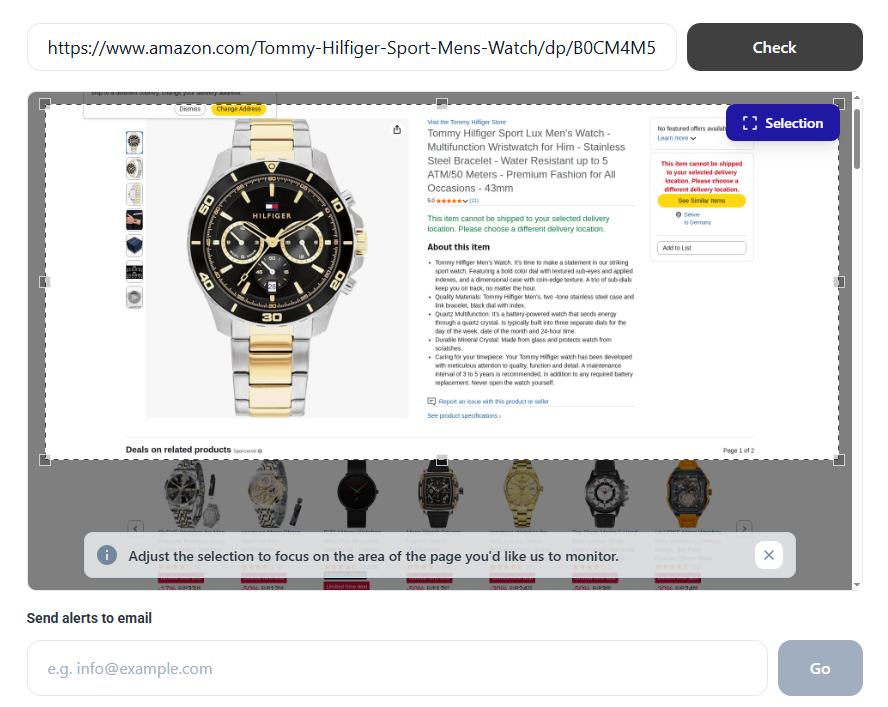
If the product has variants that live on different URLs, make sure you’re tracking the specific
version you care about.
Step 2: Select the part of the page to monitor
Once the page loads, use the selection box to highlight the specific area you want to track(see the next section for recommendations).
Focusing on a specific section helps avoid false alerts from unrelated page updates.
Step 3: Create the monitor
After selecting the area to track, enter the email address where you want to receive alerts.
This email will be used to create the monitor and send notifications when a change is detected.

Step 4: Confirm and get notified when the change happens
Confirm your email address via email from alerts@uptimerobot.com to start getting notifications. The tool checks the selected part of the page automatically.
When it detects a change, UptimeRobot sends an email alert to the address you provided.
Step 5: Act quickly
Once you receive the alert, visit the page as soon as possible.
For high-demand items, availability can change fast, so it helps to already be logged in and have payment details ready.
Other ways to use UptimeRobot’s website change detection tool
Website change detection can be used for more than restock alerts. Many teams rely on the same setup for other monitoring use cases.
| Use case | What it’s used for |
| Competitive monitoring | Tracking changes on competitor pages, including pricing, messaging, and product updates |
| Compliance monitoring | Monitoring legal pages and required disclosures for unexpected changes |
| Media monitoring | Watching news articles, press pages, or media content for updates |
| Price tracking | Detecting price changes on products, subscriptions, or listings |
| Ticket and deal alerts | Tracking availability for tickets, hotel deals, or limited offers |
| Back-in-stock alerts | Getting notified when out-of-stock products become available again |
What changes should you monitor on a product page?
Not every page update is useful. To get alerts that actually matter, you need to focus on elements that clearly signal availability changes.
The most reliable indicators are usually simple and visible.
- Stock status text: Phrases like “Out of stock,” “Sold out,” or “Unavailable” disappearing or changing are often the clearest signal that inventory has returned.
- Action buttons: Buttons switching from “Notify me” or “Unavailable” to “Add to cart” or “Buy now” usually mean the item can be purchased again.
- Availability labels: Some stores use badges near the product title, such as “In stock,” “Back in stock,” or “Ships today.” These are often stable elements worth monitoring.
- Variant-specific availability: For products with sizes, colors, or configurations, stock may change per variant. In those cases, availability updates may only appear after a specific option is selected, so it’s important to monitor the correct page state.
Avoid tracking large sections of the page or elements that change frequently, such as rotating banners, timestamps, or promotional messages. Those updates can trigger alerts that don’t reflect real stock changes.
The goal is to monitor a small, consistent part of the page that only updates when availability changes.
Website change detection vs. built-in store alerts
Built-in store alerts and website change detection aim to solve the same problem, but they work very differently. The differences matter when timing, control, and reliability are important.
Here’s a straightforward comparison.
| Feature | Built-in store alerts | Website change detection |
| Availability | Only if the store supports it | Works on almost any product page |
| Trigger logic | Controlled by the retailer | Defined by you |
| Speed | Often delayed or batched | Checks on a fixed schedule |
| Customisation | Very limited | Full control over what changes trigger alerts |
| Coverage | Usually stock only | Stock, price, buttons, text, variants |
| Alert channels | Usually email only | Email, push, SMS, integrations |
| Reliance on store systems | Fully dependent | Independent of the store’s setup |
Built-in alerts are convenient when they exist and when speed isn’t critical. They work best for casual tracking or low-demand products.
Website change detection gives you more control. You decide what to monitor, how often to check, and how alerts are delivered. That makes it a better fit for limited releases, competitive restocks, or situations where the store doesn’t offer notifications at all.
Best practices to never miss a restock
Getting alerts set up is only part of the equation. Small configuration choices can be the difference between catching a restock in time and finding out too late.
These are some tactics that consistently work.
- Monitor the exact product page: Always use the specific product URL, not a category page or search results. Availability changes usually happen at the product level, and broader pages tend to change too often to be reliable.
- Track a clear availability signal: Choose a keyword or element that only appears when the product can be purchased. “Add to cart” is usually more reliable than generic phrases like “available.”
- Check often for high-demand items: If the product tends to sell out quickly, shorter check intervals matter. Five minutes is usually fine, but faster checks can help for limited releases.
- Use more than one alert channel: Email alone is easy to miss. Pair it with push notifications or another channel you’ll notice immediately.
- Set alerts before you expect a restock: Waiting until rumours start circulating is often too late. Set monitoring up as soon as you know a product is out of stock.
- Monitor variants separately when needed: Sizes, colours, or configurations may restock independently. If the page updates per variant, make sure you’re watching the right state.
Good monitoring feels boring when it’s set up properly. That’s usually a sign it’s working.
Common mistakes to avoid
Even with the right setup, a few common missteps can make restock alerts unreliable or noisy.
- Monitoring the wrong page: Category pages, search results, or homepage sections change frequently and rarely reflect true availability. Always monitor the actual product page.
- Tracking too much of the page: Monitoring large sections increases the chance of alerts triggered by unrelated updates like banners, reviews, or layout changes. Focus on one small element tied directly to stock status.
- Using vague keywords: Generic words like “available” or “shop now” can appear in multiple contexts. Choose keywords that only appear when the product is actually purchasable.
- Setting check intervals too slow: Long intervals can mean the difference between catching a restock and missing it entirely. If stock tends to sell out fast, slower checks work against you.
- Ignoring variant behavior: Some pages don’t update availability until a size or option is selected. If the page requires interaction, make sure the monitored version reflects the correct variant state.
- Relying on a single alert channel: If notifications arrive somewhere you don’t check often, they’re easy to miss. Always use at least one channel that grabs your attention quickly.
Avoiding these issues keeps alerts predictable and useful, instead of frustrating or misleading.
Conclusion
Missing restocks usually comes down to how you’re tracking them, not luck.
When stores don’t offer reliable alerts, monitoring the product page directly gives you a clear signal the moment availability changes. You decide what to watch, how often to check, and how you’re notified.
If you want a practical way to get notified when products come back in stock, setting up website change detection with UptimeRobot is a simple place to start.
FAQ's
-
It refers to getting an alert when a sold-out product becomes available again. If a store doesn’t offer this feature, you can still achieve the same result by monitoring changes on the product page itself.
-
No. Alerts tell you when availability changes, not how much stock is available or how long it will last. For high-demand items, acting quickly still matters.
-
Yes. Website change detection works independently of the store. You don’t need an account, wishlist, or email signup on the retailer’s side.
-
That depends on how often the page is checked. With standard monitoring intervals, alerts usually arrive within minutes of the page updating.
-
In most cases, yes. If the product page visibly changes when stock returns, it can be monitored. The store’s platform doesn’t matter.
-
Yes. You can track prices, availability text, buttons, or other page elements in parallel, as long as they change when the condition you care about changes.




