You can optimize a page, publish it, watch it rank, and still lose traffic overnight.
Often it’s not an algorithm update, it’s something simple like a site change, a title tag edited, or a template pushed.
SEO change monitoring exists to catch those moments. It tells you what changed and when, so you’re not guessing why rankings or traffic suddenly dropped.
For teams working across SEO, content, product, and development, that visibility is what turns a ranking drop into a quick fix instead of a long investigation.
Key takeaways
- SEO change monitoring tracks what changed on a page, not just how rankings moved.
- Small content or technical edits can quietly cause major ranking drops.
- Change detection helps teams react before traffic and revenue are affected.
- Monitoring is especially useful after deployments, CMS updates, and content refreshes.
- Competitor page changes can explain SERP shifts even when your site hasn’t changed.

What is SEO change monitoring?
SEO change monitoring is the process of tracking changes to website elements that directly affect search performance.
It’s not the same as rank tracking. Rank tracking shows the result. Change monitoring shows the cause.
Instead of asking “why did this page drop,” you can see that a title tag changed, a section was removed, a canonical was modified, or a robots directive flipped.
Typical SEO-related changes worth monitoring include:
- Title and meta description updates
- Content edits on key pages
- Heading and layout changes
- Internal link additions or removals
- Canonical, robots, or redirect changes
SEO change monitoring is most useful when multiple teams touch the site. Developers, content editors, and product teams can all introduce changes that affect SEO, often without realizing it.
Why SEO change monitoring is critical for rankings
SEO issues are often caused by changes, not decisions.
Some changes are intentional. Content gets refreshed, templates are updated, pages are redesigned. Others are accidental, like a plugin update overrides metadata, a deploy removes schema, or a CMS edit drops a heading.
Both can hurt rankings.
CMS updates, plugins, and development work are common sources of SEO regressions. A single template change can affect hundreds of pages at once. Without monitoring, those changes can sit unnoticed until traffic starts to slide.
Competitor changes matter as well.
Even if your site stays the same, a competitor updating their content, adding new sections, or improving page structure can shift SERP positions. Without visibility into those changes, ranking drops can feel unexplained.
Real-world examples show up all the time:
- A key content block is removed during a copy edit.
- An H1 is changed and no longer matches search intent.
- Structured data breaks after a redesign.
The faster you detect these changes, the easier they are to fix.
SEO change monitoring reduces the gap between something changed and something broke, helping teams act before rankings and traffic are impacted.
What you should monitor for SEO changes
Not every website change affects SEO. The goal is to monitor the elements that influence crawlability, relevance, and ranking signals, without creating alert noise.
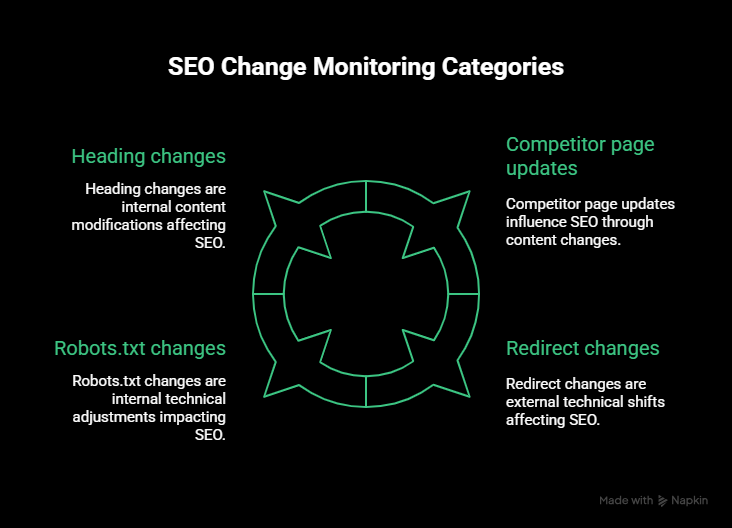
Content changes
Content changes are one of the most common causes of ranking shifts.
Monitor:
- Changes to headings (H1-H3)
- Edits to body copy on high-traffic or high-intent pages
- Removal or addition of key sections like FAQs, feature lists, or comparisons
- Changes to internal CTAs that affect page structure
Practical example: a product page is updated for conversion, but a keyword-focused section is removed. Rankings don’t drop immediately, but relevance slowly weakens.
Technical changes
Technical changes can have immediate SEO consequences, especially when they affect indexability.
Monitor:
- Robots.txt changes
- Meta robots directives (index/noindex, follow/nofollow)
- Canonical tag changes
- Redirect changes and status code shifts
- Structured data being added, removed, or broken
Practical example: A CMS update removes schema markup across a template. Rich results disappear, and click-through rates fall.
Visual and layout changes
What users see matters, and so does what search engines can render.
Monitor:
- Layout changes that push core content lower on the page
- Hidden or collapsed content introduced by scripts or design changes
- Navigation or internal link blocks being removed
- Differences between desktop and mobile rendering
Practical example: A new banner hides the main heading on mobile, reducing visible content above the fold.
Competitor page changes
SEO change monitoring isn’t limited to your own site.
Monitor:
- Competitor pages that rank for your target keywords
- Pricing, category, and comparison pages
- High-performing blog or resource pages
Practical example: A competitor adds an FAQ section or expands a comparison table and starts climbing the SERPs, even though your page hasn’t changed.
Best SEO change monitoring tools compared
The tools below focus specifically on detecting changes that affect SEO, not general website monitoring or rank tracking.
This list prioritises tools that help you spot content, technical, and structural changes that can influence crawlability, relevance, and rankings, and alert you before those changes turn into traffic loss.
Tip: Want a broader comparison? Our guide breaks down 9 website change detection tools, including what each one monitors and when they make sense to use.
#1 UptimeRobot Website Change Detection Tool
UptimeRobot’s Website Change Detection Tool ranks first because it does exactly what most SEO teams need: reliable alerts when a page changes, without setup friction or enterprise overhead.
It’s a good fit for SEOs who want to know when something changed and where, without managing a full site crawler or complex ruleset.
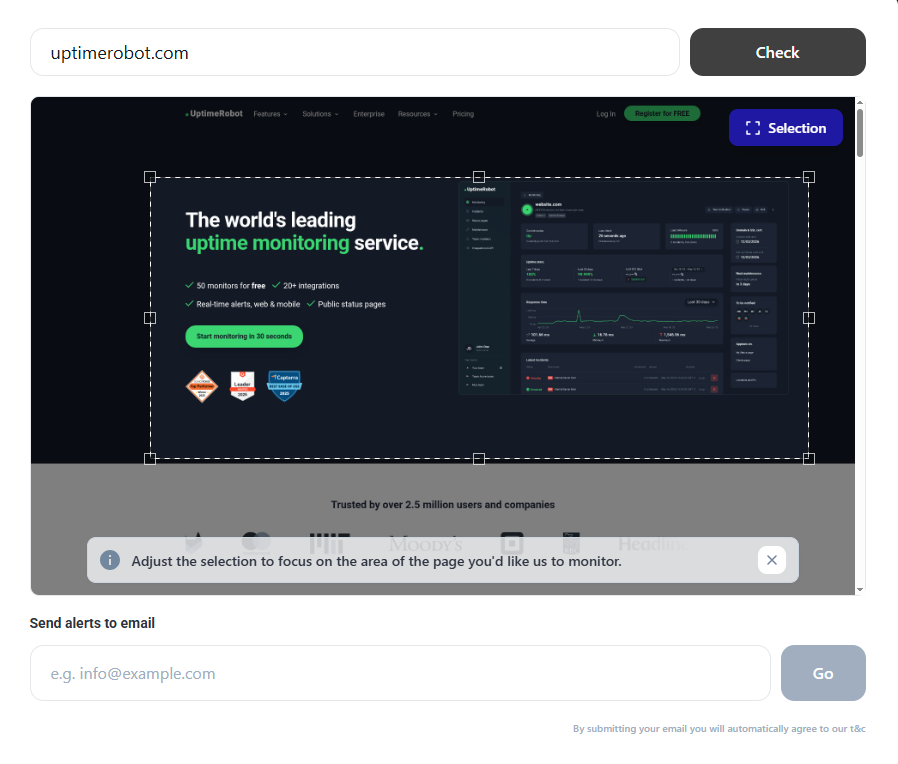
What it does well for SEO teams
UptimeRobot monitors content and visual changes on any public webpage by checking page snapshots at regular intervals and alerting you when differences are detected.
From an SEO perspective, this makes it useful for tracking:
- Content changes on high-value landing pages
- Unexpected edits after deployments or CMS updates
- Removed sections, broken layouts, or missing elements
- Competitor page updates that affect SERP positioning
You can monitor an entire page or focus on a specific section, which helps reduce noise from irrelevant changes like footers or dynamic widgets.
Key features that matter for SEO
- Content and visual change monitoring: Detects when page content or layout changes, not just uptime.
- Instant alerts: Notifications are sent as soon as a change is detected.
- No complex setup: Works on any website without crawling configuration or technical onboarding.
- Free and accessible: You can start monitoring important pages without committing to an enterprise plan.
SEO-specific use cases
UptimeRobot works best when you want fast visibility into page changes, not a full SEO audit.
Common SEO workflows include:
- Monitoring top organic landing pages after releases
- Tracking content changes during redesigns or experiments
- Catching accidental removals of important sections or elements
- Watching competitor pages for new sections, offers, or positioning changes
Because it’s external and lightweight, it’s also useful when you don’t control the CMS directly or want an independent check outside your SEO tool stack.
Why it wins
UptimeRobot’s strength is ease and no price tag.
You can set it up in minutes, get clear alerts via email, and apply it directly to real SEO workflows without learning a new system or paying for features you don’t need.
For most SEO teams, especially small to mid-sized ones, it’s the fastest way to start monitoring SEO-relevant page changes and reacting before rankings are affected.
#2 ContentKing
ContentKing is built for continuous, real-time SEO monitoring across large and frequently changing websites.
It continuously crawls your site and alerts you when SEO-critical elements change, making it well suited for environments where updates happen often and across templates.
| Strengths | Limitations |
| Real-time monitoring of SEO-critical changes | Higher learning curve than lightweight tools |
| Strong coverage of technical SEO elements (indexability, canonicals, redirects) | Enterprise-level pricing |
| Continuous site-wide monitoring | Can be overwhelming for small sites |
| Detailed change history and audit trail | Requires time to configure alerts properly |
| Built for collaboration across teams | Not ideal for monitoring just a few pages |
Best fit
- Enterprise and large websites
- SEO teams managing frequent deployments or CMS updates
- Organisations that need site-wide SEO governance and accountability
#3 SEO Radar
SEO Radar focuses on tracking SEO-relevant changes at scale, with a strong emphasis on technical accuracy and historical comparison.
It’s for teams that need to know exactly what changed in the code, across large sites and frequent releases.
| Strengths | Limitations |
| Tracks a wide range of SEO-specific changes (meta, canonicals, schema, links) | Requires SEO expertise to interpret results |
| Side-by-side change comparisons highlight exact differences | More complex than lightweight monitoring tools |
| Strong historical change tracking | Higher pricing than SMB-focused tools |
| Can compare staging vs production environments | Not ideal for small or low-change sites |
| Built around SEO regressions, not generic page changes | Setup and tuning take time |
Best fit
- Large and enterprise websites
- Technical SEO teams
- Sites with frequent deployments or staging environments
#4 Little Warden
Little Warden is a lightweight monitoring tool focused on catching common technical and configuration issues that can impact SEO.
It doesn’t crawl entire sites, but instead keeps a close eye on specific checks that are easy to forget and costly to miss.
| Strengths | Limitations |
| Monitors critical technical SEO elements (robots, canonicals, SSL, domains) | Limited visibility into content-level changes |
| Simple setup with minimal configuration | No full site crawling or deep SEO analysis |
| Alerts for infrastructure and configuration issues | Less context around SEO impact |
| Useful change history for monitored checks | Not designed for large-scale content monitoring |
| Affordable compared to enterprise tools | Monitoring scope depends on manual setup |
Best fit
- Small to mid-sized websites
- Agencies managing multiple client sites
- SEOs focused on technical hygiene and risk prevention
#5 Sitechecker
Sitechecker is a broader SEO platform that includes change monitoring alongside audits, rank tracking, and performance data.
Change detection exists, but it’s not the core product.
| Strengths | Limitations |
| Combines SEO monitoring with audits and analytics | Change monitoring is not its primary focus |
| Tracks indexability and major on-page changes | Less granular than dedicated change tools |
| Connects changes with traffic and ranking data | Can feel noisy for teams wanting only alerts |
| Centralized SEO dashboard | Limited real-time change detection |
| Suitable for general SEO oversight | Less control over specific page-level monitoring |
Best fit
- SEO generalists and small teams
- Businesses wanting an all-in-one SEO tool
- Teams that want context, not just alerts
#6 Visualping
Visualping hones in on visual and layout-based change detection, rather than SEO-specific signals.
It’s useful when seeing the change matters more than analysing SEO elements.
| Strengths | Limitations |
| Visual snapshots make changes easy to understand | No SEO-specific awareness (meta, canonicals, robots) |
| Simple setup with page or section selection | Not designed for technical SEO monitoring |
| Good for tracking competitor page updates | Limited scalability for large sites |
| Useful for non-technical teams | Can trigger alerts for cosmetic changes |
| Flexible monitoring frequency | Requires filtering to avoid noise |
Best fit
- Competitor monitoring
- Tracking content or layout changes visually
- Teams without access to a site’s CMS
#7 Custom scripts and DIY solutions
Custom scripts and DIY monitoring offer maximum flexibility, but at the cost of time, maintenance, and reliability.
They’re usually built using crawlers, scripts, or self-hosted tools that compare page versions and trigger alerts.
| Strengths | Limitations |
| Fully customisable monitoring logic | High maintenance and upkeep |
| No vendor lock-in | Easy to generate false positives |
| Can target very specific SEO checks | Requires engineering resources |
| Data stays fully in-house | No built-in UX or reporting |
| Works for niche or internal use cases | Not scalable for most SEO teams |
Best fit
- Teams with in-house engineering support
- Highly specific or regulated environments
- SEOs comfortable maintaining custom tooling
Comparison table of SEO change monitoring tools
Here’s a quick comparison with all the facts:
| Tool | Change detection type | SEO focus | Alerts | Setup difficulty | Ideal use case | Pricing level |
| UptimeRobot | Content + visual page changes | Medium: SEO-relevant page changes | Very easy | Monitoring key SEO pages and competitors | Free | |
| ContentKing | Continuous site-wide crawling | High: technical + content SEO | Email, integrations | High | Enterprise sites with frequent updates | High |
| SEO Radar | Code-level SEO diffs | High: SEO-specific elements | Email, integrations | High | Large sites and technical SEO teams | High |
| Little Warden | Targeted technical checks | Medium: technical SEO hygiene | Email, Slack | Easy | Preventing silent technical SEO issues | Low–medium |
| Sitechecker | Scheduled SEO audits | Medium: broad SEO oversight | Email, Slack | Medium | Teams wanting SEO context + monitoring | Medium |
| Visualping | Visual page snapshots | Low: not SEO-aware | Email, Slack (paid) | Easy | Visual competitor and content tracking | Free / medium |
| Custom scripts / DIY | Fully custom | Depends on implementation | Custom | Very high | Highly specific or internal requirements | Time cost |
How we evaluated the best SEO change monitoring tools
SEO change monitoring is only useful if alerts are accurate, timely, and actionable. For this comparison, we focused on how well each tool helps teams detect SEO-impacting changes and respond before rankings or traffic are affected.
We evaluated tools across the following criteria.
Accuracy of change detection
The first requirement is simple: the tool needs to catch changes that actually matter for SEO.
We prioritised tools that reliably detect:
- Content edits on important pages
- Changes to SEO-critical elements like headings, canonicals, or indexability
- Removals or additions that can affect how search engines understand a page
Tools that generated excessive noise from cosmetic or irrelevant changes scored lower.
Frequency of checks
Speed matters. The longer a harmful change goes unnoticed, the more damage it can do.
We looked at:
- How often pages can be checked
- Whether tools support near-real-time detection
- How quickly alerts are triggered after a change
Tools that rely on infrequent scheduled crawls were less suitable for fast-moving sites.
Alerting and notifications
A change alert is only useful if it reaches the right people at the right time.
We evaluated:
- Alert delivery methods (email, Slack, integrations)
- Clarity of alert messages
- Whether alerts clearly show what changed and where
Tools that made it hard to understand the impact of a change were deprioritized.
Ease of setup and use
SEO teams shouldn’t need weeks of onboarding to monitor page changes.
We favored tools that:
- Are quick to set up
- Don’t require complex configuration or scripting
- Fit naturally into existing SEO or marketing workflows
High setup overhead only makes sense when it delivers clear additional value.
SEO relevance of detected changes
Not all website changes affect SEO.
We assessed whether tools:
- Understand SEO context (indexability, metadata, structure)
- Surface changes that commonly cause ranking drops
- Help explain why performance changed, not just that it did
Generic change detection without SEO context scored lower.
Pricing and accessibility
Finally, we considered whether tools are accessible for their intended audience.
Enterprise tools were evaluated on depth and scalability. SMB-focused tools were evaluated on value, simplicity, and practicality. Free or low-cost options were judged on how usable they are without forcing upgrades.
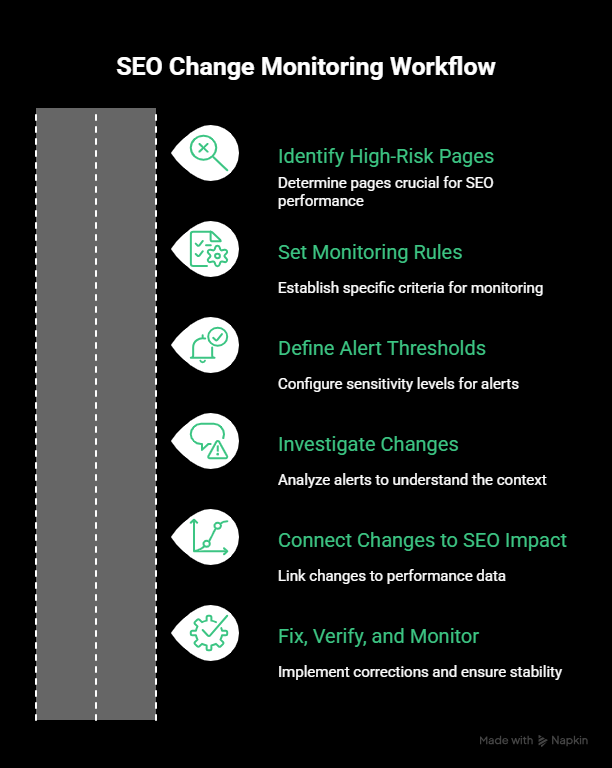
How to use SEO change monitoring in your workflow
SEO change monitoring works best when it’s applied selectively, not everywhere at once. The goal is to catch meaningful changes early, without drowning in alerts.
1. Identify high-risk pages
Start with pages where changes are most likely to hurt performance.
This usually includes:
- Top organic landing pages
- High-converting product or category pages
- Pages tied to active SEO campaigns
- Templates that affect many URLs
If a change happens here, you want to know immediately.
2. Set monitoring rules intentionally
Don’t monitor everything by default.
Focus on:
- Content sections that support keyword relevance
- Headings and page structure
- Indexability signals
- Layout changes that affect visible content
For competitor tracking, monitor only the pages that compete directly with your rankings.
3. Define alert thresholds
Alert fatigue is real.
Set tighter alerts for:
- Indexability changes
- Canonical or redirect changes
- Major content removals
Use slower intervals or less sensitive alerts for pages that change often, like blogs or news sections.
4. Investigate changes as soon as alerts fire
When an alert comes in, the first step is context.
Ask:
- What changed
- When it changed
- Whether the change was intentional
This helps you decide whether to roll something back, adjust content, or ignore the alert.
5. Connect changes to SEO impact
Change monitoring is most powerful when paired with performance data.
If a page drops in rankings or traffic:
- Check recent content or technical changes first
- Compare timelines before blaming algorithm updates
- Prioritise fixes based on business impact
This shortens diagnosis time dramatically.
For businesses that don’t have internal SEO expertise, working with a professional SEO service can help diagnose ranking drops faster and prevent similar issues in future deployments.
6. Fix, verify, and keep monitoring
Once an issue is fixed:
- Confirm the change is reverted or corrected
- Verify indexability and rendering
- Keep monitoring the page to prevent repeat issues
Over time, this builds a reliable feedback loop between SEO, content, and development.
Website change monitoring for competitor tracking
SEO change monitoring isn’t only about protecting your own site. It’s also a practical way to understand why competitors move up the SERPs when your pages haven’t changed.
When rankings shift, competitor updates are often the missing piece.
What to monitor on competitor sites
Focus on pages that directly compete with yours, not entire domains.
Common targets include:
- Category and product pages
- Comparison or alternative pages
- Long-form content ranking for high-intent keywords
- Pricing or feature pages
Monitoring these pages lets you spot meaningful changes without creating unnecessary noise.
Changes that often explain SERP movement
Competitor updates that frequently affect rankings include:
- Expanded or restructured content
- New sections like FAQs, comparisons, or use cases
- Heading changes that better match search intent
- Internal linking improvements
- Layout changes that surface content more prominently
Even small additions can shift relevance signals in competitive SERPs.
How monitoring gives you an advantage
Instead of guessing why a competitor overtook you, change monitoring lets you:
- see what they changed
- identify when the change happened
- respond with informed updates rather than reactive rewrites
This turns competitor analysis into an ongoing signal, not a one-off audit.
Keep it lightweight and focused
Competitor tracking works best when it’s selective.
Monitor:
- A small number of key pages
- Specific sections rather than full layouts
- Changes that affect content depth or structure
The aim isn’t to copy competitors, but to understand what search engines are responding to right now.
Common mistakes to avoid
SEO change monitoring is most effective when it’s intentional. These are the mistakes that usually make it noisy or useless.
Monitoring too many pages
Trying to monitor everything creates alert overload fast.
Instead of covering your entire site, focus on:
- High-traffic pages
- High-conversion pages
- Templates that affect many URLs
If a page wouldn’t trigger action when it changes, it probably doesn’t need monitoring.
Alert fatigue
Alerts that fire too often get ignored.
This usually happens when:
- Checks are too frequent for low-risk pages
- Full pages are monitored instead of specific sections
- Cosmetic changes trigger notifications
Tighter scopes and smarter intervals make alerts actionable instead of annoying.
Ignoring minor changes that compound over time
Not every small change causes an immediate drop, but many SEO issues build gradually.
Repeated content trims, heading changes, or internal link removals can slowly weaken relevance. Without change history, these patterns are easy to miss.
Monitoring helps surface cumulative drift, not just single breaking changes.
Not connecting changes to SEO metrics
Change alerts on their own don’t tell the full story.
If a ranking or traffic drop happens:
- Check recent page changes first
- Align change timelines with performance data
- Fix root causes before making reactive SEO updates
Ignoring this connection leads to wasted effort and incorrect assumptions.
Final thoughts
SEO change monitoring is a proactive layer of SEO, not a replacement for audits or rank tracking.
Most ranking drops aren’t caused by algorithms alone. They’re caused by changes that went unnoticed: content edits, technical tweaks, template updates, or competitor improvements.
The right monitoring setup helps you:
- Spot issues early
- Understand why performance changed
- Fix problems before traffic loss compounds
For most teams, starting simple works best. Monitoring a small set of high-impact pages and templates delivers far more value than trying to track everything at once.
Tools like UptimeRobot make this accessible without heavy setup, while enterprise platforms exist for teams that need deep, site-wide governance.
Try our free website change detector to get started.
FAQ's
-
SEO change monitoring tracks changes to website elements that affect search performance, such as content edits, metadata updates, indexability signals, and structural changes. It focuses on causes, not outcomes.
-
Rank tracking shows what happened in search results. SEO change monitoring shows why it happened by identifying page, content, or technical changes that occurred before rankings moved.
-
The most impactful changes usually involve:
- Title tags and headings
- Content removals or rewrites
- Canonical and robots directives
- Redirects and status code changes
- Structured data being added or removed
Even small edits can compound over time.
-
High-risk pages should be monitored more frequently, especially:
- Top organic landing pages
- High-conversion pages
- Templates affected by deployments
Lower-risk pages can be checked less often to avoid alert fatigue.
-
Yes. Monitoring competitor pages helps explain SERP shifts caused by their updates, such as expanded content, new sections, or structural improvements, even when your site hasn’t changed.
-
No. Smaller sites often benefit the most because a single unnoticed change can have a bigger impact. Lightweight tools make it easy to monitor key pages without enterprise overhead.
-
Start by identifying:
- What changed
- When it changed
- Whether it was intentional
Then verify indexability, assess SEO impact, and either roll back or adjust the change as needed.




