TL;DR (QUICK ANSWER)
Yup provides runtime validation through schema definitions. It allows you to define structured data contracts, validate external input, and centralize rules across your application.It pairs well with TypeScript when using InferType, supports conditional and nested schemas, and scales from simple forms to complex API validation. For teams prioritizing readable schemas and flexible runtime behavior, Yup remains a strong option.
In JavaScript and TypeScript applications, most bugs start at the boundary. A form submits unexpected input. An API returns a field you weren’t expecting. An environment variable is missing. Without validation, those small inconsistencies quietly flow through your system until they surface as production issues.
Yup is a schema-based validation library designed to stop that from happening.
Instead of scattering manual checks across your codebase, Yup lets you define structured schemas that describe exactly what valid data should look like. You validate once at the boundary, and your application logic can assume the data is correct.
While Yup is commonly used for form validation, its real value extends much further. It’s useful when:
- Validating API requests on the server
- Checking responses from third-party services
- Enforcing configuration rules at startup
- Structuring shared contracts between frontend and backend
By the end of our guide, you’ll understand not just how Yup works, but where it fits in real-world applications and when it makes sense to use it.

Key takeaways
- Yup uses schema-based validation to define structured data contracts.
- Validation should happen at system boundaries such as form submissions and API requests.
- TypeScript handles compile-time safety, while Yup ensures runtime correctness.
- Use InferType to keep schemas and TypeScript types aligned.
- Avoid duplicating interfaces and schemas to reduce maintenance risk.
- Keep schemas simple, reusable, and defined at module scope.
- Use abortEarly: false for user-facing validation to surface all errors at once.
- Be intentional about casting and strict mode to prevent subtle runtime mismatches.
- Share schemas across frontend and backend to maintain consistent contracts.
- Choose Yup for readability and flexible runtime validation; consider type-first libraries if strict inference is your priority.
What is Yup, and when should you use it?
Yup is a schema-based validation library for JavaScript and TypeScript. It allows you to define clear rules about what your data should look like and then validate data against those rules.
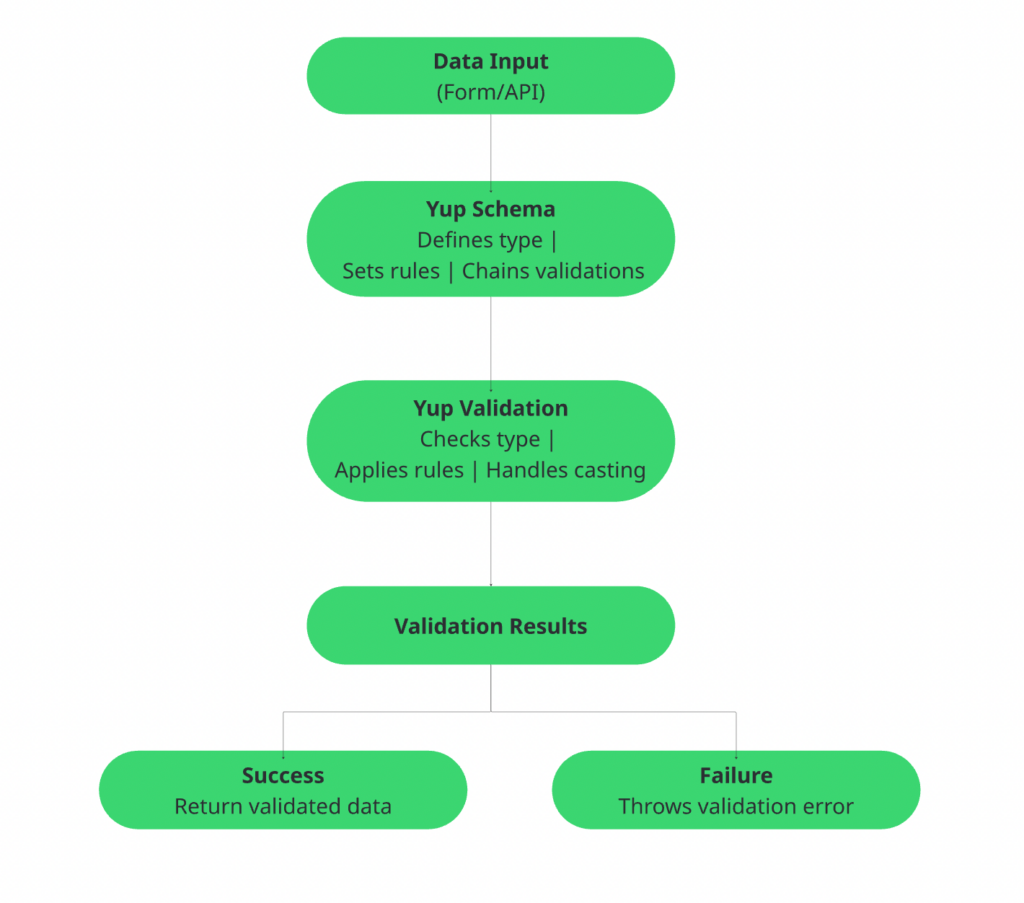
At the core of Yup is the idea of a schema. A schema is simply a structured definition of valid data. It describes:
- What type should each field be
- Which fields are required
- What formats are allowed
- Any additional constraints, like minimum length or numeric limits
Instead of writing manual validation logic throughout your application, you define a schema once and reuse it wherever needed, which is called schema-based validation.
Here’s a simple example of a Yup schema for a registration form:
import * as yup from 'yup';

const registrationSchema = yup.object({
  name: yup.string().required(),
  email: yup.string().email().required(),
  password: yup.string().min(8).required(),
  confirmPassword: yup
    .string()
    .oneOf([yup.ref('password')], 'Passwords must match')
    .required(),
  age: yup.number().min(13, 'You must be at least 13').optional(),
});
In the above example, the schema enforces that:
nameandemailare requiredemailmust be a valid email formatpasswordmust be at least 8 charactersconfirmPasswordmust matchpasswordageis optional, but must be at least 13 if provided
It’s easy to expand for additional fields or nested structures while keeping the rules clear and readable.
Common use cases of Yup
Yup is commonly used in the following scenarios:
- Form validation: Validating user input before submission. This is one of the most popular uses, especially in frontend applications.
- API request validation: Checking incoming data on the server before processing it.
- API response validation: Ensuring external APIs return data in the format your application expects.
- Configuration validation: Validating environment variables and configuration files at startup.
- General user input validation: Any time your system accepts external data, Yup can enforce structure and rules.
What problem does Yup solve?
In most applications, data enters from sources you don’t control.
Without validation, bad data flows through your system and causes issues later, often in production. Yup helps in:
- Catching invalid data early
- Keeping validation logic organized
- Making rules readable and reusable
- Reducing repetitive checks across your codebase
Instead of debugging issues deep inside your application, Yup helps you stop invalid data at the boundary.
| When to use Yup | When Yup may not be ideal |
| You want simple, readable validation rules | You need extremely high-performance validation for very large workloads |
| You are working with JavaScript or TypeScript | You require advanced type inference tightly integrated with your TypeScript types |
| You need a lightweight and flexible solution | You prefer validation libraries that generate types automatically from schemas |
| You prefer chainable, expressive APIs | |
| You want to keep validation logic clean and centralized | |
| Works especially well in frontend projects and small to medium backend services |
Core concepts in Yup
To use Yup effectively, you need to understand a few core ideas. Once these concepts click, everything else becomes much easier.
1. Schemas and schema types
Everything in Yup starts with a schema. A schema defines the structure and rules of your data. You choose a schema type based on what kind of data you expect.
Common schema types include:
string()number()boolean()date()array()object()
For example, an object schema might describe a user like this:
- name is a string
- age is a number
- email is a string
Each field gets its own schema, and the object schema combines them into a complete structure. Think of schemas as blueprints for your data.
2. Chaining validations
One of Yup’s most powerful features is its chainable API. You start with a type, then chain additional rules:
- Is it required?
- Does it have a minimum length?
- Should it match a specific format?
For example, a simple string field can be validated like this:
import * as yup from 'yup';

const nameSchema = yup.string()
  .required('Name is required')
  .min(3, 'Name must be at least 3 characters');

nameSchema
  .validate('Al')
  .catch(err => console.log(err.errors)); // Output: ['Name must be at least 3 characters']
In this snippet:
.string()defines the type.required()ensures a value is present.min(3)enforces a minimum length
The chaining style keeps your validation rules readable, compact, and easy to maintain, all in a single expressive statement.
3. Required vs. optional fields
By default, fields in Yup are optional. If you want to enforce that a value must be present, you explicitly mark it as required.
This makes intent very clear:
- Optional field: value may be undefined or missing
- Required field: value must exist and pass validation
You can also allow nullable values if needed, which is useful when a field can intentionally be null. Being explicit about what is required helps prevent accidental data gaps in production.
Example:
import * as yup from 'yup';

const schema = yup.object({
  username: yup.string().required('Username is required'), // Required field
  nickname: yup.string().optional(),                       // Optional field
  middleName: yup.string().nullable(),                    // Can be null
});

// Example usage
schema.validate({ username: 'Alice', nickname: undefined, middleName: null })
  .then(valid => console.log('Validation passed:', valid))
  .catch(err => console.log(err.errors));
In this snippet:
usernameis requirednicknameis optional and can be missingmiddleNameis nullable, allowing null as a valid value
This approach makes your validation rules explicit and prevents unintended gaps in your data.
4. Sync vs. async validation
Yup supports both synchronous and asynchronous validation.
Synchronous validation is used when all checks are local and immediate. For example:
- Type checks
- Length checks
- Pattern matching
Asynchronous validation is useful when validation depends on external systems. For example:
- Checking if a username already exists in a database
- Verifying data against an API
Yup allows custom async tests, making it flexible for real-world scenarios where validation is not always simple.
5. Casting vs. strict validation
Yup can also transform data. This is where casting comes in.
Casting attempts to convert values into the expected type. For example:
Environment variables often come in as strings, like “true” or “42”, which can be cast to booleans or numbers for your application.
Strict validation disables casting and only validates the data as-is. For example:
Financial applications where a field must be an actual number, not a string, to avoid calculation errors.
Getting started with Yup
Let’s look at an example to see how Yup works in practice.
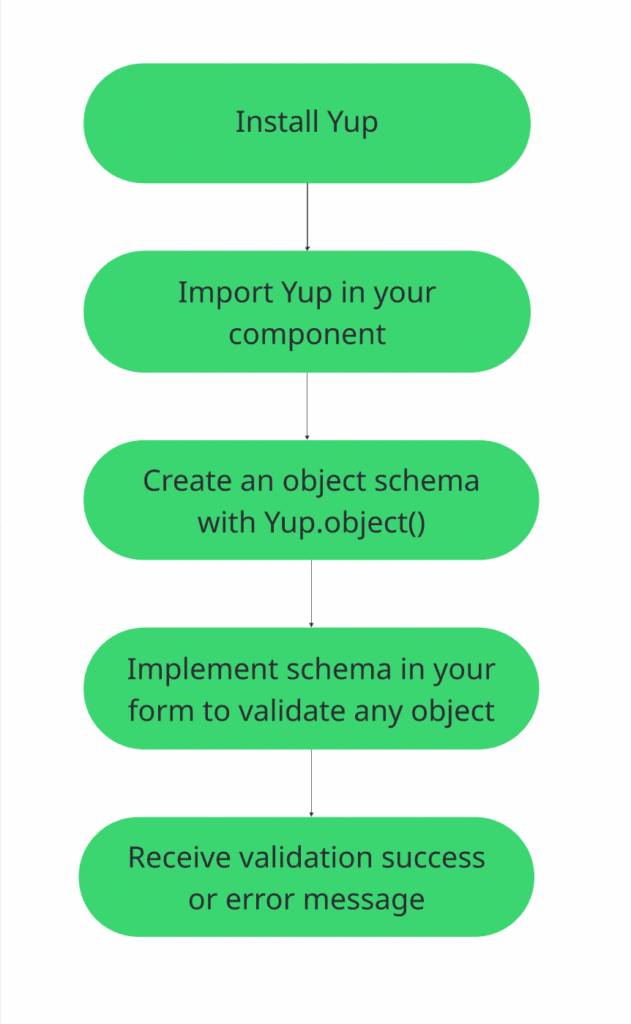
1. Install Yup
You can install Yup using npm or yarn:
npm install yupOr:
yarn add yup2. Create a basic object schema
Suppose you want to validate a simple user object with a name and email.
import * as yup from "yup";

const userSchema = yup.object({
  name: yup.string().required(),
  email: yup.string().email().required(),
});
Here’s what this schema does:
namemust be a string and is requiredemailmust be a valid email and is required
That’s your data contract.
3. Validate data
Now you can validate any object against this schema:
const data = {
  name: "Alice",
  email: "alice@example.com",
};

userSchema
  .validate(data)
  .then(validData => {
    console.log("Validation passed:", validData);
  })
  .catch(error => {
    console.error("Validation failed:", error.errors);
  });
4. Handling success and failure
If the data matches the schema, validation succeeds and returns the validated value.
If it fails, Yup throws a validation error containing details about what went wrong.
That’s it. In just a few lines, you defined rules, validated data, and handled errors. This simple pattern scales from small forms to full API validation logic.
Handling validation errors in Yup
Validation is only half the story. The other half is handling errors properly. If you don’t structure errors clearly, users get confusing messages and APIs return inconsistent responses.
Let’s look at how Yup handles validation errors and how to use them effectively.
Understanding Yup’s error object
When validation fails, Yup throws a ValidationError.
This error object contains useful information such as:
name→ The error type, usually ValidationErrormessage→ The main error messagepath→ The field where the error occurrederrors→ An array of error messagesinner→ Detailed list of all validation errors when multiple fields fail
For simple validations, you might only see one message. But for object schemas with multiple invalid fields, Yup can provide a full list of issues.
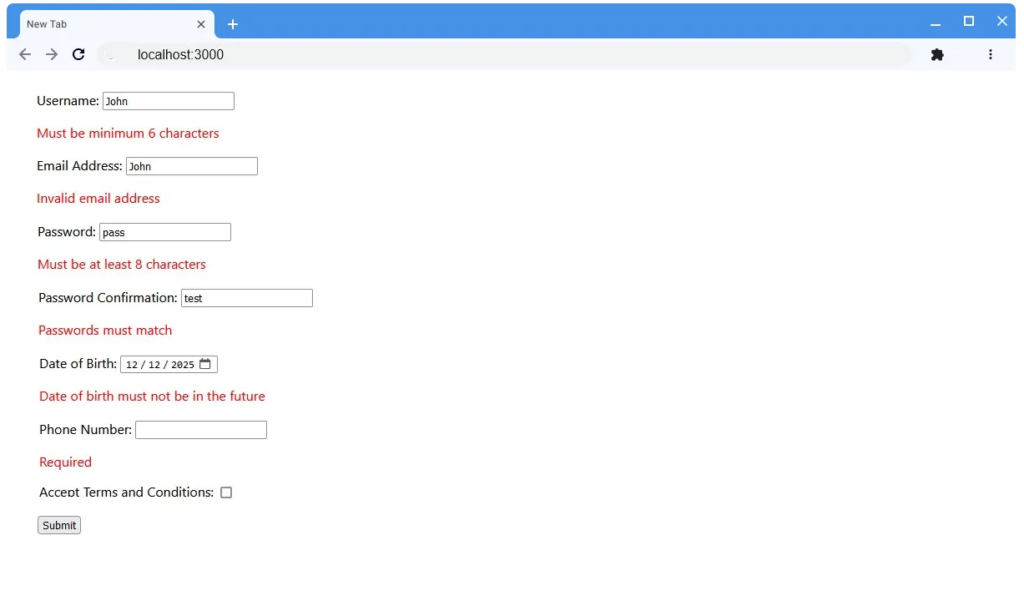
Understanding the inner array is especially important when working with forms or APIs that need structured error output.
abortEarly: true vs false
By default, Yup stops validation as soon as it finds the first error. This behavior is controlled by the abortEarly option.
abortEarly: true
- Stops at the first validation failure
- Faster because it does not check the remaining fields
- Useful for quick checks or when you only need to know if a value is valid or not, such as:
- A simple one-field input
- Pre-validation before submitting a lightweight request
- Situations where reporting multiple errors at once is unnecessary
abortEarly: false
- Collects all validation errors
- Returns a complete list of issues
- Better for forms and APIs, where you want to show all problems at once and guide users to fix multiple fields in a single attempt.
Example:
schema.validate(data, { abortEarly: false });In most real-world applications, especially user-facing forms, you want abortEarly: false so users can see all errors at once.
Formatting errors for UI forms
When you validate an object schema in Yup with abortEarly: false, multiple fields can fail at once. Yup collects all these errors in the error.inner array. Each entry in error.inner contains:
path→ the field that failedmessage→ the corresponding error message
To make errors usable in forms or APIs, you can group messages by field. This way, each field has its own list of errors.
Example scenario:
Suppose a user submits a form with invalid email and password fields. The error.inner array might look like this:
[
  { path: 'email', message: 'Email must be valid' },
  { path: 'password', message: 'Password is too short' }
]
You can transform it into a structured object that maps each field to its errors:
{
  email: ['Email must be valid'],
  password: ['Password is too short']
}
This structure makes it easy to:
- Highlight fields with errors in a UI form
- Display multiple error messages per field
- Return consistent, structured error responses in an API
Iterating over error.inner ensures that no validation failure is lost and every field’s errors are clearly associated with its path.
Formatting errors for API responses
APIs usually need structured error responses, such as:
{
  "status": "error",
  "errors": [
    { "field": "email", "message": "Invalid email format" },
    { "field": "password", "message": "Password is too short" }
  ]
}
Using abortEarly: false makes this easier because all errors are available at once.
For APIs, consistency is key. Every validation failure should follow a consistent structure, allowing frontend or client applications to handle errors predictably.
Common mistakes with error handling
Avoid these common pitfalls while handling errors:
- Forgetting to set abortEarly: false: This leads to incomplete error reporting.
- Returning raw error objects to clients: Yup’s error object contains more information than you typically want to expose. Always format it.
- Ignoring the path property: You cannot map errors to specific fields without a path.
- Not handling async validation properly: When using async validation, always await the promise or handle the catch block correctly.
Proper error handling turns validation into a user-friendly and developer-friendly experience. Instead of vague failures, you get structured, actionable feedback that improves both UI forms and APIs.
Using Yup with TypeScript
Yup works well with TypeScript, but it is important to understand how the two fit together. If you use them correctly, you can reduce duplication and make your validation and types stay in sync.
Yup is primarily a runtime validation library. TypeScript, on the other hand, works at compile time.
This means:
- TypeScript checks types while you write code
- Yup validates actual data at runtime
You often need both. TypeScript ensures your code is correct during development. Yup ensures incoming data is correct when your app runs. The key is to avoid defining your data shape twice.
Using InferType to generate types from schemas
Yup provides a utility called InferType that extracts a TypeScript type from a schema.
Example:
import * as yup from "yup";

const userSchema = yup.object({
  name: yup.string().required(),
  email: yup.string().email().required(),
  age: yup.number().optional(),
});

type User = yup.InferType<typeof userSchema>;
Now User becomes:
{
  name: string;
  email: string;
  age?: number | undefined;
}
This has two major benefits:
- Your schema becomes the single source of truth
- You avoid manually writing matching TypeScript interfaces
If you update the schema, the type updates automatically.
Yup, and TypeScript philosophy
A common mistake is doing this:
interface User {
  name: string;
  email: string;
}

const userSchema = yup.object({
  name: yup.string().required(),
  email: yup.string().required(),
});
Now you have two separate definitions that must stay in sync.
If someone updates the interface but forgets the schema, bugs happen.
Instead, define the schema first and derive the type from it using InferType. This reduces maintenance risk and keeps validation aligned with your types.
Limitations of Yup’s type inference
Yup’s type inference is helpful, but it has limitations.
Some things to be aware of:
- Type inference may not always be as strict as expected
- Complex conditional schemas can weaken type precision
- Transformations and casting can make the runtime behavior slightly different from inferred types
For example, if you use casting to convert strings into numbers, TypeScript may not fully reflect that transformation in every scenario.
Yup was not originally designed as a type-first library, so its type system is practical but not perfect.
Practical patterns for safer typing
Here are a few patterns that improve reliability:
- Define schema first, infer types second: Always derive types from schemas, not the other way around.
- Use strict mode when needed: If you want runtime behavior to match TypeScript expectations more closely, avoid automatic casting.
- Validate at boundaries: Use Yup when data enters your system, such as API requests or form submissions. Inside your application, rely on TypeScript types.
- Keep schemas simple and explicit: Overly dynamic schemas can make both validation and type inference harder to reason about.
Used correctly, Yup and TypeScript complement each other.
TypeScript protects your internal logic. Yup protects your application from invalid external data. Together, they help you build safer and more predictable systems.
Validating forms with Yup
Form validation is one of the most common use cases for Yup.
Whenever users submit data, you need to ensure it is complete, correctly formatted, and logically consistent. Yup provides a clean and structured way to enforce those rules.
Typical frontend form use cases
In frontend applications, validation usually covers:
- Required fields
- Email and URL formats
- Minimum and maximum length checks
- Password strength rules
- Numeric ranges
- Matching fields such as password and confirm password
Instead of writing validation logic inside event handlers or components, you define a schema that describes the entire form structure.
This keeps validation separate from UI logic and makes it easier to maintain.
Integration patterns with form libraries
Most modern frontend form libraries support schema-based validation.
The common pattern looks like this:
- Define a Yup schema that mirrors your form structure
- Pass that schema to your form library’s validation mechanism
- Display validation errors based on field paths
The key idea is consistency.
Your form state and your Yup schema should have matching shapes. If your form has nested objects, your schema should reflect that structure.
This makes error mapping straightforward and avoids confusing edge cases.
Even if you are not using a form library, the pattern still works:
- Validate on submit
- Optionally validate on change or blur
- Map errors to fields
- Show helpful messages
The schema becomes your single source of truth for form rules.
Conditional validation based on other fields
Real-world forms often depend on other inputs.
For instance:
- A company name is required only if the “account type” is business
- A state field is required only if the country is the United States
- A discount code must be present if a promotion toggle is enabled
Yup supports conditional validation using dynamic rules based on other fields. This allows your schema to adapt depending on the form state.
The important pattern is to keep conditions declarative inside the schema rather than scattering logic across UI components. When validation rules live in one place, they are easier to reason about and test.
Managing Complex Nested Forms
Large forms often include:
- Nested objects
- Arrays of items
- Dynamic lists, such as multiple addresses or phone numbers
Yup handles this by allowing nested object schemas and array schemas.
For example:
- A user object can contain an address object
- An order form can contain an array of line items
- Each line item can have its own validation rules
The best practice is to mirror your data structure exactly in your schema.
If your form state looks like this:
{
  user: {
    name: "",
    address: {
      city: "",
      zip: ""
    }
  }
}
Your Yup schema should follow the same hierarchy. This makes validation predictable and error mapping much easier.
Key takeaway
For form validation, Yup excels because it:
- Centralizes validation logic
- Keeps UI and validation concerns separate
- Supports conditional and nested structures
- Scales from simple forms to complex multi-step flows
Validating API requests and responses with Yup
Validation is critical when working with APIs. It ensures that data entering your system or coming from external services is safe, well-structured, and predictable. Yup provides a structured way to define rules that can be shared across frontend and backend, reducing bugs and improving reliability.
Why API validation matters
APIs are the gateway to your system. Invalid data can cause:
- Application crashes
- Database inconsistencies
- Security vulnerabilities
- Unexpected behavior downstream
By validating requests and responses, you enforce clear contracts between your services and clients, catching issues early and improving developer experience.
Validating data coming into your API
When a client submits data, you want to ensure it meets your expected shape before processing. Yup can validate fields such as:
- Required fields (
email,password) - Format checks (
email,URLs) - Numeric ranges or string lengths
- Conditional rules (e.g.,
staterequired only ifcountryis the US)
This prevents bad data from entering your system and reduces the need for defensive programming later.
These best practices help you keep your API predictable and easier to maintain:
- Validate as early as possible (before route logic executes)
- Return structured, consistent error responses
- Avoid leaking internal error details
- Keep validation separate from business logic
Validating data coming from external APIs
Even if you trust an external API, responses can be unpredictable:
- Fields might be missing
- Data types can differ from documentation
- Unexpected null or empty values
Yup lets you define schemas that describe exactly what you expect. This ensures your application handles only valid, expected data and fails gracefully if the external API changes unexpectedly.
Implementing validation in Express (or similar frameworks)
In frameworks like Express, validation should be integrated as part of the request lifecycle.
A clean pattern typically involves:
- Defining a schema per endpoint
- Validating the request before executing route logic
- Passing only validated data forward
- Handling validation errors centrally
Benefits of this approach include:
- Route handlers remain focused on business logic
- Validation logic stays reusable and testable
- Error formatting remains consistent across endpoints
- Reduced duplication across controllers
This pattern works equally well in other frameworks such as: Fastify, NestJS, Koa, and, Hapi.
Designing shared schemas across frontend and backend
One of Yup’s biggest advantages is sharing schemas across layers:
- The frontend can validate form data before sending it
- The backend can validate the same schema to enforce correctness
- Any change to the schema automatically applies to both ends
This creates a single source of truth for data contracts.
Common strategies include:
- Shared validation package in a monorepo
- Publishing internal validation libraries
- Organizing schemas by domain (User, Order, Product)
- Versioning schemas alongside API versions
Reusable schema and architecture patterns
As your project grows, validation logic grows with it. A few fields turn into dozens. One form turns into multiple APIs. One schema turns into many variations. Without structure, validation becomes messy. With the right patterns, Yup scales cleanly.
Let’s look at how to organize schemas in larger projects.
Organizing schemas in large projects
In small projects, schemas often live next to components or route handlers. In larger applications, this quickly becomes hard to manage.
A better approach is to:
- Create a dedicated
schemasorvalidationfolder - Group schemas by domain, such as
user,auth,billing - Separate frontend and backend schemas if responsibilities differ
For example:
/schemas
  /user
    user.schema.ts
    update-user.schema.ts
  /auth
    login.schema.ts
    register.schema.ts
This keeps validation logic centralized and discoverable. Treat schemas as first-class parts of your architecture, not as small helper utilities.
Shared schema packages
In full-stack applications, both frontend and backend often validate the same data. Instead of duplicating schemas, consider sharing them.
Common pattern:
- Create a shared package in a monorepo
- Export schemas from a central validation library
- Import them in both frontend and backend
This ensures:
- Consistent validation rules
- Fewer mismatches between client and server
- Reduced maintenance effort
If the backend changes a rule, the frontend automatically stays in sync. Validation should not drift between layers.
Schema composition and reuse patterns
Real applications rarely use one schema for everything.
For example:
- A “create user” request requires all fields
- An “update user” request only allows partial fields
Instead of rewriting schemas, you can compose them.
Common patterns include:
- Reusing base schemas
- Picking specific fields
- Making required fields optional in certain contexts
- Extending existing schemas with additional rules
Think in terms of building blocks. Create a base user schema. Derive create, update, and public response schemas from it. This keeps your validation logic DRY and easier to evolve.
Versioning schemas safely
APIs change over time.
New fields are added.
Old fields are deprecated.
Rules become stricter.
When validation rules change, you need to manage versions carefully.
Safe practices include:
- Versioning API routes such as
/v1and/v2 - Keeping old schemas alongside new ones
- Avoiding breaking changes without a clear migration path
- Documenting validation differences clearly
For public APIs, never silently tighten validation rules without versioning. Validation is part of your contract. Changing it can break clients.
Yup vs. Zod and other validation libraries
If you are evaluating validation libraries, you will likely come across Yup and Zod. Both are popular, widely used, and capable. But they are built with slightly different philosophies.
Yup and Zod both provide schema-based validation for JavaScript and TypeScript. The main difference is design philosophy.
| Yup | Zod | |
| Primary focus | Runtime validation | TypeScript-first validation |
| Design origin | Built around schema-based runtime checks | Built around static type inference |
| TypeScript support | Added after initial release | Core part of the design |
| API style | Chainable, expressive methods | Schema definitions closely aligned with TS types |
| Casting behavior | Supports value casting and transformations | Minimal casting, stricter validation |
| Typical ecosystem | Common in frontend form validation | Popular in TypeScript-heavy backends |
In simple terms:
Yup is runtime-first with TypeScript support. Zod is TypeScript-first with runtime validation built in. Both can validate objects, arrays, nested structures, and custom rules.
Strengths of Yup
Yup has several advantages:
- Mature ecosystem: It has been around for years and is widely adopted in frontend projects.
- Clean, chainable API: Its method chaining style is readable and expressive.
- Strong from validation support: It integrates smoothly with many frontend form solutions.
- Flexible transformations: Casting and value transformations make it practical when dealing with raw user input.
- Good balance of simplicity and power: It handles most common validation needs without becoming overly complex.
Weaknesses and trade-offs of using Yup
Yup also has its trade-offs:
- Type interference is not perfect: Compared to Zod, TypeScript integration is less strict in edge cases.
- Runtime casting can create confusion: Automatic type transformations may not always match TypeScript expectations.
- Conditional schema can reduce type clarity: Complex dynamic validation sometimes weakens type precision.
If your project relies heavily on strict compile-time guarantees, this can matter.
When to choose Yup vs. alternatives
| Choose Yup if | Consider Zod or similar libraries if |
| You prioritize developer experience and readability | You want the strongest possible TypeScript inference |
| You are building form-heavy frontend applications | You prefer a type-first approach |
| You want flexible runtime transformations | You want tighter alignment between static and runtime types |
| Your TypeScript requirements are moderate |
Migration considerations
If you are migrating:
- From plain JavaScript validation to Yup, expect a cleaner structure and better maintainability.
- From Yup to Zod, expect to refactor schemas and adjust type patterns.
- From older validation tools, test carefully to ensure error formatting and behavior remain consistent.
Validation logic sits at the boundary of your system. Changing libraries affects how errors are structured, how types are inferred, and how data is transformed. Plan migrations carefully and test thoroughly.
Pro tip: There is no universally perfect validation library. Yup remains a strong and practical choice for many real-world applications. If your focus is on readable schemas, flexible validation, and solid frontend support, it continues to be a reliable option.
Performance and scalability considerations
Validation is usually not the main performance bottleneck in an application. But as payloads grow and traffic increases, it can start to matter.
Understanding how validation behaves at scale helps you avoid unnecessary overhead.
Validation cost on large payloads
Every time you validate data, Yup:
- Traverses the schema
- Checks each field
- Applies transformations
- Runs custom tests
For small objects, this cost is negligible.
For large payloads such as:
- Deeply nested objects
- Large arrays of items
- Bulk API submissions
- High-frequency request validation
Validation time increases proportionally to the size and complexity of the data.
For example, validating an array of 10 items is very different from validating an array of 10,000 items. If validation runs on every request in a high-traffic API, that cost adds up.
Common performance pitfalls
Here are common mistakes that hurt performance:
- Recreating schemas on every request: Defining schemas inside request handlers or functions that run repeatedly increases overhead. Schemas should be defined once and reused.
- Using heavy transformations unnecessarily: Casting and transforming values adds extra work. If you do not need automatic type conversion, consider strict validation.
- Overusing async validation: Async checks such as database lookups can significantly slow down request handling if not managed carefully
- Validating extremely large arrays without limits: If clients can send unbounded arrays, validation time can grow quickly. Always enforce size limits.
- Deep conditional logic in schemas: Complex dynamic rules may increase processing time and reduce clarity.
Tips to keep schemas efficient
You do not need advanced optimization for most use cases. A few simple practices go a long way.
- Define schemas once: Create schemas at module scope and reuse them. Avoid rebuilding them per request.
- Validate only at system boundaries: Validate when data enters your system, such as API requests or form submissions. Avoid repeatedly validating the same internal objects.
- Limit payload size: Set reasonable constraints on array length and nested structures.
- Use strict mode when appropriate: If you do not need casting, disable it. This reduces unnecessary transformations.
- Keep schemas simple: Clear, direct validation rules are easier to maintain and usually faster to execute.
- Measure if performance matters: If you suspect validation is slowing down your API, benchmark it. Optimization should be driven by data, not assumptions.
Common mistakes and pitfalls with Yup
Yup is simple to use, but small missteps can create confusing bugs or unnecessary complexity. Here are the most common mistakes and how to avoid them.
1. Over-validating
Validation should happen at clear boundaries.
Mistakes occur when:
- Validating the same object multiple times inside your application
- Re-validating data that has already passed schema checks
- Adding validation deep inside business logic
The best is to validate when data enters your system, such as:
- API requests
- Form submissions
- External service responses
Once validated, trust the data internally. Over-validating wastes resources and clutters your code.
2. Overly complex schemas
As applications grow, schemas can become deeply nested and full of conditional logic.
Common symptoms:
- Hard-to-read rules
- Many chained conditions
- Large schemas that try to handle too many scenarios
This reduces maintainability and makes debugging harder.
Do this instead:
- Break schemas into smaller reusable pieces
- Use composition instead of one massive schema
- Keep validation rules focused and explicit
If a schema is difficult to explain, it is probably too complex.
3. Ignoring casting behavior
By default, Yup casts values when possible.
For example:
- “42” can become 42
- “true” can become true
This is convenient, but it can also create subtle bugs.
Example issue: You expect strict type checking, but Yup silently converts values instead of failing validation.
To avoid confusion:
- Use strict mode when you want exact type matching
- Be intentional about transformations
- Understand when casting is happening
Never assume validation only checks types. It may also transform them.
4. Misusing async validation
Yup supports async validation, which is useful for:
- Database lookups
- External API checks
- Unique field validation
Common mistakes during async validation include:
- Forgetting to await validation
- Mixing sync and async logic inconsistently
- Performing expensive async operations for every request
Async validation should be used carefully and only when necessary.
If you need to check the database, consider separating structural validation from business logic checks. Keep schema validation focused on data shape and format.
5. Type mismatches between schema and code
When using TypeScript, mismatches can occur if:
- You define separate interfaces and schemas
- You modify the schema but forget to update related types
- Casting changes runtime values in ways TypeScript does not reflect
This leads to confusing bugs where TypeScript says something is safe, but runtime validation behaves differently.
The safer approach is to:
- Define schemas first
- Use
InferTypeto generate TypeScript types - Avoid duplicating definitions
Your schema should be the source of truth for external data validation.
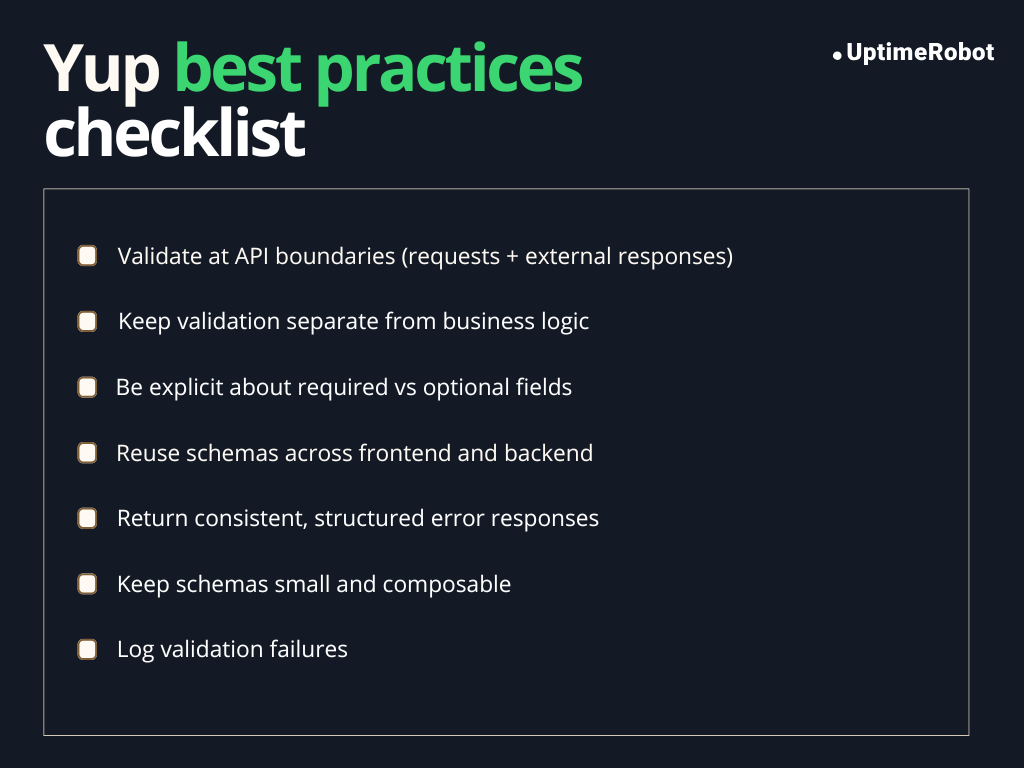
Yup best practices checklist
Using Yup effectively means more than just writing validation rules. Here’s a concise checklist for best practices.
Practical Do’s and Don’ts
| Do’s | Dont’s |
| Define schemas at module scope and reuse them | Over-validate already validated data |
| Validate data at system boundaries like API requests or form submissions | Make schemas unnecessarily complex |
| Use abortEarly: false when you want all errors at once | Ignore casting behavior or assume it is off |
| Leverage schema composition for reusable rules | Mix sync and async validation carelessly |
Schema organization tips
- Keep schemas in a dedicated schemas or validation folder
- Group schemas by domain or feature, e.g., user, auth, billing
- Use shared schema packages when frontend and backend need the same rules
- Compose partial schemas instead of duplicating fields
- Version schemas for APIs to avoid breaking changes
Error handling recommendations
- Always format errors before exposing them to users or APIs
- Map ValidationError.inner to field-specific messages for forms
- Standardize error response structures for APIs
- Use abortEarly: false to capture all validation issues at once
- Test error messages to ensure clarity and consistency
Type safety tips
- Define schemas first, then infer TypeScript types with yup.InferType
- Avoid duplicating interfaces and schemas
- Use strict mode when you want precise type validation without casting
- Validate external data at the boundaries; rely on TypeScript internally
- Keep conditional and dynamic schemas simple to preserve type inference
Summary
Yup is a schema-based validation library designed to help developers define clear rules for data validation in JavaScript and TypeScript applications. It is commonly used for form validation, API request validation, and other scenarios where data enters a system from external sources.
By defining validation rules in centralized schemas, Yup encourages consistency and reuse across different parts of an application. Its structured approach helps catch invalid data early and keeps validation logic separate from business logic, improving maintainability over time.
When choosing between Yup and alternatives such as Zod, the decision should be based on project requirements. Yup works well for applications that benefit from flexible runtime validation and strong frontend integration. Other libraries may be more suitable if strict type inference and a type-first workflow are primary concerns.
The most appropriate validation tool depends on the context of your application, team preferences, and architectural goals.
FAQ's
-
Yes. Yup continues to receive updates and bug fixes. It has a mature ecosystem and is widely used in both frontend and backend projects. While its TypeScript support was added later, the library remains stable and reliable for production use.
-
Yup works well with TypeScript, especially when you use yup.InferType to derive types from schemas. This avoids duplicate type definitions and keeps your runtime validation aligned with your TypeScript types.
That said, Yup’s type inference is not as strict as some TypeScript-first libraries, so very complex schemas may have limitations.
-
Not entirely. Yup is a runtime validation library and works perfectly for input validation, API requests, and form data.
However, backend validation often includes business logic checks, database constraints, or security rules. Yup handles structural and format validation well, but should be used alongside other backend safeguards.
-
It depends on your priorities:
- Yup: Runtime-first, chainable API, flexible transformations, excellent for frontend forms
- Zod: TypeScript-first, tighter type inference, better static type alignment
If you prioritize readability, developer experience, and flexible runtime behavior, Yup is a strong choice. If you want TypeScript types to drive everything, Zod may be better.
-
Yes. Yup is ideal for validating data from APIs, especially external services where you cannot control the format. You can define schemas that match expected responses and ensure that your application handles data safely.
Combining abortEarly: false and structured error handling makes it easy to surface meaningful messages for debugging or user feedback.