TL;DR (QUICK ANSWER)
IT alerting software turns monitoring signals into fast, actionable notifications so the right people respond before outages escalate. The best tools focus on reliable alert delivery, smart escalation, and noise reduction, not long feature lists. For most teams, simplicity and speed matter more than complexity, while larger organizations may need advanced on-call scheduling and governance. The right choice depends on team size, incident frequency, and how mature your incident response workflows are.
When systems fail, the difference between a short disruption and a prolonged outage often comes down to alerting. If the right people are notified quickly and clearly, issues get resolved faster. If alerts are delayed, noisy, or missed, downtime grows and on-call stress follows.
IT alerting software sits between monitoring tools and human response. It takes signals like failed checks, slow responses, or service errors and turns them into actionable notifications. For teams juggling multiple services, time zones, and on-call rotations, this layer is critical.
The comparison below looks at the best IT alerting software based on real incident response needs. The focus is on alert delivery, escalation, noise control, and day-to-day usability, with the goal of helping teams shortlist tools that work in practice.
Key takeaways
- IT alerting is about response, not detection: monitoring finds problems, alerting makes sure they are acted on.
- Fast and reliable alert delivery matters more than feature count during incidents.
- Escalation and on-call handling reduce the risk of missed alerts, especially outside working hours.
- Noise control is essential to avoid alert fatigue and keep teams responsive.
- The best tool depends on team size, incident frequency, and workflow maturity.

What is IT alerting software?
IT alerting software is used to notify people when something goes wrong in a system. It takes signals from monitoring tools and turns them into alerts that reach the right responders through channels like email, SMS, push notifications, or chat tools.
The goal of alerting isn’t data collection, it’s to trigger action quickly and reliably when an incident occurs.
Monitoring vs. alerting
Monitoring and alerting serve different purposes, even though they work closely together.
Monitoring tools continuously check systems, services, and infrastructure. They track metrics such as uptime, response time, error rates, and availability.
Alerting software sits on top of monitoring. When monitoring detects a failure or threshold breach, alerting decides who should be notified, how they are notified, and what happens if no one responds.
Monitoring answers “what is happening.”
Alerting answers “who needs to act right now.”
Alerting vs. incident management
Alerting and incident management are related but not the same.
Alerting focuses on notification and escalation. It makes sure the right people know about an issue as soon as possible.
Incident management covers what happens after alerts are acknowledged. This includes coordination, communication, root cause analysis, and post-incident review.
Some tools handle both, but many teams use dedicated alerting software alongside separate incident management processes.
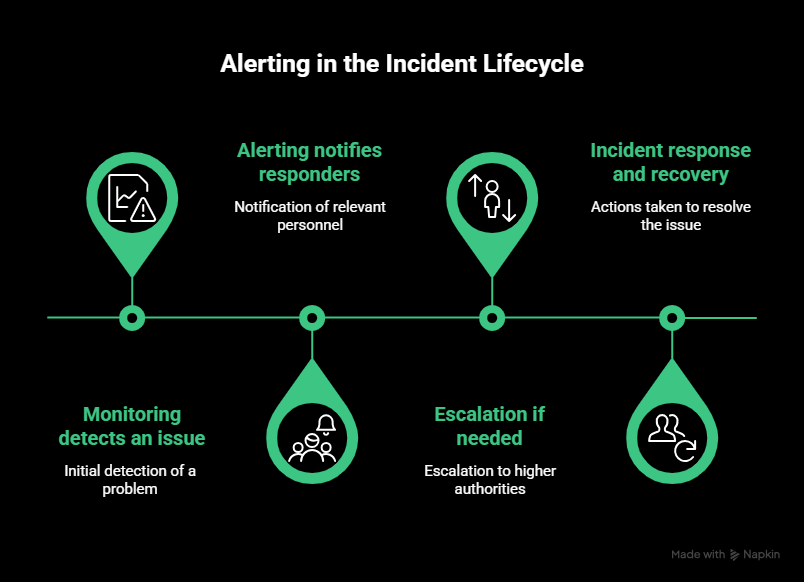
Where alerting fits in the incident lifecycle
Alerting sits between detection and response.
First, monitoring detects an issue.
Next, alerting notifies the appropriate responders and escalates if needed.
Then, incident response and recovery begin.
If alerting fails, incidents are delayed or missed entirely. That’s why reliable alert delivery and escalation are critical parts of any incident response workflow.
How we evaluated the best IT alerting software
We evaluated IT alerting tools based on how well they support real incident response, not feature count or vendor claims. The focus was on alert delivery, escalation, and day-to-day usability during outages.
We assessed each tool using the following criteria:
- Alert delivery channels: Speed and reliability across email, SMS, voice calls, mobile push, and chat integrations.
- Escalation and on-call handling: Support for escalation rules and on-call coverage when alerts are not acknowledged.
- Noise reduction: Controls for alert grouping, suppression, and thresholds to limit alert fatigue.
- Integrations: Native integrations and webhook support for monitoring, collaboration, and incident tools.
- Ease of setup and daily use: How quickly teams can configure alerts and manage them day to day.
- Pricing and free plans: Transparency, feature access, and whether free tiers support real alerting needs.
- Alert delivery reliability: Consistency and speed of alert delivery under real incident conditions.
Our evaluation is based on hands-on testing and practical operational use cases, not vendor marketing.
Best IT alerting software in 2026 (ranked)
When systems fail, fast and accurate alerts matter. The tools below are ranked based on how reliably they deliver alerts, route incidents, and support real on-call workflows.
1. UptimeRobot – Best overall IT alerting software
UptimeRobot offers reliable alert delivery, broad channel support, and easy setup for teams of all sizes.
Best for
Small to mid sized IT teams, startups, and distributed engineering groups that need fast alerts with minimal configuration.
Key alerting features
- Multiple channel notifications via email, SMS, voice, push, and webhooks
- Basic escalation via alert contacts and integrations
- Keyword, HTTP, port, and ping monitoring included on free plan
- Public status pages for external communication
Strengths
UptimeRobot is easy to set up and manage. Alerts reach responders quickly across multiple channels. The dashboard is simple and readable, which helps teams stay on top of incidents without spending time on configuration. The free plan covers essential monitoring and alerting for many use cases.
Limitations
Advanced routing rules and fine-grained suppression are more limited than in enterprise tools. Some enterprise workflows may require external integrations for escalation policies or deeper automation.
Pricing snapshot
The free plan includes up to 50 monitors with five-minute check intervals and core alerting via email and mobile notifications.
Paid plans introduce shorter check intervals, additional monitor types, more integrations, and team features. Pricing scales based on the number of monitors and required check frequency.
2. PagerDuty – Best for enterprise incident escalation
PagerDuty is designed for complex escalation and response workflows in large organizations.
Best for
Enterprise teams with formal on-call rotations and detailed escalation requirements.
Key alerting features
- Flexible escalation chains
- Advanced on-call scheduling
- Multiple alert channels and integration hooks
Strengths
PagerDuty supports detailed escalation logic across time zones and roles. It integrates with many observability and DevOps tools, making it a good fit where incident response responsibilities span multiple teams.
Limitations
The setup complexity can be high for smaller teams. Feature depth and pricing may exceed the needs of groups that only require basic alerting.
Pricing snapshot
PagerDuty uses per-user pricing with multiple tiers.
A limited free plan is available for small teams, with caps on users, alerts, and features.
Paid plans are billed per user, per month, with higher tiers adding advanced escalation rules, analytics, automation, and incident response workflows. Enterprise pricing is custom.
3. Opsgenie – Best for Atlassian centric teams
Opsgenie provides strong alert routing and on-call features with tight integration to Atlassian products.
Best for
Teams using Jira or other Atlassian tools that want seamless incident tracking.
Key alerting features
- Two way sync with Jira for issues and alerts
- Custom alert rules by source and priority
- Mobile notifications and on-call schedules
Strengths
Opsgenie integrates well with Jira Service Management and other Atlassian tools. Alert routing can be based on detailed rules, and team members can acknowledge and manage alerts directly from mobile devices.
Limitations
Standalone alerting or complex escalation outside the Atlassian ecosystem may require additional configuration. Pricing can be higher when adding advanced features.
Pricing snapshot
Opsgenie uses per-user pricing across multiple plans.
Free and paid tiers offer increasing levels of alert routing, notification methods, and automation. Advanced integrations, unlimited notifications, and complex escalation rules require higher-tier plans.
Opsgenie is no longer sold as a standalone product to new customers and is now offered as part of Atlassian Jira Service Management.
4. Splunk On-Call – Best for observability-heavy stacks
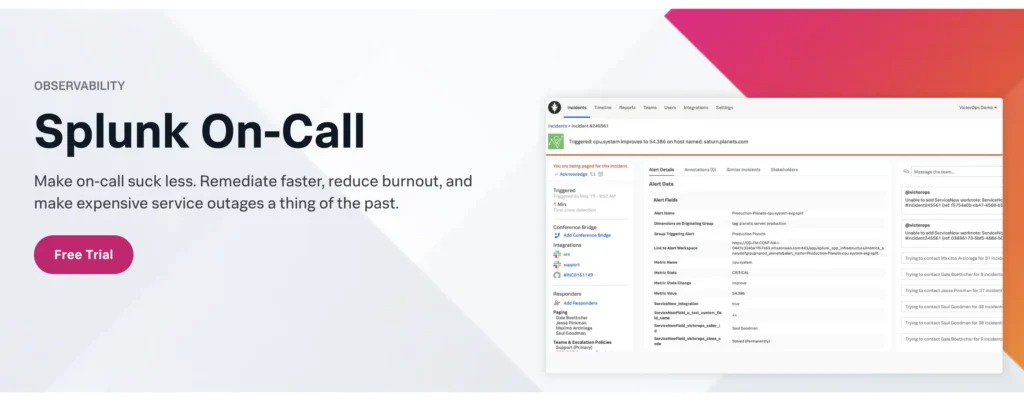
Splunk On-Call brings rich context to alerts by linking them to logs and traces in observability collections.
Best for
SRE and DevOps teams that use log and metric data for deep incident investigation.
Key alerting features
- Integration with Splunk logs, metrics, and traces
- Contextual alert content with related data
- Timeline and collaboration tools
Strengths
Alerts include rich contextual information, which helps responders understand incidents without switching tools. The timeline view assists in tracing the sequence of events.
Limitations
Splunk On-Call is best when paired with a broader observability stack. The learning curve and setup time are higher than lightweight alerting tools.
Pricing snapshot
Splunk On-Call uses per-user pricing and does not offer a free plan.
Pricing starts at approximately $10 per user per month, with higher tiers adding analytics, automation, noise suppression, and advanced routing features.
All plans include core alerting capabilities, on-call scheduling, and multiple notification channels.
5. xMatters – Best for complex enterprise workflows
xMatters coordinates alerting with automated communication and ITSM workflows for large organizations.
Best for
Enterprises that need structured incident workflows and governance tied to ITSM systems.
Key alerting features
- Advanced workflow automation
- Integration with ITSM platforms such as ServiceNow
- Role based notifications and audit logs
Strengths
xMatters goes beyond simple alert delivery. It can trigger multi step workflows that involve multiple teams and systems. Enterprise governance and audit readiness are strong points.
Limitations
The platform is feature rich, but that complexity requires planning and configuration. Smaller teams may find it more than they need.
Pricing snapshot
xMatters offers both free and paid plans with per-user pricing.
The free plan supports on-call scheduling and mobile notifications but does not include SMS or voice alerts.
Paid plans start at around $9 per user per month, with higher tiers increasing messaging limits, automation capabilities, and governance features. Enterprise pricing is custom.
Feature comparison table
Need to compare side-by-side? Here’s all you need to know laid out in table form:
| Tool | Alert channels | Escalation rules | On-call scheduling | Integrations | Free plan | Best for |
| UptimeRobot | Email, SMS, voice calls, push notifications, webhooks, Slack, Microsoft Teams, Telegram | Basic escalation via alert contacts and integrations | Basic on-call handling via alert contacts and integrations | Slack, Microsoft Teams, PagerDuty, Telegram, webhooks, API | ✅ | Small to mid sized teams needing fast alerting with minimal setup |
| PagerDuty | Email, SMS, voice calls, push notifications | Advanced multi-step escalation policies | Full on-call rotations with overrides and time zones | Datadog, Prometheus, AWS CloudWatch, New Relic, Slack, others | ⚠️ | Enterprise teams with complex incident escalation |
| Opsgenie | Email, SMS, voice calls, push notifications | Advanced routing by priority, source, and schedule | Full on-call scheduling and rotations | Jira, Jira Service Management, Bitbucket, Slack, API | ⚠️ | Atlassian-centric teams |
| Splunk On-Call | Email, SMS, push notifications | Escalation tied to observability events | On-call schedules and rotations | Splunk observability tools, Slack, Microsoft Teams | ❌ | Observability-heavy DevOps and SRE teams |
| xMatters | Email, SMS, voice calls, push notifications | Workflow-driven escalation and role-based routing | Advanced scheduling aligned with ITSM workflows | ServiceNow, BMC Remedy, APIs | ✅ | Enterprises with complex workflows and compliance needs |
Note: Alerting channels may vary by plan.
Best IT alerting software by use case
Different teams need different alerting capabilities. The sections below map common team setups to the tools that fit them best, based on escalation needs, operational complexity, and day-to-day usage.
Best for small IT teams and startups
Small teams usually need alerting that works out of the box. Setup time, cost, and ongoing maintenance matter more than complex workflows.
UptimeRobot is the best fit here. It delivers fast alerts, supports multiple notification channels, and has a clean interface that does not require dedicated administration.
Teams can start monitoring websites, APIs, and services in minutes and still receive reliable off-hours alerts.
Best for DevOps and SRE teams
DevOps and SRE teams often manage distributed systems and shared on-call rotations. They need alerting that supports escalation, routing, and integration with existing tooling.
PagerDuty makes sense when teams require advanced escalation policies, detailed on-call scheduling, and clear ownership across services. It works well in environments where incidents frequently involve multiple responders or handoffs.
Opsgenie is a strong option for teams already using Atlassian tools. Its integration with Jira helps connect alerts to incident tracking and post-incident workflows.
Splunk On-Call is a good choice for teams that rely heavily on logs and metrics during incident response. It works best when alerts need to include contextual data from an observability stack, allowing responders to investigate issues without switching tools.
Best free IT alerting software
Free plans can be sufficient for basic alerting, but trade-offs matter.
UptimeRobot offers one of the most usable free tiers, with 50 monitors and core alerting features included. This is enough for many small teams to monitor critical endpoints without paying upfront.
Common limitations of free alerting plans include longer check intervals, fewer integrations, and limited escalation options. As incident frequency or team size grows, upgrading becomes necessary to avoid missed or delayed alerts.
Best for enterprise and compliance-heavy environments
Large organizations often require detailed escalation logic, audit trails, and governance controls. Alerting needs to integrate cleanly with incident response and IT service management workflows.
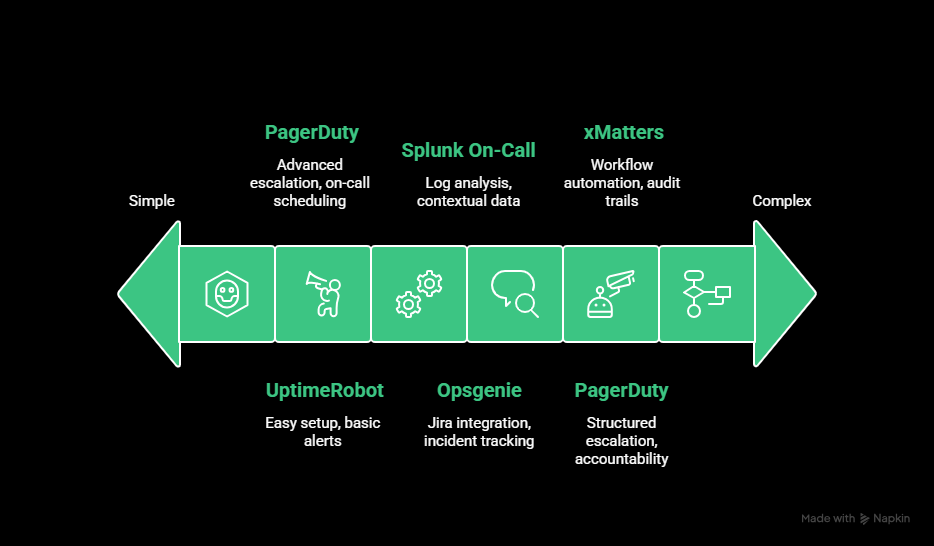
PagerDuty fits teams that need structured escalation and clear accountability across large on-call rotations.
xMatters is better suited for enterprises that require workflow automation, role-based notifications, and audit readiness. It supports complex communication paths and compliance requirements but requires more setup and planning.
These tools make the most sense when alerting is part of a broader, formal incident management process.
Common mistakes when choosing IT alerting software
To avoid backtracking later, it helps to know where teams often go wrong during the selection process. Here are some of the most common and costly mistakes to watch for when choosing the right alerting software for your business.
Prioritizing features over workflow fit
It’s easy to get distracted by long feature lists. But, if the tool doesn’t align with how your team actually works, those features won’t help much.
For example, a system might support voice call alerts, but if your team primarily uses Slack and mobile push, that capability won’t improve your response time. Or the tool may support integrations, but only through complex APIs, which adds complications for smaller teams without dedicated DevOps support.
Instead of asking “What can this tool do?”, ask “How easily can this tool fit into our existing workflows?”
Ignoring alert fatigue and noise control
Some tools treat every trigger as urgent, which leads to alert fatigue fast. Teams start ignoring notifications, or worse, mute them entirely.
A common mistake is choosing a tool that lacks flexible alert routing, escalation policies, or filtering rules. Without those, you’ll end up with every incident pinging every team member, regardless of severity or relevance.
Look for features like:
- Alert grouping or suppression during known outages
- Escalation chains based on time or priority
- Notification rules by service or incident type
If your monitoring tool can’t distinguish between a minor blip and a full outage, your team won’t either.
Overlooking integration depth
Most alerting tools claim to integrate with popular platforms like PagerDuty, Slack, or Microsoft Teams. But the depth of those integrations varies.
For instance, some tools can only send basic messages to Slack channels. Others allow interactive alerts, threaded updates, or incident acknowledgment directly from Slack. That difference matters when speed and clarity count.
Test integrations during your trial period. Don’t assume “supports Slack” means it works the way your team needs.
Choosing based on pricing alone
Budget matters, but choosing the cheapest tool often leads to hidden costs later. That might include:
- More downtime due to missed alerts
- Wasted time managing false positives
- Paying for third-party tools to fill feature gaps
If you need advanced routing or team-based permissions, it’s worth comparing plans rather than defaulting to free or cheapest.
Not involving the right stakeholders
Alerting affects more than just the on-call engineer. Product managers, customer support, and even marketing may need visibility into incidents.
A common mistake is choosing a tool based solely on the preferences of the DevOps or SRE team. Later, other teams struggle to stay informed or request manual updates during outages.
Public status pages, role-based access, or multi-channel notifications (like email and SMS) can help bridge that gap if they’re considered early in the selection process.
Avoiding these pitfalls doesn’t require more budget or more tools. It just takes a more thoughtful approach to how your team responds to incidents.
How to choose the right IT alerting software (checklist)
Use this checklist to evaluate whether an alerting tool fits how your team actually works.
- Team size: Small teams usually need simple setup and broad alert coverage. Larger teams need escalation rules and role-based routing.
- On-call coverage model: Check whether the tool supports rotations, handoffs, and escalation when alerts go unacknowledged.
- Incident frequency: High-incident environments need alert grouping and noise control to avoid fatigue.
- Alert delivery channels: Make sure alerts reach your team through the channels they rely on, such as SMS, push, or chat tools.
- Required integrations: Confirm native integrations or webhooks for your monitoring, collaboration, and incident tools.
- Ease of setup and maintenance: Alerts should be easy to configure and adjust without ongoing admin work.
- Budget range: Review pricing tiers carefully, including limits on monitors, alerts, or notification channels.
- Compliance and audit needs: Regulated teams may need audit logs, access controls, and incident history.
The right alerting software should decrease response time without increasing noise or operational overhead.
Final thoughts
The best IT alerting software depends on how your team operates today, not just where you plan to be in the future. Some teams need simple, reliable alerts they can set up in minutes. Others require advanced escalation, governance, or deep integrations across complex stacks.
UptimeRobot stands out as the best overall option for most teams because it delivers fast, reliable alerts with minimal setup and clear pricing. It covers the essentials well and scales without forcing unnecessary complexity early on.
More specialized tools like PagerDuty, Opsgenie, Splunk On-Call, and xMatters make sense when teams need deeper escalation logic, tighter ecosystem alignment, or enterprise-grade workflows.
Regardless of the tool you choose, it’s worth testing alerting in real conditions. Trigger test incidents, check delivery speed, and see how alerts behave during off-hours.
Alerting only proves its value when something breaks, and the right setup can make the difference between a quick fix and a prolonged outage.
FAQ's
-
IT monitoring tracks the health and performance of systems, services, and infrastructure. IT alerting takes signals from monitoring tools and notifies the right people when something goes wrong. Monitoring detects issues. Alerting makes sure they are acted on.
-
Yes. Even small teams benefit from reliable alerting, especially outside working hours. Without alerting software, issues can sit unnoticed in dashboards or inboxes. Lightweight tools are often enough to cover essential needs without added complexity.
-
Alert fatigue happens when teams receive too many notifications, many of which are low priority or duplicates. Good alerting tools reduce this through thresholds, grouping, suppression, and escalation rules so teams only respond to meaningful incidents.
-
Free alerting tools can be reliable for basic use cases, especially for website, API, or service uptime monitoring. The main limitations are usually alert frequency, integrations, or advanced escalation features. For many teams, a free plan is a practical starting point.
-
Alerts should be delivered within seconds, not minutes. Delays increase downtime and slow response. Fast delivery across multiple channels is critical, especially for high-impact incidents or off-hours alerts.




