TL;DR (QUICK ANSWER)
UptimeRobot is a hosted uptime monitoring platform that monitors websites, APIs, servers, endpoints, ports, pings, keywords, SSL certificates, domains, DNS records, cron jobs, and response times. It alerts teams when services go down, slow down, fail checks, or need attention, using channels such as email, SMS, voice call, mobile push, and integrations.
UptimeRobot also includes public and private status pages for incident communication.
The Free plan supports up to 50 monitors with 5-minute checks, while paid plans add faster intervals, SSL and domain monitoring, more integrations, team features, and more advanced status pages.
UptimeRobot is a hosted uptime monitoring platform that helps teams detect downtime, performance issues, and service failures across websites, APIs, and online infrastructure.
A website can go down, an API can stop responding, a cron job can fail, or an SSL certificate can expire without anyone noticing right away. UptimeRobot checks these services on a schedule and alerts the right people when something changes.
It also includes status pages for communicating incidents and uptime, along with a forever-free plan that supports up to 50 monitors with 5-minute checks.

Key takeaways
- UptimeRobot helps teams detect downtime, slow responses, certificate issues, domain risks, failed cron jobs, DNS problems, and other service interruptions.
- It supports website, API, ping, port, keyword, cron job, SSL, domain, DNS, response time, and multi-location monitoring.
- It sends alerts through email, SMS, voice call, mobile push, and integrations like Slack, PagerDuty, and webhooks.
- Status pages help teams communicate incidents, maintenance, uptime history, and service health.
- UptimeRobot is best for teams that want hosted uptime monitoring without running their own monitoring server.
- It can work alongside observability platforms, but it is not a full log, trace, or infrastructure metrics platform.
What is UptimeRobot and what does it do?
UptimeRobot works like an external watchdog for online services. You tell it what to monitor, such as a homepage, API endpoint, server, port, DNS record, SSL certificate, domain, keyword, or cron job.
UptimeRobot checks those targets on a schedule and sends alerts when the result does not match the expected state.
It detects issues such as:
- Downtime and failed HTTP or HTTPS checks
- API failures and unreachable services
- Port, DNS, and domain-related issues
- Missing or unexpected keywords
- Failed cron jobs and background tasks
- SSL certificate errors and expiration risk
- Slow response times and regional availability problems
What can UptimeRobot monitor?
UptimeRobot supports a wide range of monitoring types, covering both infrastructure and application-level checks.
| Feature | What it does | Example use case |
| Website and endpoint monitoring | Checks whether a URL responds as expected | Monitor a homepage, login page, checkout page, app route, or landing page |
| API monitoring | Checks API availability and response behavior | Monitor health endpoints, REST APIs, or customer-facing APIs |
| Keyword monitoring | Checks whether expected text appears or disappears | Detect broken pages, missing content, error messages, or defaced pages |
| Ping monitoring | Checks whether a host responds to ping | Monitor basic server or network reachability |
| Port monitoring | Checks whether a TCP port is reachable | Monitor SMTP, FTP, SSH, DNS, database ports, or custom services |
| UDP monitoring | Checks selected UDP services | Monitor services that rely on UDP availability |
| Cron job monitoring | Checks whether scheduled jobs run when expected, uses a unique URL that a job or device calls to confirm it is running | Catch failed backups, imports, reports, billing jobs, or syncs, Monitor background jobs, serverless tasks, or internal services |
| SSL monitoring | Tracks certificate errors and expiration risk | Avoid expired certificates and HTTPS issues |
| Domain monitoring | Tracks domain expiration risk | Avoid outages caused by missed renewals |
| DNS monitoring | Checks DNS availability or record issues | Detect broken DNS changes or misconfiguration |
| Response time monitoring | Tracks how long a service takes to respond, alerts when response time crosses a threshold | Detect performance degradation, catch slowdowns before downtime |
| Multi-location monitoring | Checks availability from different locations | Detect regional outages |
| Maintenance windows | Prevents planned work from triggering alerts | Pause alerts during deployments or scheduled maintenance |
| Status pages | Shows public or private service health | Communicate incidents and uptime to users |
| REST API | Manages monitors and workflows programmatically | Automate monitor creation or updates |
| Mobile app | Sends mobile alerts and gives visibility on the go | Let teams respond away from the dashboard |
How does UptimeRobot work?
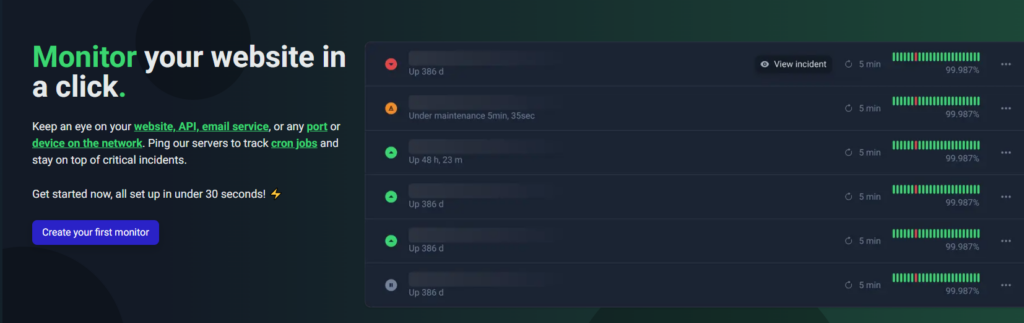
UptimeRobot’s create a monitor page
UptimeRobot follows a simple monitoring workflow that runs continuously in the background:
- You create a monitor and choose what to track, such as a website, API, server, port, or cron job.
- Select the monitor type and how often it should be checked.
- UptimeRobot checks the target at the selected interval from external locations.
- The result is compared with the expected state.
- If the monitor fails, slows down, or changes state, UptimeRobot sends an alert.
- Your team investigates and resolves the issue.
- Status pages can be used to communicate incidents and updates to users or internal teams.
Monitoring intervals depend on your plan:
| Plan | Monitoring interval |
| Free | 5 minutes |
| Solo | 60 seconds |
| Team | 60 seconds |
| Enterprise | 30 seconds |
UptimeRobot alerts and integrations
UptimeRobot monitoring is only useful if alerts reach the right people at the right time. The platform supports both direct notification channels and integrations with external tools.
Alerts can be sent through:
- SMS
- Voice call
- Email-to-SMS
- Mobile app push notifications
UptimeRobot also works with tools used for communication, incident response, and automation:
| Integration type | Tools |
| Chat and collaboration | Slack, Microsoft Teams, Google Chat, Discord, Mattermost, Telegram |
| Incident response and on-call | PagerDuty, Splunk On-Call |
| Automation and workflows | Zapier, webhooks |
| Notifications and push services | Pushbullet |
See the full list of integrations for more information.
UptimeRobot status pages
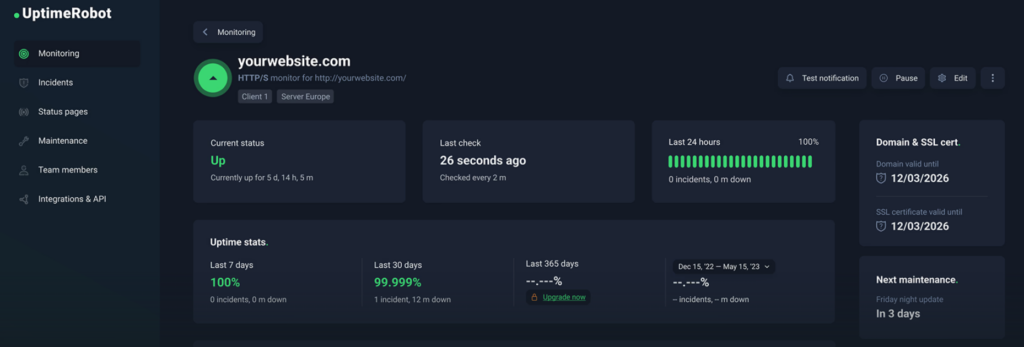
UptimeRobot status page example
UptimeRobot’s public status pages let teams communicate service health with customers and internal teams.
They show whether services are operational, degraded, or down, and can be used to share incidents, maintenance updates, uptime history, and response time information.
UptimeRobot supports both public and private status pages, making it possible to share updates externally with customers or internally with teams.
Status pages can be customized with branding, domains, and messaging to match your product or organization.
Who uses UptimeRobot?
UptimeRobot is used by a wide range of teams that need visibility into uptime, performance, and service health.
| Audience | How they use UptimeRobot |
| Developers | Monitor APIs, endpoints, cron jobs, SSL certificates, and deployments |
| IT teams | Track websites, servers, ports, DNS, domains, and certificate health |
| DevOps teams | Route alerts into Slack, Teams, PagerDuty, webhooks, or on-call workflows |
| SRE and platform teams | Confirm availability from an external user perspective |
| Product managers | Track customer-facing reliability and uptime |
| Customer support teams | Use status pages to reduce “is it down?” tickets |
| Marketers | Monitor landing pages, campaign pages, forms, and conversion paths |
| Business owners | Get simple visibility into important websites and services |
| Digital businesses | Protect checkout, login, signup, and customer portals |
UptimeRobot is strongest as an uptime monitoring, alerting, and status page platform. Teams that need deep tracing, log analytics, or infrastructure metrics often use it alongside observability tools.
Common UptimeRobot use cases
UptimeRobot supports a wide range of monitoring use cases, from basic uptime checks to more advanced reliability and incident workflows.
| Use case | How UptimeRobot helps |
| Website uptime monitoring | Checks whether important pages are reachable and responding |
| API monitoring | Tracks API availability and response behavior |
| Checkout or login monitoring | Watches critical user flows that impact revenue or access |
| SSL monitoring | Detects certificate errors and expiration risk |
| Domain monitoring | Helps prevent outages caused by missed renewals |
| DNS monitoring | Detects DNS issues or unexpected changes |
| Cron job monitoring | Alerts when scheduled jobs fail or do not run |
| Port monitoring | Checks whether key services are reachable |
| Keyword monitoring | Detects missing or unexpected page content |
| Incident communication | Uses status pages to keep users informed |
| Third-party dependency monitoring | Monitors external APIs or vendor services |
UptimeRobot pricing explained
UptimeRobot offers simple, scalable pricing with both monthly and discounted annual plans.
Annual billing saves around 20%, making it the better option for teams planning to use monitoring long term.
Pricing and limits may change, so it’s best to confirm details on the official pricing page.
| Plan | Best for | Monitor count | Interval | Pricing (annual) | Key notes |
| Free | Basic uptime checks, small sites, hobby projects | 50 | 5 minutes | $0 | HTTP, port, ping, keyword, API, UDP, DNS monitoring, limited integrations, basic status pages |
| Solo | Individuals and small projects needing faster checks | 10 or 50 | 60 seconds | $7/month | Adds SSL and domain monitoring, more integrations, notify seats |
| Team | Small teams | 100 | 60 seconds | $29/month | All integrations, full-featured status pages, team access |
| Enterprise | Larger monitoring setups | 200+ | 30 seconds | $54/month | Higher monitor counts, faster checks, more seats, full-featured status pages |
How to choose a plan
- The Free plan is strong for basic uptime monitoring and includes 50 monitors with 5-minute checks.
- Solo is useful if you need faster checks, SSL monitoring, domain monitoring, and more integrations.
- Team is a good fit when multiple people need access and shared workflows.
- Enterprise is designed for larger setups that need higher monitor counts and faster monitoring intervals.
UptimeRobot alternatives and competitors
Several tools offer uptime monitoring and related capabilities, often with different levels of complexity, pricing, and feature scope.
| Tool | Free or trial plan | Starting price | Main strengths | Why choose UptimeRobot |
| UptimeRobot | Free plan with 50 monitors | $0 for 50 monitors on Free | Uptime monitoring, API checks, ping, port, keyword, cron, SSL, domain, DNS, response time, status pages, alerts, integrations | Hosted uptime monitoring with a generous free plan and simple setup |
| Better Stack | Free plan available | 10 included monitors on free, extra monitor packs available | Uptime monitoring, incidents, on-call, logs, traces, metrics, status pages | Better when you want uptime-first monitoring without a broader observability platform |
| Pingdom | 14-day free trial | $16.50/month for 10 uptime, 1 advanced monitor | Synthetic monitoring, uptime checks, page speed, transaction monitoring, RUM | Better when you want 50 free monitors and straightforward uptime monitoring |
| Site24x7 | 30-day free trial | Website monitoring starts with smaller monitor bundles | Website, infrastructure, app, log, RUM, and synthetic monitoring | Better when you want simpler uptime monitoring instead of a broad IT suite |
| Uptime.com | Paid plans only | $7/month for 10 basic checks, 1 advanced | Website, API, transaction, page speed monitoring, reports | Better when you want a lower-friction free entry point |
| Uptime Kuma | Free, open source, self-hosted | No SaaS cost, but requires hosting | Self-hosted monitoring and status pages | Better when you want hosted monitoring without maintaining your own server |
Choosing the right tool
- UptimeRobot is best suited for teams that want hosted uptime monitoring with a generous free plan, fast setup, and broad coverage across websites, APIs, and infrastructure checks.
- BetterStack is made for teams that need uptime monitoring alongside logs, metrics, traces, and incident management. It offers a broader observability stack, which also introduces more complexity and setup compared to uptime-focused tools.
- Pingdom is used for synthetic monitoring and real user monitoring. It’s strong for performance-focused use cases, but doesn’t offer a comparable free plan or the same range of monitoring types out of the box as UptimeRobot.
- Site24x7 is built as a full IT monitoring platform covering infrastructure, applications, logs, and performance. It suits teams that need wide coverage, but comes with a more complex interface and pricing structure.
- Uptime.com is geared toward advanced monitoring and reporting needs, particularly for teams managing more complex environments. It requires a paid plan and has fewer monitors for the same price as other tools.
- Uptime Kuma is a self-hosted, open-source monitoring tool suited for developers who want full control over their setup. Because it runs within your own infrastructure, it can fail alongside the systems it monitors and requires ongoing maintenance, including ensuring the monitoring system itself remains available.
When should you choose UptimeRobot?
UptimeRobot is a great fit if you want simple, hosted uptime monitoring with enough flexibility to cover common reliability needs.
It works well if you need:
Core monitoring coverage
- Websites, APIs, endpoints, and services
- Ping, port, keyword, DNS, and cron job monitoring
- SSL and domain monitoring (on paid plans)
Alerts and visibility
- Fast alerts across email, SMS, voice, push, and integrations
- Response time tracking and slow response alerts
- Public or private status pages
Ease of use and scalability
- Up to 50 monitors on the Free plan
- Quick setup with minimal configuration
- A clean dashboard, mobile app, and integrations
UptimeRobot may not replace full observability platforms for logs, traces, or infrastructure metrics, but it works well alongside them as an external uptime monitoring and incident communication layer.
Ready to start monitoring your services?
Create a free account with 50 monitors and start monitoring your services in minutes. .
-
UptimeRobot is a hosted uptime monitoring platform that checks websites, APIs, servers, endpoints, SSL certificates, domains, DNS records, ports, pings, keywords, cron jobs, and response times.
-
UptimeRobot monitors online services at regular intervals, detects downtime or unexpected behavior, sends alerts, and helps teams communicate service health through status pages.
-
Yes. UptimeRobot has a Free plan with 50 monitors and 5-minute checks.
-
Free checks run every 5 minutes. Solo and Team support 60-second checks. Enterprise supports 30-second checks.
-
Yes. UptimeRobot can monitor API endpoints and alert teams when they are unavailable or not responding as expected.
-
Yes. UptimeRobot can monitor cron jobs and alert when a scheduled job fails or never starts.
-
Yes. UptimeRobot supports SSL monitoring on paid plans, including certificate errors and expiration risk.
-
Yes. UptimeRobot includes status pages for service health, incidents, maintenance, uptime history, and response time visibility.
-
UptimeRobot supports channels and integrations such as email, SMS, voice call, mobile push, Slack, Zapier, PagerDuty, Telegram, webhooks, Discord, Mattermost, Microsoft Teams, Google Chat, and more.
-
UptimeRobot is mainly an uptime monitoring, alerting, and status page platform. It can work alongside observability tools, but it is not positioned as a full log, trace, and infrastructure metrics platform.




