If you are a business or freelancer with lots of monitors where getting the up/down notifications is not enough and want to keep an eye on the snapshot of the statuses of all monitors regularly, here is a new feature:
TV Mode
It is simply a focused view of the dashboard where only:
- the number of the up-down monitors
- and a list of “Latest Events”
are the most important.
The TV Mode refreshes each minute so that it always displays the up-to-date information.
It is a perfect fit to be displayed on a separate display where the teammates can also view it easily.
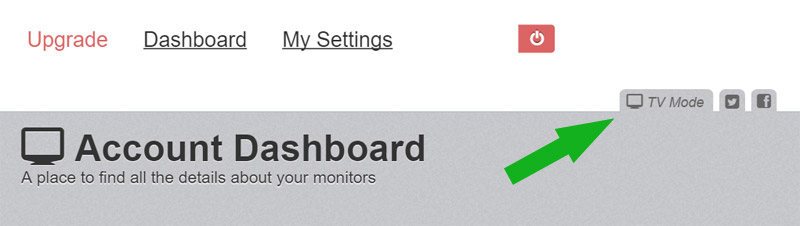
The feature can be reached from the “TV Mode link” at the right-top side of the dashboard (and, if pressed on a “monitor detail page”, it’ll keep the focus on that monitor).
P.S> Soon, we’ll be adding an option to reach the TV Mode with a unique link that doesn’t require user-pass (where login is sometimes an issue on display-only devices).
P.S2> The TV Mode is actually available since few weeks, yet, we hadn’t introduced it and hope that this blog post helps in case you had not seen it in the dashboard.



22 Comments
A qr code login mode for tv would be great!
Can you expand this a little more?
Like YouTube application for smart TV do when you want to synchronize with the app on your smartphone.
You open the application on TV, and displays a QR code, then the phone (already connected to the own smartphone app with your account) it identifies you and the TV automatically accesses your account without the need to enter e-mail / password manually.
Another example is the web Whatsapp!
No screenshot of the TV mode itself?
:)) You are right.. Yet, it is almost no different than the dashboard.. minus the sidebar.. and auto-refresh.
Just as an FYI, if you have Ad Block Plus loaded, these tabs are hidden... you'll need to whitelist uptime robot.
Thank you!!
Would love to have it more customization, for example, to hide the blog link, add a logo, etc... reason being we have TVs where we display our monitoring alerts to the public in our office. Makes for a great impression. We'd like to include Uptime Robot in our public rotation too!
Using Uptimerobot API that is super easy to make! Even there is a JQuery plugin.
I agree, maybe a dark theme?
For now i just use the css style bot chrome extension and tweak the css.
When will the unique link to TV mode stats be ready?
The unique link for tv mode would be great.
Any news ?
Would rather have a list of uptime charts from the left in the position of the news roll... what is the point of the news on a tv feed?
Agree and noted for removal.
WOuld be nice to have option with direct link, where without any authorization external user would be able to see status and logs
Is the following TV mode feature available , where we get a unique link without having to enter credentials ?
Here are notes from your website:
P.S> Soon, we’ll be adding an option to reach the TV Mode with a unique link that doesn’t require user-pass (where login is sometimes an issue on display-only devices).
It would be nice to have option with direct link, where without any authorization external user would be able to see status and logs.
Hi,
some news about the direct link ?
We are about to release a "public status pages" feature which will be covering exactly this need.
If the direct link can be customizable without any authentication it would be great.
Is this feature released ?
Public Status Page Without Authentication
If yes, where is the link
Yes, the feature is released. Please check https://uptimerobot.com/blog/introducing-public-status-pages-yay/ .