Your checkout might run on Stripe, your files on AWS, and your images on a CDN. When one of those providers has an incident, part of your product breaks with it, and your own monitors can stay green the whole time.
Starting today, UptimeRobot monitors beyond your own infrastructure.
Third party monitoring lets you add the services your product depends on, select the components you actually use, and get an alert through your existing channels when their status changes.
It’s powered by IsDown’s provider data, now part of UptimeRobot following our acquisition of IsDown.
Is it your code, or is it them?
When something breaks, the first question is where to look.
Until now, ruling out a provider meant opening their status pages one by one, and every minute spent there was time you weren’t spending on your own logs.
Third party monitoring puts provider incidents next to your own monitors. When your checkout monitor goes down and Stripe has reported a payments incident, you can immediately see both in UptimeRobot and know where to start.
How it works
1. Search the provider list. More than 6,000 providers, searchable by company or by product. Search for S3 and you get AWS.
2. Pick your alert contacts. Provider incidents go through the contacts and integrations already on your account, including Slack, Microsoft Teams, PagerDuty, Discord, email, SMS and webhooks. There’s nothing new to connect, and you can test your notifications before you start tracking a provider.
3. Select the parts you use. If you use Stripe for payments and webhooks, track those components and leave the Stripe dashboard out. You’ll only get alerts for the components you select.
What you see on each provider
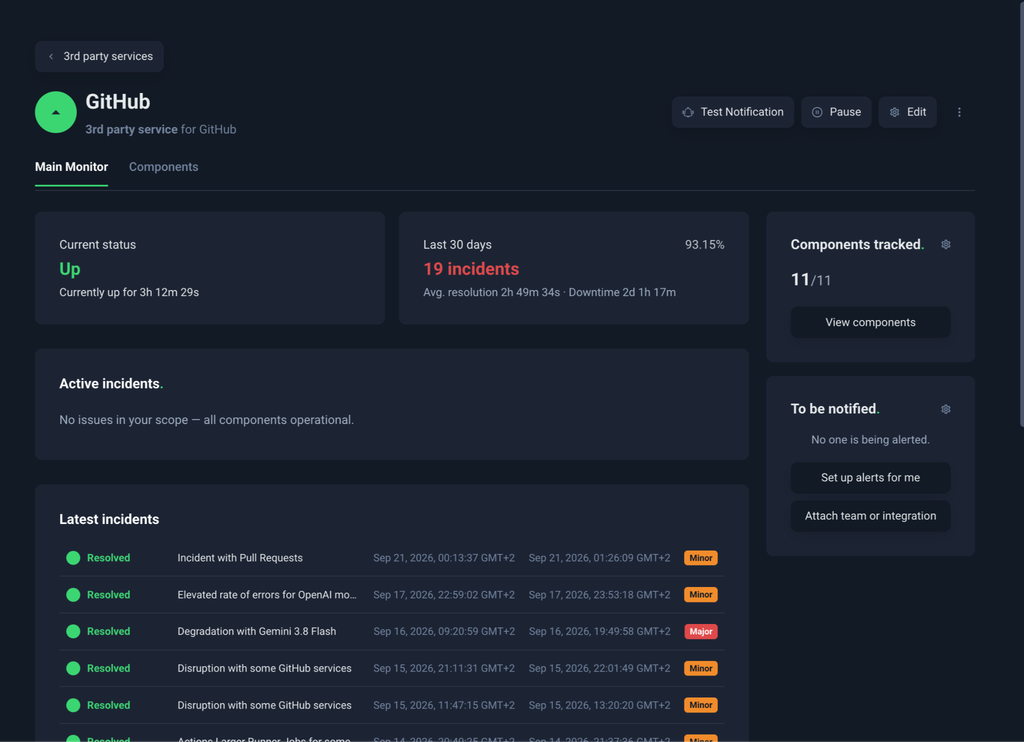
Tracked providers get their own third party services section in the dashboard, next to Monitoring and Incidents. Each provider has a detail page with its current status, how many incidents occurred in the last 30 days, the average time to resolve them, and the total downtime.
Below that is the incident list, each one marked minor or major.
Open an incident and you’ll see the provider’s updates word for word, not just a summary. If the incident doesn’t affect any of the components you track, you’ll see that, too.
You can also manage third party services through the UptimeRobot API, including adding providers, selecting components and setting alert contacts. So, when you add a new dependency to your product, you can add it to UptimeRobot at the same time.
Find out before they share on the status page
A provider’s status page can only tell you what the provider has acknowledged. Someone has to spot the incident, confirm it and publish an update first. Some incidents never make it to the status page at all.
Third party monitoring also tracks reports from people using the service, giving you an earlier signal when something is going wrong.
We’ve already seen the difference. During one AWS incident, we sent an alert 10 minutes before AWS acknowledged the issue.
Third party services don’t use your monitors
Every current paid plan comes with its own allowance of third party services, separate from your monitor quota. A Solo account using all 10 of its monitors can still track its most important provider.
| Plan | Monitors | Third party services |
| Solo | 10 | 1 |
| Solo | 50 | 5 |
| Team | 100 | 20 |
| Scale | 200 | 40 |
| Scale | 500 | 100 |
You can search the full list of providers on any paid plan. Your plan sets how many you track at once, and your dashboard keeps count.
See pricing for the details of each plan.
Built on IsDown
UptimeRobot acquired IsDown in July, 2026. IsDown tracks the status of more than 6,000 cloud and SaaS providers and holds years of their incident history, including who went down, when, and for how long.
Third party monitoring runs on that data.
IsDown remains a standalone product, and existing customers can keep using it as they do today.
Add your first provider
Log in to your UptimeRobot dashboard, search for a provider your product depends on, and pick the parts you use. The next time it has an incident, you’ll hear about it from us.
-
Yes, for the providers that matter most. An API monitor checks whether a provider responds to your requests from our locations, right now. Third party monitoring tells you what the provider has reported and what other users are seeing. Together they cover more than either one alone.
-
No. When you add a provider, you pick from the alert contacts and integrations already on your account.