Across sales calls and support tickets, one question comes up again and again when teams plan uptime monitoring at scale: “We have 200 websites, so we need 200 monitors, right?”
Usually not. A team with 200 sites typically ends up between 300 and 500 monitors. Not because of upselling, but because a website fails in more than one way, and most of those failure modes need their own check.
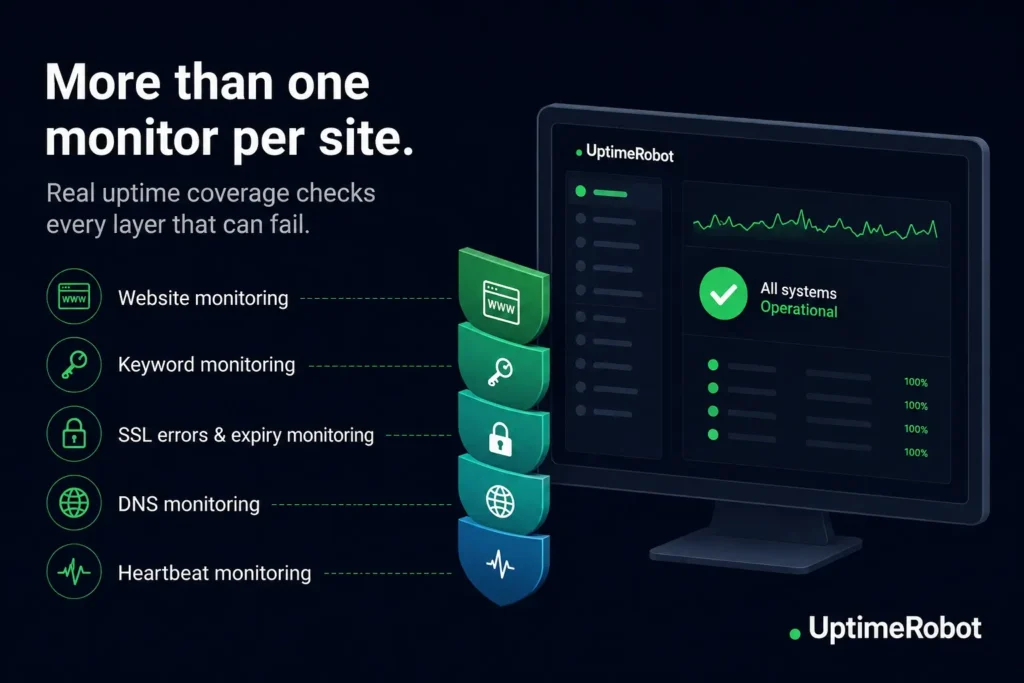
Why one website is rarely one monitor
A monitor sends one type of check to one target. A website can break in several independent ways.
- The server can go down
- The page can load but return an error
- The DNS record can change
- The certificate can expire
Each of these is a different signal.
With UptimeRobot, each website, ping, port, keyword, DNS, or API monitor counts separately toward your plan limit.
An HTTPS website monitor also alerts you to SSL certificate errors, certificate expiry, and domain expiry. That means one monitor can cover three potential problems.
The most common setup pairs an HTTP monitor with a keyword monitor. One confirms the site is reachable. The other verifies visitors see the expected content.
A simple way to estimate your number
Start with your list of sites and services, then decide which layers each one needs.
Layer 1: Is it reachable? One website monitor per site or endpoint is your baseline. Add a ping or port monitor when you also need to know whether the server or a specific network service answers.
Layer 2: Is it actually working? A keyword monitor confirms the page contains the content you expect. It catches error pages and broken builds that still return a 200 OK. Add one per site where “up but broken” is a real risk.
Layer 3: Will it break soon? Monitoring SSL certificate errors, certificate expiry, and domain expiry come with every HTTPS website monitor on paid plans. No second monitor, no extra slot, so there is no reason to leave it off a customer-facing domain.
Layer 4: Is the plumbing intact? DNS monitoring watches records for changes or tampering. Heartbeat monitoring covers scheduled jobs: each job pings UptimeRobot when it runs, and the monitor goes down if that ping does not arrive on time. Both need their own slot.
Monitor count examples
The same layers produce very different totals depending on what you run. Here is how the layers add up for three common setups.
Agency with 200 client sites: 300+ monitors
A website monitor on all 200 covers reachability, SSL, and domain expiry. The agency guarantees uptime to its clients, so every production homepage gets a keyword monitor too. That is 400. Add DNS on the domains where tampering is a real risk and you are at more than 440, which puts you on Enterprise 500.
Not every client needs the full stack. Full coverage for the top 50 and website monitoring only for the other 150 lands at 300 and fits Enterprise 350.
SaaS team with one product: 28+ monitors
One marketing site, one app domain, one status API, and twelve critical API endpoints. Keyword checks on the marketing homepage and the app login page. DNS on three domains, and heartbeats on eight scheduled jobs.
That is 28 monitors, which fits a Team plan and matches what a single-product team typically runs. That covers the public surface.
Add staging, the databases and queues behind the app, and the third-party services you depend on, and the same product lands closer to 60.
MSP with 250 properties: 370+ monitors
Website monitoring on all 250 is the baseline. Keyword checks go on the 100 properties that take bookings or payments, where a page that loads but shows the wrong thing costs revenue directly.
The remaining 150 are brochure sites where a website monitor is enough. Add DNS on 20 domains and the total is 370, so Enterprise 500 with room to grow.
The number climbs with complexity, not with site count. A hundred brochure sites need fewer monitors than one product with a dozen APIs and a nightly batch job.
Where teams overspend and underspend
Overspending usually means monitoring staging at production intensity, or running two checks that fail together.If two monitors would always fail at the same time, you probably only need one of them.
Underspending is more common and more expensive. The classic gaps are missing heartbeat monitors on backup jobs and no DNS monitoring on domains that matter. A silently failed nightly backup is invisible to every up/down check you run. You find out when you need the restore.
Planning the budget
Map your estimate to a plan. The free plan covers 50 monitors at 5-minute intervals. Paid plans raise the limit, drop the interval to 60 seconds, and add SSL, domain expiry, DNS, API, and UDP monitoring. Enterprise runs 30-second checks from 200 monitors up.
Check current pricing and monitor limits before choosing a plan.
Budget for growth, not for today. If you are adding clients or services, monitor count grows faster than site count, because new services tend to arrive with APIs and jobs attached.
Decide your per-site coverage standard once, write it down, and apply it at onboarding. Ad-hoc decisions per site are what produce both the gaps and the duplicates.
For estimates in the hundreds or thousands, the enterprise plan is built for it: higher monitor counts, 30-second checks, and volume pricing that beats stacking smaller plans.
-
Yes. A site with a website monitor and a keyword monitor uses two slots. Each check you configure counts individually.
-
No. SSL certificate errors, certificate expiry, and domain expiry are checked by the HTTPS website monitor you already have. Enter the URL with https:// and they are on by default on paid plans.
-
No. Status pages display monitors you already have. Neither do notification channels, integrations, or team seats. Only the checks you configure count. Wanting a detailed public page often motivates more granular monitors, so plan for that if client-facing pages are part of your setup.
-
Usually yes, at lower intensity. A single website check on staging catches broken deploys without doubling your budget. Tag staging monitors separately so their alerts stay out of your on-call rotation.
-
Count your customer-facing domains and double it, for one website check and one keyword check each. Then add one DNS monitor per domain where tampering matters, one heartbeat per scheduled job you care about, and one API monitor per critical endpoint. That lands within about 20% of the real number.
-
Monitor count is visible in your dashboard against your plan limit. Check it before onboarding a batch of new sites, since a client with an app, an API, and a cron job can consume five or six slots on its own.
-
Check what the next tier includes as you approach your current limit. Monitor count grows faster than site count, so if you add sites monthly, pricing the tier you will need in six months avoids a mid-year migration.