SMS is built for the alerts you can’t afford to miss. It doesn’t depend on an app being installed, and it can still reach you when Slack is closed and email is buried.
It’s also the only notification channel with a meter running. Email, push, Slack, Teams, and webhooks are effectively unlimited. SMS and voice calls consume credits, because they run through external telephony providers that charge per message.
That difference is why teams occasionally find an empty credit balance in the middle of an incident. Almost always, the credits went somewhere avoidable.
How UptimeRobot credits actually work
The rates are simple, and worth knowing before you design your alert routing.
- SMS costs 1 credit per message in most countries and 2 credits in a specific list of 32 countries, and 5 credits in Russia.
- Voice calls cost 2 credits per call everywhere in the world.
- Phone number verification messages are charged at the same rates as regular SMS notifications, so confirming a new number costs credits too.
Credits are sold in packages:
- $3 for 10
- $15 for 100
- $25 for 200
- $55 for 500
- $100 for 1,000
SMS and voice are available on all plans, and paid subscribers receive a one time credit package sized to their tier. Auto refill can be enabled at a threshold of 25 remaining credits, though it requires a saved card and isn’t available on the smallest pack.
The number of monitors in your account doesn’t determine how quickly you use credits. What matters is how many SMS messages each incident sends and how many people receive them.
Where credits actually go
Unexpected credit usage often comes down to a few common patterns:
Setup and testing: Adding and verifying new phone numbers costs credits before the first real alert is sent. With several SMS contacts to set up, those verification messages can take a noticeable bite out of a small credit pack.
Duplicate contacts: Two people on the same rotation, plus a shared team number, plus someone’s personal number added “just in case,” means every alert costs three or four credits instead of one.
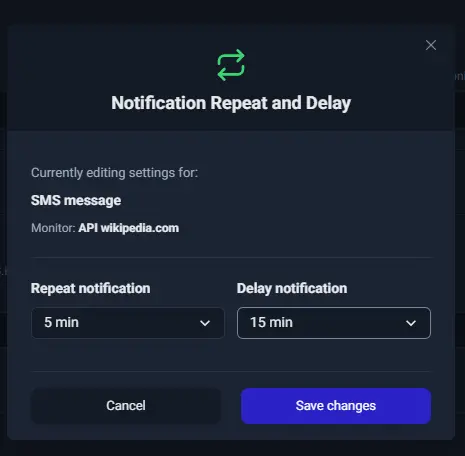
Recurring notifications: A five-minute repeat interval on a two-hour outage sends 24 messages per contact. With three SMS contacts attached, one incident costs 72 credits.
To adjust the interval, edit the monitor and click ‘No delay, no repeat’ under the contact. Paid plans let you set both a notification delay and a recurrence interval.
Flapping monitors: A marginal endpoint oscillating between up and down generates a down alert and an up alert every cycle. Overnight, that’s a four-figure credit problem and a team that stops reading their texts.
How to use fewer SMS credits
A few changes to how you test notifications, choose SMS recipients, and configure repeat alerts can greatly cut your credit usage.
Test your SMS alerts
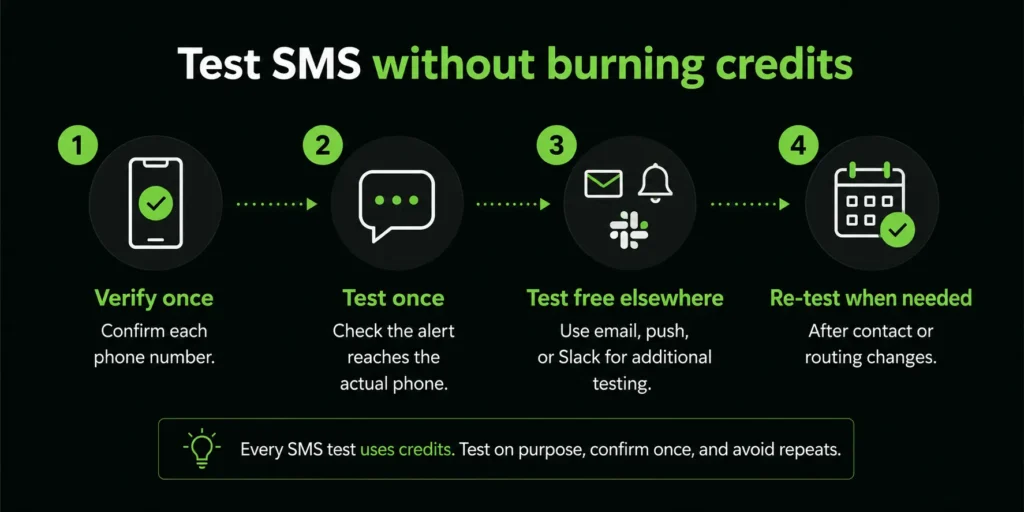
Test notifications let you confirm that alerts actually reach the phone they’re supposed to. After adding and verifying an SMS contact, send a test notification and confirm it arrives on the actual handset rather than relying on the “test notification sent” confirmation on screen.
Re-test after making changes to your contacts or notification settings.
One number per role, not five per team
The fastest way to cut credit usage is to stop sending the same message to overlapping recipients.
Attach SMS to the person or rotation expected to act, and let everyone else find out through the channels that cost nothing. If three people need to know about an outage, one of them needs an SMS and the other two need a Slack message.
Tie alert contacts to roles instead of individuals, so the on-call number changes when the rotation changes instead of accumulating former team members.
You should also make alert contact cleanup part of offboarding. A departed engineer’s number consuming credits on every incident is a waste of resources.
Let the platform absorb the blips first
Two mechanisms already stand between a transient failure and your phone, and both are free.
The first is built in: when a check fails, UptimeRobot runs up to three confirmation re-checks in the same region, roughly 10 to 20 seconds apart, before marking a monitor down. A single dropped packet never becomes an alert.
The second is the delay setting on paid plans, which specifies how many minutes to wait after a failure before notifying the contacts attached to that monitor. On anything not genuinely urgent, a delay of two to five minutes eliminates most of the short blips that would otherwise cost a credit each and teach the team to ignore their phones.
Set that delay on the SMS contact specifically. Push and Slack can fire immediately; the metered channel can afford to wait and be certain.
Recurring notifications: the biggest silent drain
Recurrence exists for a good reason. A single alert at 3 A.M can be slept through, and a repeat is what turns a notification into an acknowledgment. But the default instinct is far too aggressive.
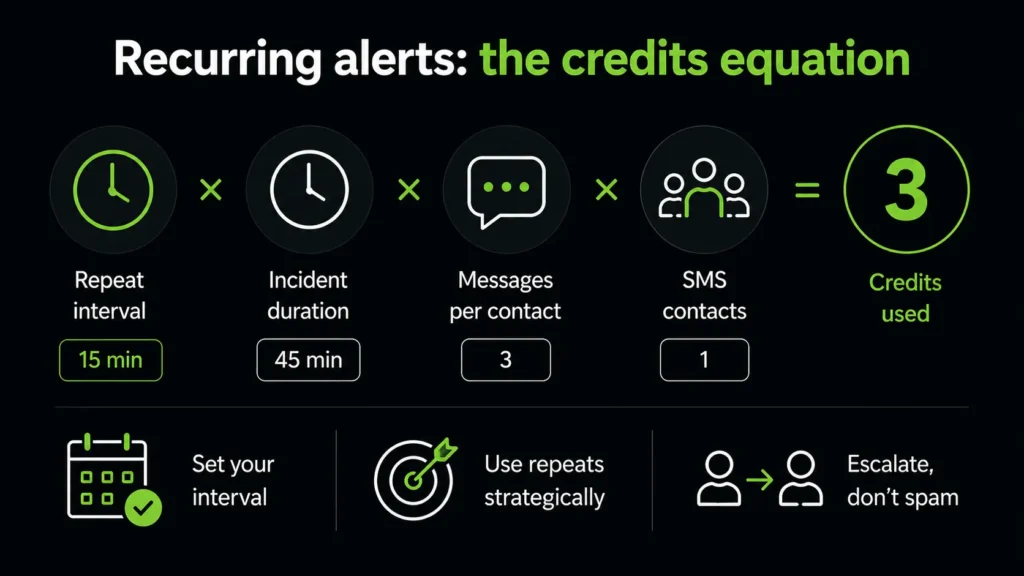
Recurring notifications can use credits quickly during longer incidents, especially when several SMS contacts are attached.
For instance, a 15-minute repeat interval over 45 minutes sends three messages to each contact. Set the interval based on how quickly your team is realistically able to acknowledge an alert, and reserve frequent repeats for incidents that genuinely require an immediate response.
Think in cooldowns, not just in alerts
Before changing your SMS settings, look for alerts that don’t need to be sent in the first place.
Use maintenance windows for planned deploys, migrations, and scheduled restarts. Work you already know about should never reach a phone. Detach SMS from monitors you’re actively debugging rather than living with the noise. Then, fix flapping at the source. If a monitor toggles repeatedly, the answer is a longer delay, a better check target, or a real fix to the service, not a bigger credit package.
Watch the up alerts too. Recovery notifications are enabled by default and cost the same as down alerts. For many teams, learning about recovery through Slack is entirely sufficient, and turning up alerts off on the SMS contact halves the per-incident cost immediately.
SMS belongs in the backup layer
The most durable way to avoid wasting credits is to stop treating SMS as the primary notification path.
Instead, layer your channels. Push and email carry everything, at no cost, for everyone who needs visibility. Slack, Teams, or Discord carry team-level awareness and give you a searchable incident history. Webhooks and PagerDuty carry anything that needs to enter an automated workflow or an on-call rotation with real escalation.
SMS and voice sit on top of that as the wake-up layer, reserved for the small set of monitors where a delayed response has genuine consequences and the people who need to act may be asleep. SMS and voice work best when they’re reserved for critical monitors and the people who need to respond.
The principle to hold onto is that no single failure should be able to keep an incident silent. Channel redundancy is what gets you that, and SMS is one layer of the redundancy rather than the foundation of it.
Avoid running out of SMS credits
Once you’ve weeded out unnecessary SMS usage, keep an eye on your remaining balance so alerts don’t stop during an incident.
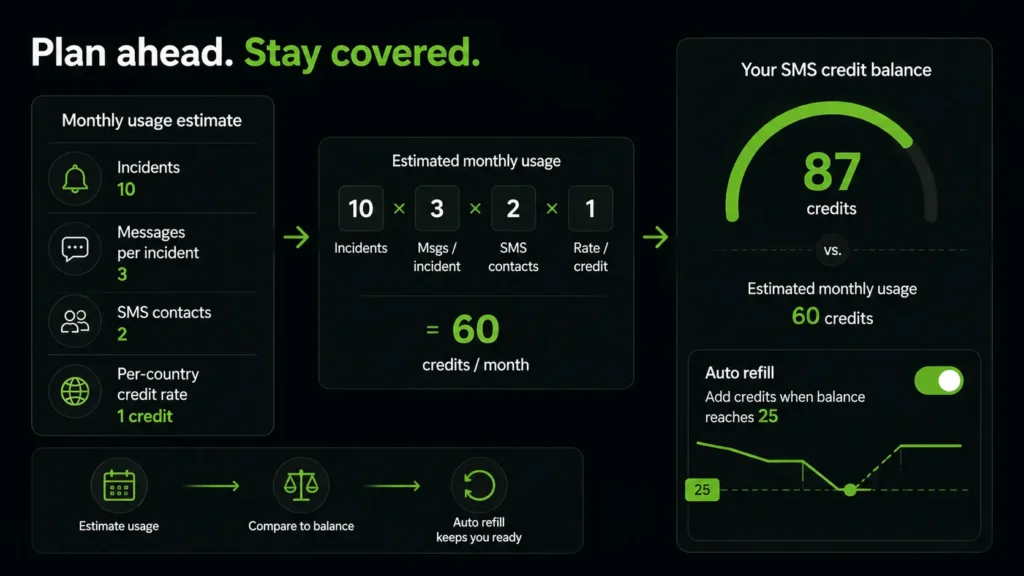
Estimate your typical monthly usage based on the number of incidents, messages per incident, SMS contacts, and your per-country credit rate. Compare that estimate with your current balance and enable auto refill to add more credits automatically when your balance reaches 25.
If your team is in a country where SMS costs two credits, or you use voice calls, account for the higher rate in your estimate.
Check your balance as part of your regular monitoring review so you have enough credits available when you need them.
Credit-saving checklist
After your SMS alerts are set up, use this checklist to keep credit usage under control without sacrificing important notifications.
- Know your per-country rate: 1 credit in most countries, 2 in 32 countries, and 2 per voice call everywhere.
- Verify each number once, test each SMS contact once, and validate the rest of your alert path on free channels.
- Re-test SMS quarterly and after contact or routing changes, not on impulse.
- Attach SMS to one on-call number or rotation per tier, tied to a role rather than a person.
- Remove departed team members’ numbers as part of offboarding.
- Add a notification delay on SMS contacts so short blips never reach a phone.
- Calculate recurrence cost before enabling it, and reserve repeats for the production-critical tier.
- Turn off up and recovery alerts on the SMS contact and take recoveries through Slack or email.
- Use maintenance windows for planned work, and detach SMS from monitors you’re debugging.
- Keep SMS and voice as the wake-up layer above push, email, and chat integrations.
- Enable auto refill at 25 credits and review your balance monthly against your estimated burn.
To sum up: SMS works best as a targeted backup channel, not the default destination for every alert. Keep the most urgent notifications on SMS, use free channels for everything else, and review your setup occasionally as your team and monitors change.
-
Phone number verification messages are charged at the same rates as regular SMS notifications. Test notifications travel the same delivery pipeline as real alerts, so plan your testing as though every test message counts, and do exploratory testing on email, push, or Slack.
-
One SMS contact with no recurrence costs 1 credit for the down alert and 1 for the recovery. Add a 5-minute repeat across three contacts on a two-hour outage and the same incident costs over 70. The variable is almost never the outage. It’s your routing and recurrence settings.
-
Yes. SMS and voice calls are available on all plans including the free plan, though credit packages are purchased separately and paid plans include a one time allowance.
-
Voice calls cost 2 credits everywhere, roughly twice an SMS in most countries. They are worth it for a genuine wake-up tier, where a ringing phone beats a text, but they’re an expensive default for routine alerting.
-
The usual causes, in order: a flapping monitor generating paired down and up alerts overnight, a short recurrence interval on a long incident, and duplicate contacts receiving the same message. Check the incident that preceded the drop and count how many numbers were attached to it.
-
SMS and voice delivery stops while your other channels keep working, which is precisely the argument for treating SMS as one layer of a redundant setup rather than the only path. Auto refill at a 25-credit threshold is the simplest protection.