Yes. UptimeRobot is available for commercial and business use. The current Terms of Service state: “UptimeRobot is available for any use, including commercial and business use.”
The important distinction is between using UptimeRobot as part of a service you provide and reselling UptimeRobot itself as a monitoring service.
The Terms restrict resale and redistribution of UptimeRobot’s service, data, status pages, alerts, and API responses as a standalone or rebranded monitoring service unless separately authorized.
Here’s what that means in practice.
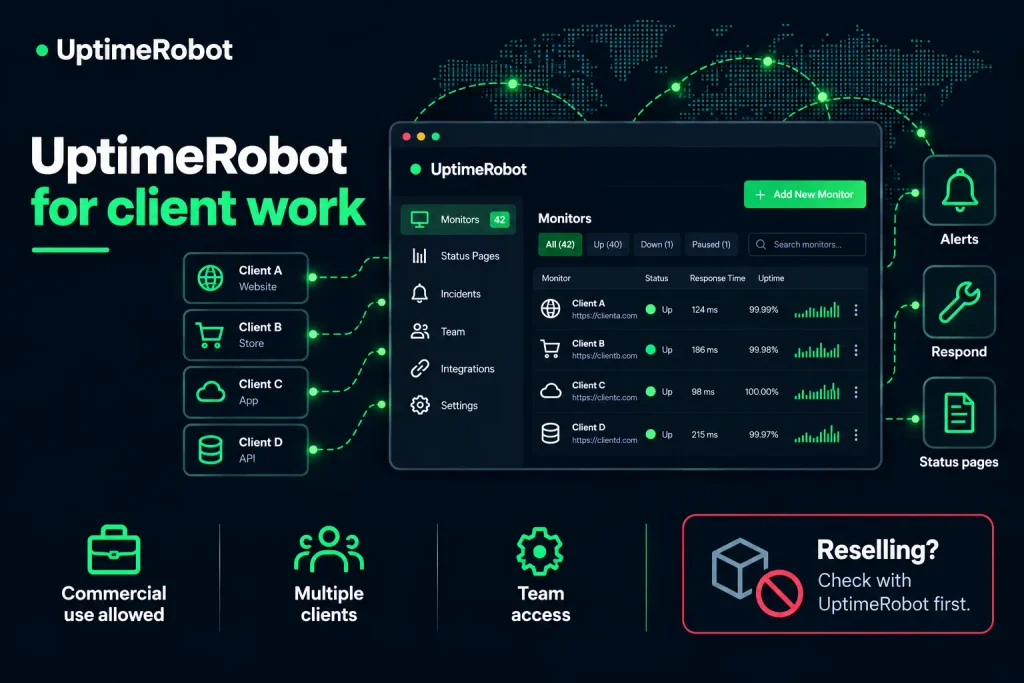
Using UptimeRobot for clients vs. reselling it
Using UptimeRobot for client work means monitoring is part of a broader service you provide. For example, you might monitor a client’s website, receive alerts, investigate incidents, and handle problems as part of a maintenance, hosting, or managed service.
Reselling is different. If you build a separate product around UptimeRobot data or sell access to what is effectively a rebranded version of UptimeRobot, you’re no longer simply using the tool for client work.
The Terms specifically restrict repackaging or white-labeling UptimeRobot data, status pages, alerts, and API responses as a standalone or rebranded monitoring service without a separate commercial agreement.
If monitoring is part of the service you provide, that’s commercial use. If monitoring is the product you’re selling, check with UptimeRobot first.
Common scenarios
| What you want to do | How to think about it |
|---|---|
| Monitor client websites from your agency account and act on alerts | Commercial use of UptimeRobot |
| Include monitoring as part of a broader maintenance or support service | Commercial use of UptimeRobot |
| Give a client visibility into the monitors you manage for them | Use UptimeRobot’s available team or status-page features |
| Publish a status page for a client | Supported by UptimeRobot’s status-page features; check the plan and branding options you need |
| Sell a separate monitoring product built around UptimeRobot data or API responses | Requires separate authorization under the Terms |
| Repackage UptimeRobot as your own monitoring service | Requires separate authorization under the Terms |
| Create multiple accounts bypass account limits | Not permitted under the Terms and Fair Use Policy |
The exact boundary can depend on how your service is structured. For anything that starts to look like monitoring is the product rather than part of a broader service, talk to UptimeRobot first.
Giving clients access
There are two main approaches.
A status page is usually the simplest option when the client just needs visibility. Paid plans add features such as custom domains, custom design, and white-labeling, depending on the plan.
A login seat makes sense when a client needs access to the dashboard itself. Team includes 3 login seats and Scale includes 5, with additional seats available. Notify-only seats are also available on these plans for people who need alerts but not dashboard access.
Free and Solo don’t include login seats, so you’ll need Team or higher if clients need access to the dashboard.
The single-account rule
The Terms require users to have only a single account. UptimeRobot’s Fair Use Policy also prohibits operating multiple accounts together to bypass the resource limits of a single account.
For agencies, that means creating a separate free account for every client isn’t a workaround for monitor limits.
Instead, keep client monitoring in the account you’re responsible for and use features such as tags, team access, and status pages to organize and share it.
Before adopting a multi-client setup, check that it fits your plan and the way your team operates.
What you can promise clients
Be precise about what you’re promising and make sure your monitoring setup supports the commitments in your client agreement.
Response times
You control how quickly your team responds to an alert, but you can’t guarantee that a third-party monitoring service will detect every incident. Base your client commitments on your own response process instead of promising that every outage will be caught immediately.
Monitoring intervals
Choose a monitoring interval that gives your team enough time to meet its response commitments. If your contract promises action within 15 minutes, for example, the monitoring and notification workflow needs to leave enough time to investigate and respond.
UptimeRobot’s Scale plan supports checks every 15 seconds, while the Free plan checks every 5 minutes. Enterprise plans offer custom and faster intervals.
Alerting
Client-critical monitors should notify someone who is expected to act on them. Set up notification channels and team access around your actual response process.
Reporting
If your client agreement includes uptime reports or incident reviews, choose a plan with enough data retention for the reporting period you’ve promised.
When to talk to UptimeRobot first
Get in touch before you build if:
- Monitoring itself is the product you’re selling.
- You want UptimeRobot data, alerts, API responses, or status information to power a product you sell to third parties.
- You need a large-scale or custom monitoring setup.
- Your client’s procurement or security team needs information directly from UptimeRobot.
UptimeRobot offers custom monitoring solutions for agencies, service providers, software companies, and enterprises.
The Terms also provide a route for separately negotiated commercial agreements where resale or redistribution is authorized.
-
Yes. UptimeRobot allows commercial and business use on the Free plan. It currently includes 50 monitors with 5-minute checks, but doesn’t include login or notify-only seats. For a small client portfolio, the Free plan may be enough for monitoring. You’ll need a higher plan for faster checks, additional status-page features, or team access.
-
No. The Terms require users to have only a single account, and the Fair Use Policy prohibits using multiple accounts together to bypass account limits. Use your account’s organization and sharing features to manage monitoring across clients instead.
-
UptimeRobot supports custom domains and white-labeled status pages on supported paid plans. However, the Terms also restrict offering UptimeRobot’s status pages and other service elements as a standalone or rebranded monitoring service without authorization. If you’re using a branded status page as part of a client service and want certainty about your particular arrangement, contact UptimeRobot before you build the workflow.
-
Yes, when monitoring is part of the broader service you provide. UptimeRobot’s Terms allow commercial and business use. If you’re selling a monitoring service built around UptimeRobot itself, contact UptimeRobot first to confirm the arrangement.
-
Yes, if your plan includes login seats. Team currently includes 3 and Scale includes 5, with additional seats available. Free and Solo don’t include login seats.
-
Decide this in your client agreement before you start. Your off-boarding process should cover who owns the UptimeRobot account, who retains access, what happens to historical monitoring data, and whether monitors and contacts are removed or transferred. The UptimeRobot account holder is responsible for the account and its activity, so account ownership should be clear from the start.
-
That’s normal for larger clients. UptimeRobot’s Enterprise offering includes security review and related procurement support, so direct the client to UptimeRobot when they need information or documentation you shouldn’t provide on the company’s behalf.