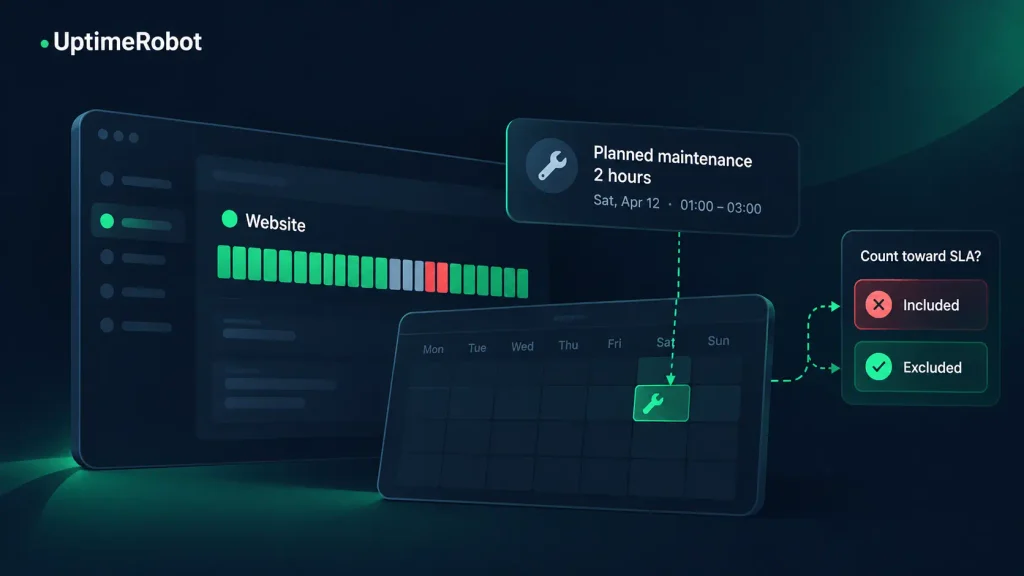
Your monitoring dashboard shows two hours of downtime. Those two hours happened during a scheduled upgrade on Saturday night, when your team expected the service to be offline.
Should they count against your uptime SLA (Service Level Agreement)?
That depends on the agreement. This guide is for teams that offer an uptime SLA to their own customers, whether you’re drafting one or reporting against one already in place.
Scheduled maintenance is only excluded if your SLA allows it. Nights and weekends still count if you promise availability around the clock.
The tricky part is making sure your monitoring settings and reports reflect those rules. Pausing monitoring for maintenance, excluding time from an SLA calculation, and changing who gets alerted aren’t the same thing. Here’s how to choose the right approach.
Define when your uptime promise applies
An uptime percentage needs a measurement period. “99.99% availability” tells customers very little unless they also know when that promise applies.
Here’s how much downtime common targets allow over two different measurement periods:
| Measurement period | Total measured time | Allowed at 99.9% | Allowed at 99.99% | Allowed at 99.999% |
| 24/7 over a 30-day month | 720 hours | 43 min 12 s | 4 min 19.2 s | 25.9 s |
| 8 hours a day over 22 working days | 176 hours | 10 min 33.6 s | 1 min 3.4 s | 6.3 s |
These examples assume no additional exclusions. Each extra nine cuts the allowance by a factor of ten, and a business-hours SLA allows less again because it covers fewer hours.
Also, be clear about whether “business hours” refers to service availability or support availability.
A support team answering tickets from 09:00 to 17:00 doesn’t necessarily mean the application can be unavailable overnight. Your SLA should define the two separately.
If your SLA uses business hours, it should state:
- The days and hours covered.
- The time zone, including how daylight saving changes are handled.
- Which holiday calendar applies.
- The reporting period, such as a calendar month.
- Any permitted maintenance exclusions.
- How incidents crossing those boundaries are counted.
For example, if availability is measured Monday through Friday, 09:00-17:00, an outage from Tuesday at 16:55 to 17:30 contributes 5 minutes of downtime under that rule. That alone would breach a 99.99% business-hours target for the month. The full incident still lasted 35 minutes.
Both figures are useful, but for different jobs. The 5 minutes is what counts against the SLA. The 35 minutes is what customers experienced, and it’s the figure your incident review should work from.
Should nights and weekends count?
For a service with a 24/7 availability commitment, yes. That includes public holidays and hours when nobody on your team is working.
An online store can lose orders at midnight, or an API can fail while its customers are running overnight jobs. Low traffic doesn’t automatically make downtime exempt.
A narrower measurement window can make sense for an internal application that employees only need during agreed working hours. Even then, continuous monitoring may be useful. Finding a problem at 06:00 gives your team a chance to fix it before people sign in at 09:00.
Choose the availability commitment based on how the service is used. Then decide what monitoring you need to support it.
When does planned maintenance count as downtime?
Planned maintenance can make a service unavailable just as an unexpected failure can. Whether that time counts toward the SLA depends on the exclusion rules.
Before treating maintenance as exempt, confirm it meets your SLA’s maintenance terms.
Common conditions include:
- Advance notice to customers.
- Work happening during an approved window.
- A limit on the duration or frequency of maintenance.
- Specific services or types of work being covered.
Scheduling an upgrade doesn’t automatically satisfy those conditions.
Suppose approved maintenance runs from 13:00 to 13:30, but the service doesn’t recover until 13:45. If the SLA excludes only the approved window, the remaining 15 minutes count as downtime during covered hours.
The same principle applies when an incident begins before maintenance. If an outage starts at 12:50 and the approved window opens at 13:00, the first 10 minutes count. Keep the original incident timeline, then apply the permitted exclusion. Don’t reclassify the whole outage as maintenance because part of it overlaps.
How maintenance windows work in UptimeRobot
UptimeRobot supports one-time and recurring maintenance windows on paid plans. They pause normal monitoring for planned work and keep expected downtime out of your overall uptime statistics.
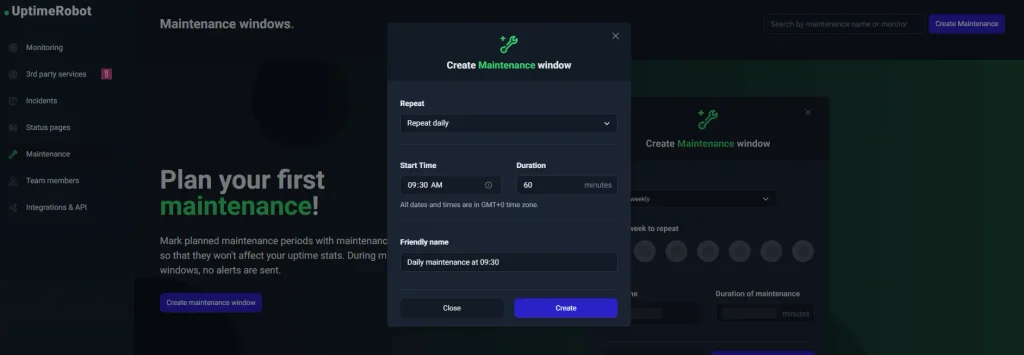
For most monitor types, a failure during the window doesn’t create an incident, and the monitor keeps the status it had when the window started. That status isn’t evidence that the service stayed available.
Match each window to the approved maintenance period in your SLA. If you pad it for safety, UptimeRobot’s statistics can hide an overrun that still counts against the agreement.
Before scheduling a window, check your account time zone and attach the window to the affected monitors. Follow the maintenance window setup guide for the configuration details.
If an upgrade affects several services, use Bulk Actions to update their maintenance window settings together.
Heartbeat monitors need extra care. A heartbeat monitor already marked DOWN when maintenance begins stays DOWN throughout the window, even if the job resumes. It switches back to UP on the first check after the window ends. Start the window before you stop the job, and verify recovery afterward.
Keep monitoring when you still need visibility
A business-hours SLA doesn’t require you to stop monitoring outside business hours.
Suppose your availability commitment covers weekdays from 09:00 to 17:00. You may still want overnight incident records so you can investigate recurring failures or arrive at work knowing a service needs attention.
In that case, keep monitoring continuously and apply the business-hours rules when preparing your SLA report.
Use this distinction when choosing your setup:
| Your requirement | Monitoring approach | Reporting approach |
| 24/7 availability | Monitor continuously; use maintenance windows for permitted exclusions | Measure the full reporting period, applying the agreed exclusions |
| Business-hours availability with overnight visibility | Monitor continuously | Count only downtime within the contractual window |
| Business-hours availability with no need for monitoring outside it | Consider recurring maintenance windows for intentionally unmonitored periods | Clearly identify excluded and unmonitored time |
Be careful with the last option. You give up normal monitoring coverage during those windows, including for scheduled jobs that only run overnight, so you may miss a failure that needs fixing before the next working day.
If the real problem is overnight notifications, review your alerting arrangements before pausing checks. Your team’s notification needs and the service’s monitoring needs may differ.
Calculate uptime using the eligible time
For a time-based SLA that removes approved exclusions from the measurement period, use this version of the standard uptime formula:
Uptime (%) = ((eligible time − counted downtime) ÷ eligible time) × 100
Here:
- Eligible time is the time covered by the SLA after permitted exclusions.
- Counted downtime is the unavailable time that overlaps those eligible periods.
Use the same rules for both parts of the calculation. If your SLA removes a maintenance window from eligible time, don’t remove only the downtime while leaving that window in the denominator.
Example: Business hours with excluded maintenance
Assume a monthly SLA covers:
- 22 working days, with 8 covered hours per day.
- 30 minutes of approved maintenance during working hours.
- 1 minute of unexpected downtime within the remaining covered hours.
The calculation is:
| Item | Duration |
| Scheduled business hours | 10,560 minutes |
| Approved maintenance exclusion | 30 minutes |
| Eligible time | 10,530 minutes |
| Counted downtime | 1 minute |
Uptime = ((10,530 − 1) ÷ 10,530) × 100 ≈ 99.9905%
Under these assumptions, the service meets a 99.99% target. The margin is thin: the allowance for this period is about 63 seconds, so a second minute of downtime would bring the result down to about 99.981%.
Maintenance outside business hours doesn’t reduce eligible time, because those hours were never in the calculation. Overlapping exclusions should also be deducted only once.
Keep full precision when assessing the target. Rounding a result for display can hide a small breach. With 64 seconds of downtime, for example, the result is 99.98987%. That rounds to 99.99% on a dashboard, but it misses the target.
Build a report that explains the number
A dashboard’s overall uptime percentage may use a different measurement window from your SLA. If you monitor 24/7 against a business-hours SLA, the dashboard figure will usually be lower than your SLA result, because it includes overnight downtime. Don’t treat the headline figure as the contractual result.
For a business-hours report:
- Establish the covered dates and hours in the agreed time zone.
- Apply permitted exclusions, removing any overlaps.
- Count the portion of each incident that falls within the remaining time.
- Calculate availability using that eligible time.
- Keep the incident records and exclusion details alongside the result.
If you’re automating the process, consult the UptimeRobot API documentation for the monitor data and endpoints available to your integration. Your reporting logic still needs to apply the agreement’s calendar and exclusion rules.
A useful report shows the target, measured period, eligible minutes, excluded maintenance, counted downtime, and resulting percentage. Label unmonitored periods clearly so readers can distinguish them from confirmed availability.
Tell customers what to expect
Excluding maintenance from an uptime calculation doesn’t remove its effect on customers. They still need to know when the service will be unavailable.
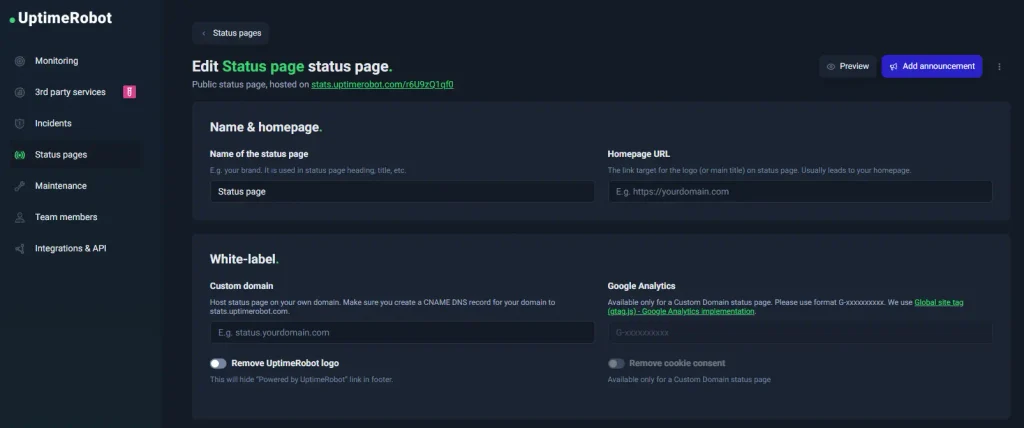
Before work begins, communicate the affected services, expected impact, start and end times, and time zone. Explain where updates will appear if the work takes longer than expected.
You can publish these details as announcements on your UptimeRobot status page. Treat the announcement and the monitoring window as separate setup tasks: customers need the notice, while your monitors need the correct configuration.
After the work, verify that the service has recovered and normal monitoring has resumed. If maintenance overruns, preserve the actual recovery time and account for it under the SLA’s rules.
Make your monitoring, report, and SLA follow the same rules
The math is rarely where uptime reporting goes wrong. Problems start when the agreement, the monitoring setup, and the report each follow slightly different rules. Decide when your commitment applies and which maintenance it excludes. Then configure monitoring and build reports that apply those same rules.
Before your next scheduled upgrade, check the agreement, the affected monitors, and the customer notice together. That small amount of preparation makes the resulting uptime report much easier to explain.
For the wider setup, see the pre-launch SLA monitoring checklist.
UptimeRobot checks your services around the clock, and paid plans add one-time and recurring maintenance windows. You can also announce planned work on your status page. Start monitoring for free, or compare plans to find the one that fits your SLA.
-
No. It must meet the agreement’s exclusion rules. A maintenance setting in your monitoring tool doesn’t change the availability commitment you made to customers.
-
Yes. Keep monitoring active, then calculate availability using only the eligible periods. This preserves visibility into overnight incidents while keeping the SLA report aligned with the agreed hours.
-
No. Excluded time sits outside the relevant calculation. When normal monitoring is paused, you also lose the usual evidence of availability during that period.
-
Record when the service actually recovers. Any overrun within covered hours counts unless the SLA permits an additional exclusion.