TL;DR (QUICK ANSWER)
Start by monitoring the third-party services that can block checkout, particularly payment processors, fraud screening, tax calculation, and shipping APIs. Then cover storefront services, order communications, customer support, and advertising. When an incident occurs, check which functions are affected, test the customer experience, and use available alternatives. Monitor your own store alongside external providers to identify where the problem began.
An e-commerce store can lose sales without going offline. A payment processor might stop accepting transactions, a shipping API might fail to return delivery options, or a tax calculation service might prevent customers from completing checkout. Meanwhile, the storefront itself continues to work normally.
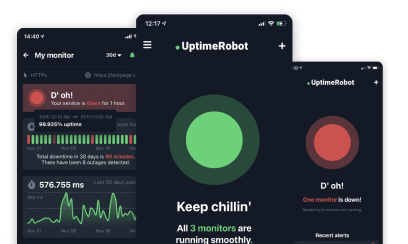
These failures can be difficult to spot if you’re only monitoring your own website. UptimeRobot’s Third party monitoring lets you track incidents affecting external providers alongside your own website monitoring.
Below, we’ll look at 20 services worth monitoring, how outages affect customers, and what to do when something goes wrong.
Key takeaways
- Prioritize checkout dependencies. Start with payment processors, fraud screening, tax calculation, and shipping rates, since failures here can prevent customers from placing orders.
- Monitor the services you actually use. Track relevant providers and components rather than subscribing to every incident a company reports.
- Check the customer experience when an alert arrives. Test the affected checkout step, product search, or other function to see whether the outage is impacting your store.
- Prepare alternatives before an outage. Know which payment methods, shipping carriers, and customer contact channels you can use if a provider goes down.
- Assign responsibility for responding. Decide who receives alerts, who investigates incidents, and how customers will be informed when orders or deliveries are affected.
What a minute of downtime costs your store
To estimate how much revenue your store generates per minute, use this formula:
Annual online revenue ÷ 525,600 = average revenue per minute
For example, a store generating $2 million annually would calculate:
$2,000,000 ÷ 525,600 = $3.81 per minute
That’s approximately $229 per hour. During peak shopping periods, such as Black Friday, revenue at risk could be several times higher.
Of course, this is an average, not a prediction of actual losses. The impact depends on when the outage occurs, how long it lasts, which customers are affected, and whether they return to complete their purchases.
There are also costs beyond missed sales, including staff time spent investigating failed orders, responding to customers, and reconciling payments. Advertising campaigns may continue spending even when shoppers can’t complete checkout.
Your store runs on services you don’t control
Whether you use Shopify, WooCommerce, BigCommerce, or a custom storefront, your store depends on external services for payments, shipping, search, and more. Any of these can fail independently of your website. Your homepage might load normally while customers are unable to complete checkout because a payment processor is down.
Monitoring third-party providers alongside your own website gives you a clearer picture of where problems start.
Checkout and payments
When payment, fraud screening, or tax services fail, customers may be unable to complete their purchases even though your storefront is working normally.
1. Stripe
Stripe processes card payments and supports payment-related events used by e-commerce stores. An outage can cause failed payments, stalled checkout screens, or uncertain transaction statuses.
2. PayPal
PayPal lets customers pay without entering card details directly into your checkout.
An interruption can prevent shoppers from signing in, approving payments, or returning to your store after authorization.
3. Adyen
Adyen processes payments across different markets and payment methods.
An outage may affect specific countries or payment types, leaving some customers unable to complete checkout while others can still purchase.
4. Signifyd
Signifyd provides fraud screening and risk-related services for e-commerce businesses.
Delayed or unavailable fraud decisions can leave orders pending or interrupt legitimate purchases, depending on how your store uses the service.
5. Avalara
Avalara provides tax calculation and compliance services.
If tax calculations fail, customers may be unable to see their final order total or complete checkout. The problem may affect only certain locations or tax rules.
Fulfillment promises
A successful payment doesn’t mean the order is finished. Shipping and fulfillment services determine whether you can deliver what you’ve sold and keep customers informed.
6. Shippo
Shippo connects e-commerce stores with shipping services for rates, labels, and related shipping tasks.
When those connections fail, customers might not see delivery options at checkout. Orders that have already been placed may also be delayed while staff wait to generate labels.
7. UPS
UPS provides shipping and tracking services used by online retailers.
If tracking information becomes unavailable, customers may see outdated shipment statuses or broken tracking links. The package might still be moving, but shoppers have no clear way to confirm it.
8. ShipStation
ShipStation supports order management and shipping workflows.
An interruption can delay order imports, label generation, or shipment processing. Customers might receive their purchase confirmation, but see no further progress toward dispatch.
9. DPD
DPD provides parcel delivery and tracking services for online retailers.
A disruption could affect shipping label generation, parcel tracking or delivery updates, depending on the services your store uses.
The storefront itself
These services affect whether customers can reach your store, view products, and find what they want to buy.
10. Shopify
Shopify hosts e-commerce storefronts and provides services used throughout the purchasing process.
If a relevant Shopify service experiences an outage, customers may have trouble loading storefront pages, using checkout, or completing orders. The effect depends on which component is affected.
11. Cloudflare
Cloudflare provides services including content delivery, DNS, and website security.
An issue affecting your configuration or a service you use could make your storefront slow or inaccessible. Customers might see connection errors or be unable to load product pages.
12. Cloudinary
Cloudinary provides image and media management services.
If product images fail to load, shoppers might see empty image areas or missing product galleries. The store may technically remain usable, but customers lose important information about what they’re buying.
13. Algolia
Algolia provides hosted search and product discovery capabilities.
A search interruption can leave customers with empty results, slow searches, or unavailable autocomplete suggestions. Shoppers who know what they want may still struggle to find it.
Trust surfaces
Trust and support services don’t always prevent checkout directly. But when they fail, shoppers can lose access to the information or reassurance they need before purchasing.
14. Trustpilot
Trustpilot reviews can appear on e-commerce websites as social proof.
If a review widget fails to load, customers may see an empty area where ratings or testimonials normally appear. A slow widget can also affect the page experience.
15. Yotpo
Yotpo offers e-commerce tools that include product reviews and other customer engagement features.
When a review integration fails, product ratings or customer feedback may disappear from product pages. Shoppers can still buy, but they may have fewer details to inform their decision.
16. Gorgias
Gorgias provides customer support tools for e-commerce businesses.
An outage can prevent customers from opening chat conversations or contacting support through an integrated widget. This becomes especially frustrating when shoppers already have payment or delivery questions.
Order communications
Customers expect to hear from your store after placing an order. Missing messages can create uncertainty even when the purchase itself was successful.
17. SendGrid
SendGrid provides email delivery services used for transactional messages.
If messages are delayed or fail to send, customers may not receive receipts, shipping notifications, or account-related emails. Some may assume their orders weren’t placed.
18. Twilio
Twilio provides messaging and communication services, including SMS capabilities.
A disruption can delay delivery updates, verification codes, or other text notifications. If your store uses SMS for account verification, customers may also have trouble signing in.
Paid acquisition
Advertising services don’t usually determine whether a storefront stays online. They can still affect revenue when campaigns stop running or tracking problems make it difficult to understand which ads are producing sales.
19. Google Ads
Google Ads brings paid traffic to e-commerce websites through search, shopping, and other advertising placements.
A service interruption may affect campaign management, reporting, or ad delivery. Separately, a problem on your own website can leave active campaigns sending paid traffic to pages that don’t convert.
20. Meta Ads
Meta Ads supports advertising across Facebook, Instagram, and other Meta placements.
An interruption may affect campaign management, reporting, or delivery. Tracking problems can also make it harder to judge performance even when purchases continue.
All 20 services at a glance
| Service | Group | What customers see | First move |
| Stripe | Checkout and payments | Failed or uncertain card payments | Check transactions and available alternatives |
| PayPal | Checkout and payments | PayPal checkout won’t complete | Check PayPal status and other payment methods |
| Adyen | Checkout and payments | Payment errors in affected markets | Identify affected regions and payment methods |
| Signifyd | Checkout and payments | Pending or rejected orders | Check fraud decisions and approved fallbacks |
| Avalara | Checkout and payments | Tax errors or blocked checkout | Identify affected tax calculations |
| Shippo | Fulfillment promises | Missing shipping options | Check affected carriers and alternatives |
| UPS | Fulfillment promises | Delayed tracking updates | Confirm carrier status and inform customers |
| ShipStation | Fulfillment promises | Delayed order dispatch | Check order imports and fulfillment backlog |
| DPD | Fulfillment promises | Shipping or tracking errors | Check affected services and delivery options |
| Shopify | Storefront | Unavailable pages or checkout | Compare platform incidents with your own checks |
| Cloudflare | Storefront | Slow or inaccessible pages | Check service status and regional impact |
| Cloudinary | Storefront | Missing product images | Check image delivery and fallback images |
| Algolia | Storefront | Broken product search | Test searches and keep navigation available |
| Trustpilot | Trust surfaces | Missing review displays | Check or temporarily disable affected widgets |
| Yotpo | Trust surfaces | Missing product reviews | Check affected product pages |
| Gorgias | Trust surfaces | Unavailable support chat | Provide an alternative contact method |
| SendGrid | Order communications | Missing confirmation emails | Check delivery status and order records |
| Twilio | Order communications | Missing texts or verification codes | Check delivery and available alternatives |
| Google Ads | Paid acquisition | Reduced ad visibility or interrupted campaigns | Check campaigns and storefront availability |
| Meta Ads | Paid acquisition | Campaign or reporting problems | Compare ad reports with store orders |
Before Black Friday: a 30-minute check
You don’t need to wait for an incident to find out which outside services your store depends on. A short check before a major shopping period can reveal missing alerts and unclear responsibilities.
- List your providers: Write down the services handling payments, shipping, storefront delivery, customer communication, and advertising. Start with those that could interrupt a purchase.
- Track the providers you use: Add available providers to Third party monitoring and select the relevant components. You don’t need alerts for parts of a provider your store doesn’t use.
- Check your own checkout page: Set up a keyword monitor to check for expected content on an accessible checkout-related page. This can detect certain page-content failures, but it doesn’t verify that a complete payment succeeds.
- Choose who receives alerts: Decide who handles payment, storefront, shipping, and communication incidents. Send notifications to contacts who can investigate and respond.
- Prepare a customer status message: Draft a short explanation for checkout or shipping interruptions. When something goes wrong, staff can update the details instead of writing a message from scratch.
What happened last Black Friday?
Think your store is in the clear once Cyber Monday is over? In 2025, the worst day for outages came four days later, on December 5.
That morning, a Cloudflare issue caused errors for customers accounting for around 28% of the HTTP traffic it serves.
UptimeRobot detected approximately 184,000 failures in a single hour, compared with around 30,000 in a typical hour. By the end of the day, failures were 46.7% above baseline.
For online retailers, that’s a good reason to keep monitoring beyond the big shopping days. Your store could be running normally one minute and losing customers the next because a service you depend on is having problems.
Read our Black Friday outage analysis to see what else went wrong during the 2025 shopping period, or check UptimeRobot’s live record of major outages to see what’s happening across external services.
How to track these services in UptimeRobot
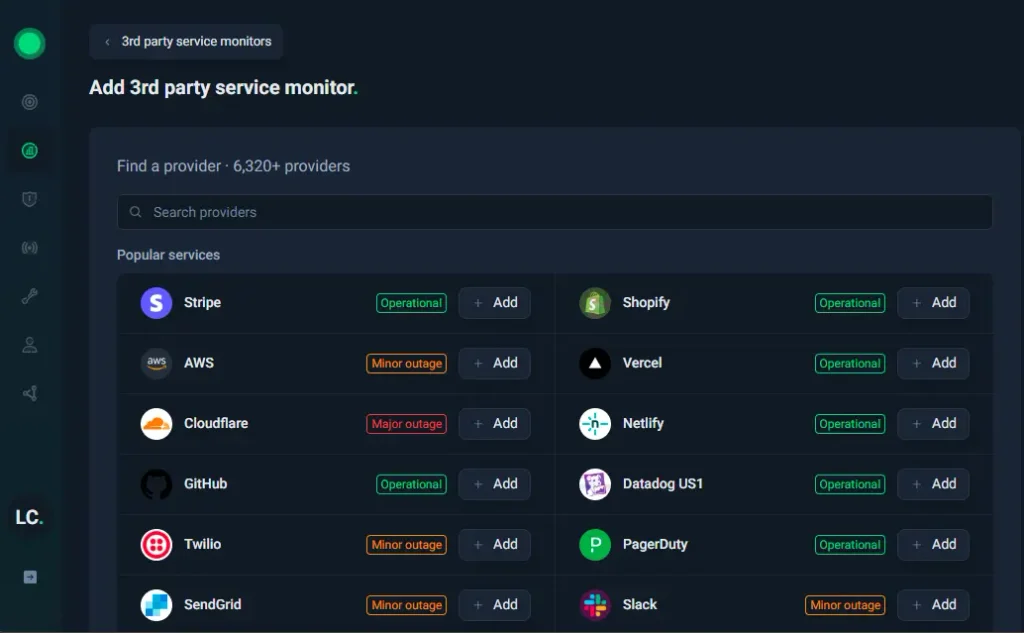
UptimeRobot’s Third party monitoring tracks incidents across more than 6,000 providers. You can search for a company or product, select the components your business actually uses, and receive alerts through contacts and integrations already configured in your account.
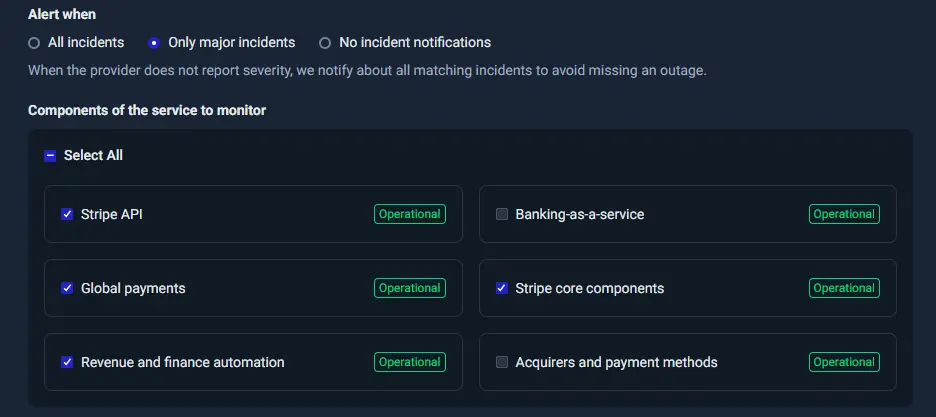
For example, a store using Stripe might track the Stripe API and Global payments components without getting alerts for unrelated Stripe services.
Step 1: Find your provider
Open Third party monitoring in your UptimeRobot dashboard and search for the service your store uses.
Select the relevant provider from the available results.
Step 2: Choose the components
Pick the components that matter to your business. Pick the components that matter to your business. For Stripe, that could mean Stripe API and Global payments.
Selecting relevant components keeps alerts connected to the services your customers depend on.
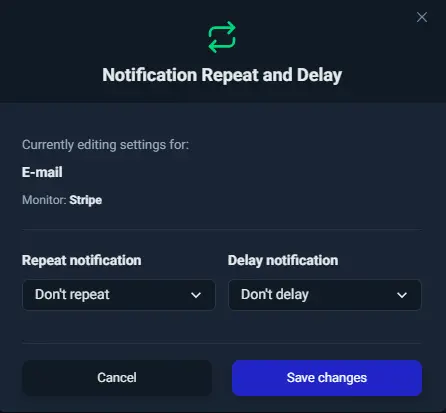
Step 3: Set up your alerts
Use your existing alert contacts and integrations to notify the right people when an incident is reported.
Supported channels include Slack, Microsoft Teams, PagerDuty, Discord, email, SMS, and webhooks.
UptimeRobot brings together official provider updates and user reports, so you may spot problems before a provider posts an official notice.
Third-party monitoring has its own allowance on paid plans, so it won’t use up your regular monitors. Check the pricing page for details.
Pair it with Website, API, and Keyword monitoring to see whether a problem is coming from your store or one of the services it relies on.
Conclusion
You won’t be able to prevent every outage, especially when the problem is with a service outside your control. But you can avoid being caught off guard.
Review your dependencies regularly, keep your alerts up to date, and make sure your team knows what to do when something fails. A little preparation now can save a lot of scrambling when customers start reporting problems.
-
Customers may be unable to complete payments, even if your storefront is still online. Check which Stripe services are affected, verify transaction statuses before retrying, and offer alternative payment methods where available.
-
Compare Shopify’s service status with your own monitoring results. If Shopify reports no relevant issues, check your domain, apps, theme, integrations, and recent changes.
-
Divide annual online revenue by 525,600. A store earning $2 million annually averages $3.81 per minute, though actual losses depend on traffic, timing, and whether customers return. Use our free uptime and downtime calculator to see your true costs.
-
Yes. Payment processing can fail while your storefront remains online. Monitoring your payment provider can help identify the cause of checkout problems faster.